![Best Label Printers [cy]: Top 10 Thermal Printers and Makers for Business and Home](https://www.guidespot.com/wp-content/uploads/2026/07/featured-update-70053-1784150192753.jpg "10 Best Label Printers (2026): Tested & Reviewed for Home & Office")
Disclaimer: Label printers use thermal print heads that can become hot during high-volume printing. Allow the device to cool before replacing rolls. Ensure you are using label tapes rated for the specific printer model to prevent jamming or residue build-up on the print head.
Choosing among the best label printers starts with a less exciting question than brand: what has to be on the label, and how long must it remain readable? A four-by-six carrier label, a pantry tag, a cable marker, and an outdoor asset tag demand very different machines and materials.
For this 2026 update, I compared the current specifications, media limits, connection methods, and workflow restrictions for 10 active models. I gave extra weight to the trouble spots buyers repeatedly report: calibration that wastes labels, mobile apps that add an extra step, tape margins on short labels, and drivers that make a simple shipping task harder than it should be.
My short answer is straightforward. Pick the Rollo USB when a desk-based shipping station needs dependable, fast four-by-six output; choose the Phomemo 241BT when phone printing matters; and get the Brother PT-D210 when the job is organizing things rather than mailing parcels.
The Top 3 Label Printers for Shipping, Home, and Office Use
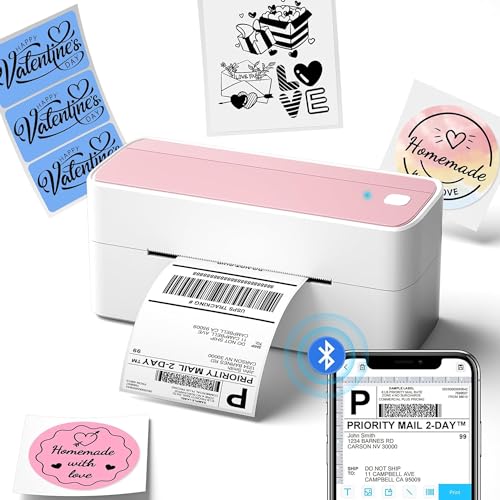

Best shipping workstation: Rollo USB is the sensible choice for a computer-based packing desk. Its direct-thermal design, four-inch media support, and shipping-software compatibility address the everyday needs of sellers who print labels in batches.
Best flexible shipping option: Phomemo 241BT adds Bluetooth and broad desktop operating-system support. It is the better fit when labels sometimes originate on a phone, tablet, Chromebook, or a shared household computer.
Best home organizer: Brother PT-D210 is not a shipping printer, and that is its strength. The built-in keyboard and durable laminated tape make it a much better match for folders, bins, classroom supplies, and cable management.
Compare the Best Label Printers by Workflow in 2026
This overview separates wide direct-thermal shipping machines from narrow-tape label makers. Check maximum media width before deciding: a compact maker cannot replace a four-by-six shipping printer, while a shipping unit is awkward for labeling spice jars or network cables.
| Product | Key Features | Action |
|---|---|---|
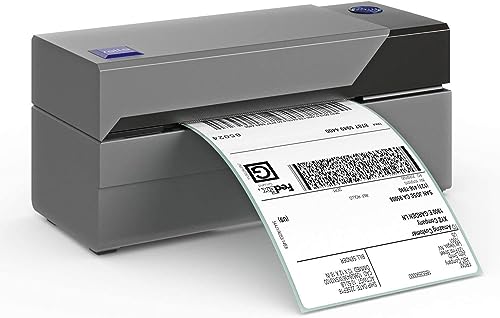 Rollo USB Shipping Printer
|
|
Check Latest Price |
|
Phomemo 241BT
|
|
Check Latest Price |
 Brother QL-800
|
|
Check Latest Price |
|
Brother PT-D210
|
|
Check Latest Price |
 Nelko P21
|
|
Check Latest Price |
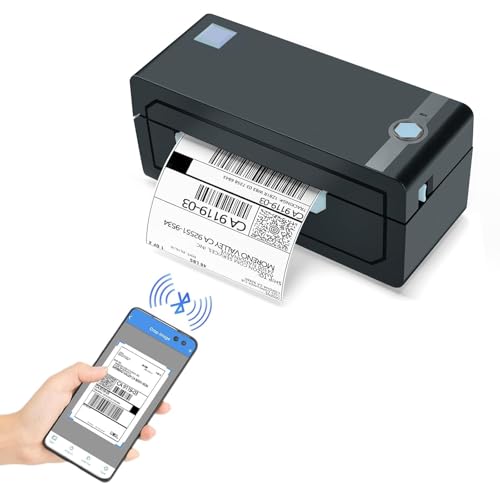 JADENS JD268BT
|
|
Check Latest Price |
 DYMO LabelManager 160
|
|
Check Latest Price |
 NIIMBOT B21
|
|
Check Latest Price |
 Brady M211
|
|
Check Latest Price |
 Westinghouse WHTP203e
|
|
Check Latest Price |
1. Rollo USB Shipping Label Printer – Best for a Dedicated Shipping Desk
Rollo USB Shipping Label Printer - Commercial Grade 4x...
150 mm/s
203 DPI
USB Windows and Mac
1.57 to 4.1 inch media
What We Like
- Fast shipping-label output
- Broad platform support
- Windows and Mac compatible
What We Don't Like
- USB-only
- Monochrome 203-DPI output
The Rollo USB is the best label printer in this lineup for sellers who print from one computer at a fixed packing station. It is a purpose-built direct-thermal machine rather than a label maker with a shipping mode bolted on.
Its 150 mm/s rated speed and support for labels from 1.57 to 4.1 inches wide cover standard four-by-six carrier labels, barcode labels, and many product stickers. The 203 DPI printhead is a normal shipping specification: text and carrier barcodes are the priority, not photographic detail or tiny decorative type.
USB workflow and shipping platforms
A wired connection sounds ordinary, but it removes a frequent source of friction. If the printer stays beside the scale and the same Windows or Mac computer creates labels, USB avoids pairing screens, phone permissions, and a disappearing Bluetooth connection during a busy dispatch run.
Rollo lists compatibility with Rollo Ship, ShipStation, ShippingEasy, Shippo, Amazon, Shopify, Etsy, eBay, USPS, UPS, and FedEx workflows. Confirm the current label-size setting inside the software before a large batch; platform support does not prevent a file from being sent at the wrong scale.
Media width, calibration, and barcode clarity
The 4.1-inch maximum media width makes this a shipping and warehouse tool. It accepts both common roll and fanfold formats, so a business can choose the feeding arrangement that keeps its desk tidy.
Before blaming any direct-thermal printer for blank or offset labels, run its calibration process after changing stock. Sellers on community forums often point to incorrect paper sensing and mismatched four-by-six settings as the reason a machine advances an extra label or cuts a design short.
Where direct thermal makes sense
Rollo’s ink-free operation is convenient because shipping labels are typically short-life documents. Direct-thermal paper darkens under heat, so it is not the right material for records that will sit in sun, a hot vehicle, or long-term storage.
Use a thermal-transfer printer and a suitable ribbon when a barcode, asset ID, or compliance label must survive abrasion, chemicals, weather, or years of handling. That distinction matters more than raw printing speed for permanent identification work.
Who should choose the Rollo USB
Choose it for a home business or small warehouse that prints mainly from a Windows or Mac desktop and ships enough parcels that feeding individual sheet labels feels wasteful. It is also a good option for a seller who prefers established desktop software to an app-centered workflow.
Skip it if mobile printing is non-negotiable, if you need labels wider than four inches, or if full color is part of the product presentation. It is focused, rather than universal.
2. Phomemo 241BT – Best Wireless Value for Small-Business Shipping
Phomemo Bluetooth Thermal Label Printer, 241BT 4X6 Wireless...
Bluetooth and USB
203 DPI
1 to 4.6 inch media
Up to 72 labels/min
What We Like
- Bluetooth and USB
- Broad OS support
- Wide shipping-label range
What We Don't Like
- Monochrome only
- Mobile printing needs Labelife
Phomemo’s 241BT is the practical answer when a shipping label may be created on more than one kind of device. It combines Bluetooth with USB instead of making a buyer commit to a phone-only or computer-only setup.
It supports media from one to 4.6 inches wide, prints at 203 DPI, and is rated for up to 72 four-by-six labels a minute. That gives occasional and growing sellers more flexibility than a narrow portable label maker without turning the desk into a dedicated industrial station.
Mobile, Chromebook, and desktop compatibility
The broad compatibility list is a major advantage: iOS and Android use the Labelife app, while USB supports Windows, Mac, ChromeOS, and Linux. That range is useful in households and small offices where the computer used for inventory is not always the computer used for orders.
There is a trade-off. Mobile convenience depends on an app, so test the app, account sign-in, and your preferred marketplace workflow during the return period. A stable printer cannot compensate for a mobile workflow that adds too many taps before every label.
Four-by-six labels and everyday throughput
This is designed around carrier labels for Etsy, Shopify, Amazon, eBay, USPS, UPS, and FedEx shipments. It has the width for four-by-six stock, but it can also take smaller formats when a seller needs inventory stickers or return labels.
For a few labels at a time, wireless printing can feel liberating. For hundreds of labels, a USB cable may still be the calmer option because it reduces the chance that a sleeping phone or a Bluetooth reconnection interrupts the queue.
Preventing blank-label waste
Shipping-printer frustration usually appears as a label that starts too high, feeds too far, or comes out blank. Load the roll squarely, select the physical label dimensions in the carrier software, and recalibrate after switching from fanfold stock to a roll.
Keep a small test file with a border and text near each edge. It exposes scaling errors before an order batch turns into a pile of unusable labels, a problem buyers commonly flag in seller forums.
Best fit and limitations
Pick the 241BT for an online seller who wants one printer that can follow them between a laptop and a phone. It is especially attractive for a first shipping station where device compatibility matters as much as maximum speed.
It cannot produce color, and direct-thermal output should not be treated as a permanent label solution. Buyers who never print from mobile devices may prefer the simpler wired routine of the Rollo.
3. Brother QL-800 – Best for Crisp Paper Labels and Red Highlights
Brother QL-800 High-Speed Professional Printer, Plug & Label...
300 DPI
93 labels/min
USB Windows and Mac
auto-cutter
What We Like
- 300-DPI output
- Black and red capability
- Built-in cutter
What We Don't Like
- USB-only
- Red needs compatible DK media
The Brother QL-800 occupies a different niche from the four-by-six shipping models. It is well suited to paper labels, file folders, visitor badges, mailing labels, and administrative work where a clean small font and a cutter are more useful than the largest media width.
Its 300 DPI resolution and rated 93-label-per-minute output make it the technical pick for detailed office labels. It can print black with red highlights when paired with compatible Brother DK media, which is helpful for attention markers and date-sensitive labels without pretending to be a full-color printer.
Why 300 DPI matters for office labels
203 DPI is generally enough for shipping barcodes; 300 DPI gives small text, detailed symbols, and compact barcodes a cleaner edge. That is useful when a label must carry more than an address, such as a file code, a patient-facing instruction, or a densely packed product identifier.
Do not confuse higher resolution with permanence. The substrate and print technology still determine whether the label resists heat, abrasion, or exposure, so choose the actual DK material around the environment.
Auto-cutter and continuous rolls
The built-in auto-cutter earns its place when a task calls for many individually separated labels. It also works with compatible continuous-length material, allowing a user to set a custom label length instead of settling for the closest pre-cut size.
For short strings, plan the design before printing. Chain printing or grouping similar labels reduces leading and trailing waste, a recurring annoyance with tape and continuous-roll machines.
Black-and-red labels are not full color
The QL-800’s red capability is distinctive, but it is a controlled two-color effect on appropriate media. It works for warnings, priority flags, or visual sorting; it will not reproduce logos, photos, or multi-color food packaging artwork.
A small business that needs polished color packaging should look at a dedicated color-label system or preprinted stock. A monochrome thermal device is usually the better choice for operational labels, not retail graphics.
Who benefits most
Choose the QL-800 for an office, clinic, classroom, or business that prints varied paper-label sizes and values a cutter, sharp text, and simple USB use. Word, Excel, and Outlook support can be handy for straightforward desktop label jobs.
Pass if wireless printing is required or if the primary job is wide four-by-six parcel labels. The printer is specialized around Brother DK media and a connected computer.
4. Brother P-touch PT-D210 – Best Standalone Label Maker for Home Organization
Brother P-Touch, PTD210, Easy-to-Use Label Maker Bundle...
QWERTY keyboard
3.5 to 12 mm tape
TZe laminated labels
battery or AC
What We Like
- Standalone keyboard
- Durable laminated tape
- Four tapes included
What We Don't Like
- AAA batteries separate
- AC adapter optional
The PT-D210 makes sense for people who want to make a label without opening an app or finding a cable. Its QWERTY-style keyboard, display preview, templates, frames, and symbols make it easy to create practical labels at the cabinet, desk, or classroom table.
It uses Brother TZe laminated tape in widths from 3.5 to 12 mm. The bundle includes four tapes, giving a new owner enough material to label a meaningful amount of storage before choosing replacement colors or widths.
A physical keyboard beats an app for some jobs
The value here is less about advanced design and more about immediate control. A physical keyboard is friendly for teachers, family members, and anyone who wants to label several containers without Bluetooth pairing, phone notifications, or an app update.
The preview screen helps catch a misspelling or an overly long phrase before tape is used. It is a small feature, but it makes a handheld label maker feel less wasteful.
Laminated TZe tape for real household surfaces
Brother describes its genuine TZe laminated tape as water- and fade-resistant and suitable for freezer, microwave, and dishwasher use. Those properties make it a sensible option for pantry containers, freezer bins, school equipment, and file storage.
Surface preparation still counts. Wipe grease and dust from plastic, glass, or metal before applying a label, then press along its entire length. Textured, damp, or flexible surfaces can defeat even a good adhesive.
Tape widths, margins, and waste
A 12 mm maximum width is perfect for organization but far too narrow for parcel addressing. Before buying, picture the actual objects: thin cable flags may call for 3.5 or 6 mm tape, while large bins often read better with 9 or 12 mm.
Handheld makers leave margins at either end. Print several short labels as one chain when possible, then cut them apart, rather than feeding a fresh length for every single word.
Who should buy this maker
This is the best label printer for home use when “printer” really means an easy label maker for storage, folders, classroom materials, and cables. It remains usable even where a phone or laptop is inconvenient.
Do not buy it for shipping-label volume, wide product stickers, or computer-driven batch records. Six AAA batteries are required for portable use, while continuous desk operation calls for the optional adapter.
5. Nelko P21 – Best Pocket Bluetooth Label Maker for Quick Tags
Nelko Label Maker Machine with Tape, P21 Bluetooth Label...
Bluetooth phone app
203 DPI
USB-C rechargeable
fixed-length labels
What We Like
- Compact rechargeable body
- Large app template library
- QR and barcode tools
What We Don't Like
- No computer support
- Fixed-length media only
The Nelko P21 is made for quick, small labels created from a phone. It is compact, rechargeable through USB-C, and uses Bluetooth with the Nelko iOS and Android app rather than a physical keyboard.
That arrangement suits pricing tags, small storage labels, school supplies, and occasional barcode or QR-code work. It does not work with computers, a boundary worth taking seriously before purchase.
Phone-first template creation
The app includes templates, icons, borders, materials, and language options, so it can be faster than hand-formatting a decorative tag. QR codes and barcodes are useful for simple inventory references when a small business already has a phone-based workflow.
App richness is not the same as app reliability. Before committing a large labeling project, print a sample, confirm the app preserves your template, and check whether the final label scans and reads at the size you selected.
Fixed-size labels shape the workflow
The P21 supports fixed formats such as 14 by 40 mm, 14 by 50 mm, and 14 by 75 mm rather than continuous tape. That is convenient for repeated small tags, but it limits freedom when the wording suddenly needs more room.
Measure the available surface and decide whether one line needs to be legible from a distance. Small direct-thermal labels are best kept simple; crowded text can look faint or become difficult to read after handling.
Direct-thermal limits for portable tags
The P21 prints black text at 203 DPI without ink or toner. That is convenient for temporary and indoor organization, but direct-thermal labels can fade with heat, light, and time.
Do not treat it as a substitute for durable laminated tape or industrial thermal-transfer media. A pantry date label and a cable identifier that must survive years are different assignments.
Good fit and poor fit
Choose Nelko P21 for a shopper, student, maker, or mobile seller who wants a lightweight label maker and is happy using a smartphone. Its rechargeable design is much easier to carry than a full desktop printer.
A user without a compatible phone, anyone who needs computer access, and every seller printing four-by-six shipping labels should pick a different model. Its portability is useful precisely because its scope is narrow.
6. JADENS JD268BT – Best for Mixed-Device Shipping Workflows
JADENS Bluetooth Thermal Shipping Label Printer – Wireless...
203 DPI
Bluetooth and USB
1.57 to 4.1 inch media
roll or fanfold
What We Like
- Bluetooth plus USB
- Roll and fanfold support
- Marketplace compatibility
What We Don't Like
- Mobile needs Jadens app
- Recalibration needed after media changes
JADENS JD268BT is another flexible shipping choice, with Bluetooth alongside USB and support for roll or fanfold media from 1.57 to 4.1 inches wide. It is built around the standard shipping-label ecosystem rather than small organization tape.
The printer uses a 203 DPI thermal printhead and does not need ink or toner. Its strongest appeal is a setup that can accommodate Windows, Mac, Android, and iOS users in the same small business.
Bluetooth where it helps, USB where it matters
Windows 8 or later and Mac systems can use Bluetooth printing, while Android and iOS print through the Jadens Printer app. USB supports Windows 7 or later and Mac OS 10.9 or later, giving a wired fallback when a wireless connection is unreliable.
That fallback is more important than it sounds. When orders must leave today, a cable is often the fastest troubleshooting step after a device fails to pair or an app loses the printer.
Carrier-label compatibility and setup
JADENS names Endicia, Dazzle, ShipStation, Shipping Easy, Shippo, ShipWorks, Ordoro, eBay, Amazon, Etsy, and Shopify among its intended label workflows. Use the platform’s native four-by-six setting where available instead of scaling a PDF through a generic document print menu.
Forum users often compare consumer machines with a secondhand Zebra. A used industrial printer can be capable, but legacy drivers, unknown printhead wear, and unfamiliar configuration can cost time. A current model with clear setup support may be the better operational decision for a new seller.
Calibration after changing stock
The printer needs calibration when the label type changes. Treat that as routine maintenance, not a defect: run the feed adjustment whenever label dimensions, gap spacing, or roll style changes.
Keep labels dry and load them with the sensing side correctly aligned. If the output is shifted, inspect physical alignment and software dimensions before reinstalling drivers; those two checks solve many apparent thermal label printer problems.
Who should select JADENS
It is a good fit for an Etsy, eBay, Amazon, or Shopify operation where several people may create labels on different devices. The choice between fanfold and roll labels also helps adapt it to a compact home desk or a larger packing table.
Skip it if app-based mobile printing is a deal-breaker, if your work requires wider labels, or if long-life identification labels are the goal. It is a direct-thermal shipping printer, not an industrial marker.
7. DYMO LabelManager 160 – Best Simple QWERTY Maker for Beginners
DYMO LabelManager 160 Label Maker Bundle with 3 D1 Label...
QWERTY keyboard
Up to 12 mm D1 tape
three cassettes included
portable
What We Like
- Straightforward keyboard
- Three tapes included
- Compact design
What We Don't Like
- Uses DYMO D1 tapes
- Battery-powered portable use
The DYMO LabelManager 160 is for buyers who want an uncomplicated handheld tool. It has a QWERTY keyboard, a large display, one-touch formatting keys, and support for quarter-inch, three-eighth-inch, and half-inch DYMO D1 tape.
The included bundle provides three half-inch cassettes, which makes it easier to start labeling home or office items immediately. It is not a mailing-label machine and should not be judged against one.
Fast text entry without a phone
A physical QWERTY layout is the core reason to choose this model. Users who dislike mobile interfaces can type, edit, select a text format, and print from the device itself.
That simple interface is particularly helpful for a teacher, front desk, or shared family workspace. It minimizes the question of who has the app installed and whose device is paired.
D1 tape choices and print expectations
D1 tape comes in useful colors and widths, but recurring media compatibility matters. DYMO recommends authentic D1 tapes for best performance, so check availability of the color and width you expect to use before standardizing a whole project around it.
Keep labels short and readable. As with any compact label maker, very small fonts and long strings make output harder to inspect and create more tape-margin waste.
Power use and placement
Automatic power-off helps conserve batteries when the maker is picked up occasionally. Place it where labeling happens, such as near filing drawers or supply bins, rather than hiding it in a cabinet; a tool that is within reach tends to get used.
For constant use, factor battery replacement into the decision. A stationary labeler with an adapter or a desktop printer may be more comfortable for a heavy office routine.
Who it serves best
Buy the LabelManager 160 if a plain-English, QWERTY-keyboard experience is more important than app templates and wireless connectivity. It is a sensible starter for basic home and office organization.
Choose Brother PT-D210 instead if durable laminated TZe tape is the priority, or move to an app-based maker if design tools and QR codes are central. Neither choice should be used for four-by-six parcel labels.
8. NIIMBOT B21 – Best for Designed Product and Inventory Labels
NIIMBOT B21 Label Maker, Thermal Label Printer, Portable...
Bluetooth app
0.8 to 2 inch labels
60 mm/s
text QR and barcodes
What We Like
- Fast narrow-label output
- Strong app design tools
- Several label formats
What We Don't Like
- No iPad support
- Not for shipping labels
NIIMBOT B21 is designed for narrow labels that need more than plain text. It prints media from 0.8 to 2 inches wide at up to 60 mm/s and supports text, images, QR codes, barcodes, serial numbers, and batch printing through its app.
That makes it appealing for boutique inventory, ingredients, price tags, address labels, clothing, and jewelry. It is specifically not a four-by-six shipping-label printer.
Design tools for small-business labels
The app offers fonts, icons, borders, scan features, image recognition, batch printing, and serial-number tools. Those are practical for a seller creating a run of stock labels that must include a SKU, a QR code, and a consistent visual style.
Design restraint still helps. A label that looks polished on a phone screen can become busy on a two-inch surface, so print one sample at final size before generating a full batch.
Label sizes and adhesion realities
The B21 supports white, colored, cable, and transparent thermal formats. Select a label shape and adhesive intended for the surface rather than assuming every included or compatible roll will grip textured containers equally well.
Community testing and buyer reports make one point clear: rough, curved, dusty, or oily surfaces are harder on adhesive labels. Test the actual packaging, then allow the adhesive to set before handling it heavily.
Device compatibility and battery routine
The B21 works with iOS and Android, and PC use requires a driver. It is not compatible with iPad, which is an easy detail to miss in a household or retail counter that relies on a tablet.
Its rechargeable battery is rated for four hours of continuous work after a 1.5-hour charge. For occasional tasks this is convenient; for a full shift, charging habits and a backup workflow matter more than the headline battery figure.
When the B21 is the right tool
Choose NIIMBOT B21 for small business product labels, ingredient labels, inventory identifiers, and tags where layout flexibility matters. It has more creative headroom than a basic QWERTY maker.
Skip it for shipping parcels, iPad-only workflows, or labels expected to withstand severe heat and years outdoors. Direct-thermal output has a clear place, but it is not a permanent color-label system.
9. Brady M211 – Best Portable Choice for Professional Asset Marking
Brady M211 Portable Bluetooth Monochrome Label Printer...
203 DPI
Bluetooth 5 LE
up to 0.75 inch media
iOS and Android app
What We Like
- Professional portable format
- Bluetooth Low Energy
- 203-DPI output
What We Don't Like
- 0.75 inch maximum width
- App-based smartphone workflow
The Brady M211 is aimed at professional identification work carried out away from a desk. It is a portable monochrome unit with Bluetooth 5 Low Energy, 203 DPI output, and support for media up to 0.75 inch wide.
That media limit rules out shipping labels, but it is appropriate for compact asset tags, wire and cable work, equipment identifiers, and facility labeling where a technician needs a mobile tool.
Mobile field workflow
The M211 connects to Android and iOS through the Brady Express Labels Mobile app. Bluetooth Low Energy is a good fit for a tool that moves around a site, though the phone requirement should be considered alongside workplace device policies.
For repeat work, create and validate templates before entering the field. A consistent asset-ID sequence, a scan-tested barcode, and a known material selection prevent errors when access to a desk or network is limited.
Media width and industrial decision-making
A three-quarter-inch ceiling means the printer is for compact identification, not signage. Measure the available space on a cable, panel, tool, or equipment face, then choose the material and label geometry appropriate to that application.
For compliance, outdoor exposure, chemicals, or high abrasion, do not rely only on the printer name. Confirm the exact Brady media’s environmental rating and whether the required label lifespan calls for a thermal-transfer solution.
Barcode and QR-code preparation
Small labels leave little margin for code mistakes. Print a test at the real label size and scan it with the same phone or inventory reader used on site before producing a large batch.
Keep the data concise and preserve quiet space around barcodes. A code that is technically present but too small, curved around a cable, or placed on a dirty surface can still fail in daily use.
Who should buy the M211
It suits maintenance teams, contractors, facilities staff, and professionals who need portable, compact identification labels with an app-driven workflow. Its narrow format is a feature for wires and assets, not a compromise to work around.
Home organizers, office users, and parcel shippers should buy a simpler or wider tool. The M211 has a professional focus that would be wasted on a few pantry jars.
10. Westinghouse WHTP203e – Best for Shared Ethernet Shipping Stations
Westinghouse Thermal Shipping Label Printer USB, 4x6 Label...
6 ips
203 DPI
Ethernet and USB
0.78 to 4.6 inch media
What We Like
- Ethernet and USB
- Fast 6 ips output
- Windows macOS and Linux support
What We Don't Like
- No Bluetooth
- 4.25 inch maximum print width
The Westinghouse WHTP203e is the standout for a packing area shared by more than one computer. Ethernet and USB make it more flexible for a small office than a single-user USB unit, while direct-thermal printing keeps the media workflow simple.
It prints at up to six inches per second at 203 DPI and accepts fanfold labels or rolls from 0.78 to 4.6 inches wide. Its maximum print width is 4.25 inches, squarely aimed at standard shipping formats.
Ethernet for shared access
Ethernet is useful when orders are prepared from separate desks or stations. Instead of moving a USB cable between computers, a team can put the printer on a compatible local network and send jobs from the appropriate workstation.
Network printing also introduces setup decisions: reserve a sensible location, label the printer clearly, document its IP or network name, and give the team a single tested configuration. Shared hardware is only helpful if everyone knows which queue to use.
Operating systems and ZPL-oriented workflow
Westinghouse lists Windows, macOS, and Linux compatibility and says the printer can be used with ZPL software. That breadth is valuable for a business with mixed computers or specialized shipping applications.
Run a first-label test from every operating system that will use it. Driver settings, paper size, and orientation can vary, and discovering an edge-to-edge scaling error during a rush is avoidable.
Media handling for four-by-six shipping labels
Use either a compatible fanfold stack or roll with a core from one to three inches, based on the available desk space. Fanfold stock is often neat behind a printer; rolls can be compact when stored within the holder.
As with every direct-thermal model, select the exact physical dimensions in both the print driver and carrier application. If labels feed extra blanks, recalibrate and inspect the gap detection before changing software.
Who should choose Westinghouse
Choose this printer for a small business that wants a shared, network-connected shipping station and does not need Bluetooth. It is well matched to a back office, packing counter, or multi-user ecommerce setup.
Mobile vendors should consider a Bluetooth model instead. It also is not for wide-format labels, color packaging, or long-life labels exposed to heat and sunlight.
How We Evaluated These Label Printers
I treated the manufacturer listing as the source for stated speed, media width, connectivity, supported systems, and included accessories. I did not carry forward dramatic performance, durability, savings, platform, or drop-test claims from older copy when they were not supported by the refreshed product data.
The comparison focuses on what changes a buying decision: label width, direct-thermal versus durable media needs, resolution, wired or wireless connection, computer versus phone reliance, cutting method, and media restrictions. Ratings are shown in the product cards as current marketplace context, not as proof that a model fits every job.
I also considered seller and organization-community concerns: extra blank labels after a calibration change, legacy-driver hassles with used industrial printers, tape waste around short labels, adhesion on textured surfaces, and whether a buyer has a PC, a phone, or both. Those practical details often matter more than one headline speed figure.
Choose Your Label-Printer Type Before Choosing a Brand
Four-by-six shipping printers
Choose a wide direct-thermal printer such as Rollo, Phomemo, JADENS, or Westinghouse for carrier labels, return labels, warehouse barcodes, and ecommerce dispatch. Look for at least four-inch media support, a connection method that matches the shipping computer, and simple calibration controls.
For an Etsy or Shopify seller, the best shipping label printer is usually the one that works with the device creating the labels. A fast machine with unsupported software or a troublesome driver is not a time saver.
Narrow-tape home and office label makers
Use a label maker for home organization, folders, storage bins, cable management, and classroom materials. Brother PT-D210 and DYMO LabelManager 160 work without a computer; Nelko and NIIMBOT focus on Bluetooth app creation.
The best label maker for teachers is usually one with a forgiving keyboard, readable preview, and easily available tape. For items going through a freezer, dishwasher, or heavy handling, choose the tape material based on the manufacturer’s stated durability instead of assuming every label roll behaves the same way.
Industrial and long-life identification
Asset tags, panel labels, wire markers, safety information, and long-lived outdoor identifiers call for a closer look at media. A portable model like Brady M211 can fit field work, but the actual cartridge material and its environmental rating are what determine suitability.
A secondhand Zebra-style industrial printer can be attractive for volume, but investigate driver support, printhead condition, label calibration, and whether the machine works with the current operating system. Refurbished hardware is not automatically a bad choice; it simply shifts more responsibility to the buyer.
Direct Thermal vs. Thermal Transfer: Pick for Label Lifespan
Direct thermal uses a printhead to heat thermochromic-coated paper. It is simple, quiet, and does not need ink, toner, or a ribbon, which makes it excellent for shipping labels, receipts, temporary inventory labels, and other short-life documents.
Its weakness is environmental exposure. Heat, sunlight, friction, and time can darken or fade a direct-thermal image, so it is a poor choice when readability must last for years or through harsh conditions.
Thermal transfer uses heat to move wax, resin, or a wax-resin ribbon onto a label substrate. It adds a consumable and more setup, but it is the appropriate technology for many durable asset, compliance, outdoor, chemical-exposed, and long-term identification labels.
There is no universal winner. Match the label lifespan and surface to the material first, then choose the printer. A low-maintenance direct-thermal shipping printer and a thermal-transfer industrial labeler solve different problems.
Buying Guide: The Details That Prevent a Bad Label-Printer Purchase
Measure label width and usable print width
Start with the largest label you will genuinely print. Standard parcel labels need a machine that accepts roughly four-inch media; Brady M211’s 0.75-inch maximum and a handheld maker’s 12 mm tape are intended for entirely different surfaces.
Also distinguish media width from maximum print width. A printer may accept a 4.6-inch label but have a smaller printable area, which matters when a carrier design or barcode uses the edge of the page.
Choose the connection your workflow will actually use
USB is dependable for one desk and one computer. Bluetooth is useful for phones and flexible workspaces, but it may rely on a brand app; Ethernet or LAN is useful when a shipping printer is shared across a team.
Read the device requirements before buying. “Bluetooth” does not necessarily mean every tablet works, “compatible with Mac” can refer to USB rather than mobile printing, and a portable label maker may have no computer support at all.
Resolution, barcode size, and small type
203 DPI is standard and normally enough for carrier labels and ordinary barcodes. Choose 300 DPI when detailed office labels, compact text, or small codes need extra crispness, as with the Brother QL-800.
Always scan a real printed barcode rather than trusting how it looks on screen. Label material, print darkness, code size, glare, and a curved application surface all affect real scanning.
Consumables, cutter behavior, and waste
A printer’s long-term experience is shaped by its media. Ask whether it takes generic rolls, brand-specific DK or D1 stock, continuous tape, fixed-size labels, or specialty materials. Availability matters as much as initial convenience.
An auto-cutter makes repeated individual labels easier, while chain printing can cut waste on handheld makers and continuous rolls. For very short text, group labels in a single print sequence and trim them apart instead of accepting large margins each time.
Color labels and food packaging
Most thermal label printers in this guide produce monochrome output; the QL-800 can add red with compatible media but is not a full-color device. If brand colors, product photos, or colorful packaging are required, use a dedicated color-label solution or order preprinted labels.
For food packaging, separate the visual label question from the safety and durability question. Verify adhesive, regulatory information, storage conditions, and contact requirements for the exact material; a generic thermal label is not automatically appropriate for every food application.
Fix common thermal label printer problems first
If a printer feeds an extra blank label, prints off-center, or produces a blank result, first confirm the selected paper dimensions, reload the media squarely, and recalibrate. Then check print density, driver orientation, and whether the label’s printable side faces the printhead.
Clean the printhead only according to the manufacturer’s instructions and use compatible labels. If the issue began after changing roll type, gap sensing and calibration are likelier causes than a sudden hardware failure.
Best Label Printers FAQs
What is the most reliable label printer for shipping?
For a fixed computer-based packing station, the Rollo USB is a strong choice because it combines USB simplicity, four-inch media support, and broad shipping-platform compatibility. Reliability also depends on correct calibration and compatible labels.
Do thermal label printers need ink?
No. Direct-thermal printers create an image by heating coated label paper, so they need labels but not ink or toner. Thermal-transfer printers use a ribbon, which is better suited to many long-life labels.
What size label printer do I need for shipping?
Most parcel carriers use four-by-six shipping labels. Choose a printer with at least four inches of supported media width and confirm its maximum printable width, then select four-by-six in both the carrier software and print settings.
Which is better for home organization, Brother or DYMO?
Brother PT-D210 is a good pick when durable laminated TZe tape matters, while DYMO LabelManager 160 favors a simple QWERTY-keyboard experience with D1 tape. The better choice depends on tape availability, desired durability, and whether you prefer each device’s controls.
Can a thermal printer print color labels?
Most direct-thermal printers print in one color, usually black. The Brother QL-800 can produce black and red with compatible media, but businesses needing full-color branding or food packaging artwork should use a dedicated color-label method or preprinted stock.
Final Picks for the Best Label Printers
For a dedicated computer and a steady stream of four-by-six parcels, buy the Rollo USB. If shipping labels need to come from a phone as well as a laptop, the Phomemo 241BT is the more adaptable choice; for a shared office shipping station, Westinghouse’s Ethernet connection is compelling.
For home organization, start with the Brother PT-D210 if durable laminated tape and a standalone keyboard appeal. Pick DYMO LabelManager 160 for uncomplicated QWERTY labeling, Nelko P21 for pocket phone-based tags, or NIIMBOT B21 for design-oriented small labels.
The best label printers are not interchangeable. Choose the width, material, label lifespan, and connection method that match the work you do, then print a few tests before committing to a large roll or cartridge supply.