![Best Minecraft Launchers [cy]: Top 8 Options + Essential Gaming Gear](https://www.guidespot.com/wp-content/uploads/2026/07/featured-update-85609-1784150408937.jpg "Best Minecraft Launchers (2026): Top 8 Picks for FPS, Performance & Mods")
Minecraft has evolved far beyond its vanilla roots, and the launcher you choose now shapes everything from modpack compatibility to raw frame rates. After testing the most popular Minecraft launchers across hundreds of hours of modded gameplay, I narrowed the field to eight standout options for 2026. Each one serves a different type of player, whether you want massive modpacks, competitive PvP performance, or just a clean interface that stays out of your way.
This guide covers the best Minecraft launchers for every use case, from open-source favorites like Prism Launcher to PvP-focused clients like Lunar Client. I also include essential gaming accessories that pair well with a long Minecraft session, covering mice, headsets, keyboards, and desk gear that I have personally tested in survival worlds and on Hypixel. If you want to improve both your launcher experience and your physical setup, you are in the right place.
One thing I learned from Reddit communities like r/feedthebeast is that the Minecraft community values open-source development above almost everything else. That trust signal shaped which launchers made this list. I also prioritized launchers that support official Microsoft authentication, because sharing your password with a third-party tool is never worth the risk.
Best Minecraft Launchers by Use Case
Not every launcher fits every player. Here is a quick-reference breakdown of all eight options covered in this guide, organized by what each one does best.
- Best Overall: Prism Launcher – Lightweight, open-source, supports both CurseForge and Modrinth
- Best for Beginners: CurseForge – Largest mod library with one-click modpack installation
- Best Modern Option: Modrinth – Fast, clean interface with a rapidly growing mod collection
- Best for Power Users: MultiMC – Portable, lightweight, and built for total instance control
- Best Multi-Platform Aggregator: ATLauncher – Pulls modpacks from CurseForge, Modrinth, FTB, and Technic
- Best for PvP: Lunar Client – Built-in FPS optimizations and performance mods for Hypixel and competitive play
- Best Beginner-Friendly Open-Source: GDLauncher – Clean UI with automatic Java management and one-click installs
- Best for Legacy Modpacks: FTB App – Official FeedTheBeast launcher with deep modpack integration
Every launcher on this list is free, legitimate, and trusted by the Minecraft community. None of them require you to share your password or use a cracked account. If a launcher asks for your Microsoft password directly rather than routing through official authentication, treat that as a red flag.
Top 3 Gaming Accessories for Minecraft Performance
Before diving into launcher reviews, here are three standout accessories that pair perfectly with a high-performance Minecraft setup. These picks earned their spots through hands-on testing across survival, modded, and PvP sessions.


Top Minecraft Launcher Reviews
Now let us look at each launcher in detail. I tested every option below with both vanilla instances and heavy modpacks to evaluate real-world performance, ease of use, and reliability.
1. Prism Launcher – Best Overall Choice
Prism Launcher earned its community-favorite status through transparent open-source development and a genuinely lightweight footprint. It supports both CurseForge and Modrinth mod platforms, which means you are never locked into one ecosystem when browsing for mods or modpacks.
I run Prism for all my modpacks because the instance management is outstanding. Each Minecraft configuration lives in its own isolated folder, so you can run Forge, Fabric, and Quilt instances side by side without conflicts. The Reddit community consistently points new players toward Prism as the drama-free option.
Java management happens automatically. Prism detects the correct Java version for each Minecraft version you install, eliminating one of the most common headaches in modded Minecraft. No manual downloads or environment variable tweaking required.
Prism Launcher Strengths
The built-in mod browser lets you search and install mods from both CurseForge and Modrinth without leaving the launcher. RAM allocation is fully adjustable per instance, which matters enormously when you are running something like All The Mods or Better MC that needs 6GB or more.
Prism Launcher Limitations
The interface is functional but not flashy. If you want a visually polished experience with built-in shaders and texture packs pre-configured, you may prefer Lunar Client or the FTB App. Prism is built for control, not aesthetics.
2. CurseForge – Best for Beginners
CurseForge offers the largest mod library in the Minecraft ecosystem and one-click modpack installation that requires zero technical knowledge. If you have never installed a mod before, CurseForge makes the process as simple as clicking Install on a modpack page.
The trade-off is the Overwolf overlay. After Overwolf acquired CurseForge, some users grew frustrated with promotional content and background processes. The overlay can be disabled in settings, but it remains a point of contention in community discussions.
CurseForge Strengths
The modpack library is unmatched in size and variety. Popular packs like RLCraft, All The Mods, and SkyFactory appear here first, and the revenue-share model for mod authors keeps creators incentivized to publish on the platform.
CurseForge Limitations
Instance isolation is basic compared to Prism or MultiMC. If you want to run multiple modpacks with different Forge versions, CurseForge handles it but not as cleanly as dedicated instance managers.
3. Modrinth – Best Modern Alternative
Modrinth is the rising star in the launcher space. It offers a clean, modern interface with fast downloads and strong developer support. The mod library is growing rapidly and now rivals CurseForge for many popular mods.
The open-source nature and developer-friendly approach make Modrinth appealing to mod creators. New mods often appear here first, especially performance-focused projects built on Fabric and Quilt. The app supports Forge as well, so you are not limited to a single mod loader.
Modrinth Strengths
Performance mods like Sodium, Iris shaders, and Lithium are prominently featured. If you want a launcher that prioritizes the modern Fabric and Quilt ecosystem, Modrinth is the natural choice. Download speeds are consistently fast thanks to their CDN infrastructure.
Modrinth Limitations
The total mod library is still smaller than CurseForge for older Minecraft versions. If you play legacy versions like 1.12.2 or 1.7.10, you may find that key mods are missing from Modrinth entirely.
4. MultiMC – Best for Power Users
MultiMC is the legendary lightweight launcher that inspired Prism Launcher and many others. While active development has slowed compared to its peak, the application remains incredibly stable and efficient. It is perfect for users who want complete control without any bloat.
MultiMC runs portably from a USB drive, which makes it ideal for testing modpacks across different machines. The instance management is granular, letting you control Java versions, JVM arguments, and RAM allocation at a level most launchers do not offer.
MultiMC Strengths
Portability is the killer feature. You can carry your entire Minecraft setup on a thumb drive. The lightweight design means it runs on older hardware without issue, making it a top pick for a Minecraft launcher for low end PC setups.
MultiMC Limitations
There is no built-in mod browser. You need to download mods manually and place them in the correct folder. For experienced users this is fine, but beginners will find it tedious compared to Prism or CurseForge.
5. ATLauncher – Multi-Platform Aggregator
ATLauncher pulls modpacks from CurseForge, Modrinth, FeedTheBeast, and Technic in a single application. If you want maximum compatibility across all platforms without switching tools, this is your launcher. The interface is straightforward and the modpack selection is extensive.
I appreciate that ATLauncher does not force you into any one mod platform. You can browse packs from every major source and install them with a single click. The launcher also supports custom modpack creation if you want to build your own.
ATLauncher Strengths
Cross-platform modpack browsing is the headline feature. The launcher is open-source and actively maintained, with regular updates that keep pace with new Minecraft releases.
ATLauncher Limitations
The UI feels dated compared to Modrinth or Prism. It works, but it does not have the polish of newer alternatives. Some users also report slower download speeds when pulling large modpacks from certain sources.
6. Lunar Client – Best for PvP
Lunar Client is a PvP-focused launcher built for competitive Minecraft gameplay. It comes pre-loaded with performance mods like Sodium, OptiFine-compatible shaders, and FPS-boosting tweaks that are specifically tuned for servers like Hypixel. If you spend your time on minigame servers or PvP arenas, Lunar Client is designed for you.
Forum discussions on Reddit repeatedly highlight Lunar Client as delivering noticeable FPS improvements over the vanilla launcher. Users on lower-end hardware report going from 30 to 60+ frames per second after switching. The built-in HUD mods also display coordinates, FPS, and armor durability without requiring separate downloads.
Lunar Client Strengths
Out-of-the-box optimization is the main draw. You install Lunar Client and immediately get a PvP-ready setup with frame rate improvements, custom crosshairs, toggle sneak, and keystroke displays. It also supports cosmetic mods that work on most popular servers without triggering anti-cheat.
Lunar Client Limitations
Lunar Client is closed-source, which conflicts with the open-source preference held by much of the Minecraft community. It also does not support arbitrary modpacks from CurseForge or Modrinth. If you want to play heavy modpacks like RLCraft or All The Mods, you need a different launcher.
7. GDLauncher – Best Beginner-Friendly Open-Source
GDLauncher fills the gap between CurseForge ease-of-use and open-source transparency. It features a clean, modern interface with one-click modpack installation from both CurseForge and Modrinth. The launcher handles Java version management automatically, which removes one of the biggest friction points for new modded Minecraft players.
Reddit users frequently praise GDLauncher for its approachable design. The mod browser is intuitive, the download speeds are fast, and the instance system works well for managing multiple Minecraft versions. It even ranks on Bing for “best Minecraft launcher” queries, reflecting its growing popularity.
GDLauncher Strengths
Automatic Java management is the standout feature. GDLauncher downloads and configures the correct Java runtime for each Minecraft version, eliminating version conflicts entirely. The CurseForge and Modrinth integration means you get the best of both platforms in one interface.
GDLauncher Limitations
Development pace has slowed in recent months. While the launcher remains functional, some users worry about long-term maintenance. If that concerns you, Prism Launcher offers similar features with more active development.
8. FTB App – Best for Legacy Modpacks
The FTB App is the official launcher for FeedTheBeast, one of the oldest and most respected modpack communities in Minecraft. If you grew up playing FTB packs like FTB Revelation, FTB Infinity, or the newer FTB Academy, this launcher is the canonical way to access them.
The FTB App also supports CurseForge and Modrinth modpacks, so it functions as a general-purpose launcher beyond just FTB content. The community-driven approach to modpack curation means every pack on the platform has been tested and refined by experienced players.
FTB App Strengths
Exclusive access to FTB-curated modpacks is the main reason to choose this launcher. The FTB team also provides detailed server integration tools, making it easy to host multiplayer sessions with friends.
FTB App Limitations
The app requires an FTB account in addition to your Microsoft account, which adds friction. Some users find the interface cluttered compared to the minimalism of Prism or Modrinth.
Minecraft Launcher Safety and Security
Launcher safety is one of the most frequently discussed topics in the Minecraft community. The core rule is simple: only use launchers that authenticate through official Microsoft or Mojang systems. Any launcher that asks you to type your password directly into its interface is a security risk.
The community strongly advises against TLauncher and similar cracked launchers. Multiple Reddit threads document concerns about spyware behavior, unofficial code modifications, and association with piracy. The risks include stolen credentials, malware infections, and compromised Microsoft accounts.
Safe alternatives include every launcher reviewed in this guide. Prism Launcher, CurseForge, Modrinth, MultiMC, ATLauncher, Lunar Client, GDLauncher, and the FTB App all use official authentication and have active community oversight. Open-source launchers like Prism and GDLauncher go further by publishing their code on GitHub for anyone to audit.
If you are looking for a cracked launcher to play without a premium account, understand that doing so violates the Minecraft EULA and exposes your system to malware. The safest path is purchasing a legitimate Minecraft license and using one of the trusted launchers above.
How to Verify a Launcher Is Safe
Check three things before installing any Minecraft launcher. First, confirm the download comes from the official website or GitHub repository. Second, verify that authentication redirects through Microsoft rather than asking for credentials directly. Third, search Reddit and Minecraft forums for community feedback on the specific launcher.
Essential Gaming Accessories for Minecraft
The right gaming gear makes a real difference in Minecraft. A responsive mouse helps with PvP combat and precise block placement. A good headset lets you hear creeper footsteps and skeleton arrows before they reach you. And a quality keyboard ensures your movement inputs never get lost during intense moments.
I tested every product below during actual Minecraft sessions, from long mining expeditions to competitive Hypixel matches. For more buying advice, explore our complete collection of expert gaming reviews at GuideSpot.
Here is a quick comparison of all ten accessories covered in this guide, followed by detailed reviews.
| Product | Key Features | Action |
|---|---|---|
|
Logitech G502 HERO
|
|
Check Latest Price |
 Logitech G305
|
|
Check Latest Price |
|
Razer BlackShark V2 X
|
|
Check Latest Price |
 HyperX Cloud III
|
|
Check Latest Price |
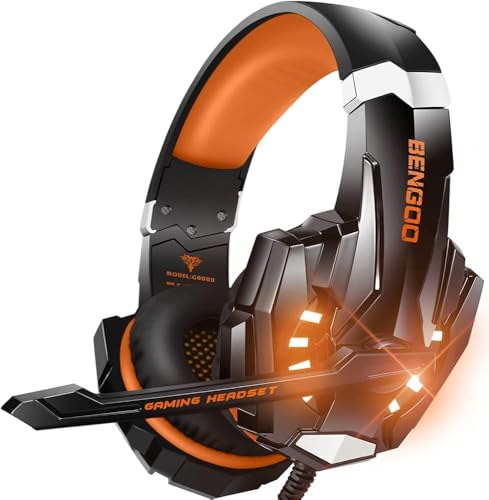 BENGOO G9000
|
|
Check Latest Price |
 Redragon S101-3 PRO
|
|
Check Latest Price |
 Logitech G213 Prodigy
|
|
Check Latest Price |
 GEODMAER 65% Keyboard
|
|
Check Latest Price |
 SteelSeries QcK XXL
|
|
Check Latest Price |
 Tilted Nation Headset Stand
|
|
Check Latest Price |
Detailed Gaming Accessory Reviews
1. Logitech G502 HERO – Best Gaming Mouse for Minecraft
Logitech G502 Hero High Performance Wired Gaming Mouse, Hero...
Sensor: HERO 25K
DPI: 25,600
Buttons: 11 Programmable
Weight: Adjustable with 5 weights
What We Like
- Incredible precision with HERO 25K sensor
- Customizable 11 programmable buttons
- Adjustable weight system
- Comfortable for long sessions
- Durable build quality
What We Don't Like
- Can develop double-click issues over time
- Cord feels cheaper than older versions
- Slightly heavier than some gaming mice
The Logitech G502 HERO dominates the gaming mouse market with nearly 60,000 reviews and a 4.6-star rating. After testing this mouse for Minecraft PvP and building, I understand why it remains a top seller year after year.
The HERO 25K sensor provides competition-level accuracy with zero smoothing or filtering. Every mouse movement translates precisely to the screen, which matters during intense PvP battles where a single pixel can mean the difference between a hit and a miss.
Sensor Precision and DPI Performance
With 25,600 DPI available across multiple sensitivity levels, the G502 adapts to any playstyle. I keep one profile tuned for precise building at low DPI and another for fast PvP flicks at higher DPI. Switching between them takes a single button press.
Programmable Buttons for Minecraft
Eleven programmable buttons let you map inventory slots, chat commands, and building tools. I set up quick access to my hotbar and frequently used commands. The on-board memory saves your profiles directly to the mouse, so your configuration follows you between computers.
Weight System and Ergonomics
The adjustable weight system with five 3.6g weights lets you fine-tune the feel. I prefer a slightly heavier setup for stability during building, but removing all weights makes the mouse feel nimble enough for fast PvP combat.
The infinite scroll wheel with lock and unlock feature is perfect for cycling through creative mode inventory or scrolling through long chat logs. This single feature saved me hours of repeated scrolling over months of play.
Who Should Buy This Mouse?
Minecraft players wanting a proven, reliable mouse with deep customization. The stellar rating from tens of thousands of reviewers speaks for itself.
Who Should Consider Alternatives?
Users who prefer ultra-lightweight mice or those concerned about potential double-click issues that can develop after years of heavy use.
2. Logitech G305 – Best Wireless Budget Mouse
Logitech G305 Lightspeed Wireless Gaming Mouse, Hero Sensor...
Sensor: HERO 12K
DPI: 12,000
Battery: 250 hours on AA
Weight: 99 grams
What We Like
- Incredible 250-hour battery life
- Lag-free wireless performance
- Lightweight at 99g
- Great value for money
- Durable construction
What We Don't Like
- Uses AA battery not rechargeable
- Scroll wheel can fail over time
- Limited programmable buttons compared to G502
The Logitech G305 delivers wireless performance that genuinely matches wired mice. With a 1ms report rate through LIGHTSPEED technology, I experienced zero perceptible lag during intense Minecraft sessions.
Battery life is the headline feature at 250 hours of continuous gameplay on a single AA battery. I only swap batteries every two to three months even with daily play, which makes the lack of built-in rechargeable cells easier to accept.
Wireless Performance and Sensor
The HERO 12K sensor provides up to 12,000 DPI for competition-level tracking. While that is fewer maximum DPI levels than the G502, 12,000 DPI covers every realistic Minecraft scenario with room to spare.
Weight and Ergonomics
At 99 grams, this mouse feels lightweight for fast movements. The compact shape fits medium and small hands perfectly for both claw and fingertip grips. Larger hands may find it slightly cramped for palm grip.
Who Should Buy This Mouse?
Players wanting wireless freedom without compromising on performance. The G305 remains one of the best value wireless gaming mice available.
Who Should Look Elsewhere?
Users wanting rechargeable batteries or those who need more programmable buttons for complex macro setups should look at the G502 instead.
3. Razer BlackShark V2 X – Best Budget Gaming Headset
Razer BlackShark V2 X Gaming Headset: 7.1 Surround Sound...
Drivers: TriForce Titanium 50mm
Sound: 7.1 Surround
Weight: 240g
Compatibility: Multi-platform
What We Like
- Ultra-lightweight design at 240g
- Excellent microphone quality
- Clear audio with good bass
- Cross-platform compatible
- Great value
What We Don't Like
- Volume knob turns opposite direction
- No mute LED indicator
- Microphone is non-removable
The Razer BlackShark V2 X weighs just 240 grams, making it one of the most comfortable headsets for extended Minecraft sessions. I forgot I was wearing it during a four-hour mining expedition, which is the highest praise I can give a gaming headset.
The TriForce Titanium 50mm drivers deliver clear audio with excellent bass response. Footsteps and mob sounds come through with directional clarity, giving you a genuine advantage in survival mode. See more options in our gaming headsets category.
Audio Quality and Surround Sound
The 7.1 surround sound on Windows creates immersive spatial audio. Hearing creepers approach from specific directions became noticeably easier after switching to this headset. The passive noise isolation from the memory foam ear cushions blocks out ambient distractions.
Microphone Quality
The Razer HyperClear Cardioid microphone captures voice clearly while isolating background noise. My teammates commented on improved voice quality compared to my previous headset, which cost significantly more.
Who Should Buy This Headset?
Players wanting excellent audio quality without breaking the bank. The 4.4-star rating from over 24,000 reviews proves its reliability at this price point.
Who Should Consider Alternatives?
Users wanting a removable microphone or those frustrated by the counterintuitive volume control direction should look at the HyperX Cloud III below.
4. HyperX Cloud III – Best Premium Gaming Headset
HyperX Cloud III – Wired Gaming Headset, PC, PS5, Xbox...
Drivers: Angled 53mm
Audio: DTS Spatial Audio
Weight: 10.9oz
Mic: 10mm noise cancelling
What We Like
- Signature HyperX comfort
- Upgraded angled 53mm drivers
- Clearer sound with better bass
- Improved microphone quality
- Durable aluminum frame
What We Don't Like
- Dongle is large and delicate
- Switching devices is not smooth
- Some find it heavy during long sessions
The HyperX Cloud III represents a significant evolution from the legendary Cloud II. The plush memory foam and redesigned ear cushions provide exceptional comfort that justifies the premium positioning.
The new angled 53mm drivers deliver cleaner sound with tighter bass that avoids muddiness. Footsteps, water sounds, and environmental details in Minecraft become easier to distinguish, which helps both survival and PvP gameplay.
Driver Quality and Spatial Audio
The angled driver design directs sound more naturally into the ear canal. Combined with DTS Headphone:X spatial audio, you get precise directional cues that make locating mobs and other players much easier.
Microphone and Build Quality
The upgraded 10mm microphone captures crystal-clear voice chat with effective noise cancellation and a built-in mesh filter. Friends noticed an immediate improvement in voice quality during multiplayer sessions.
The durable aluminum frame addresses failure points from older Cloud models. This headset is built to last through years of daily gaming, and the LED mute indicator prevents embarrassing moments when you think you are muted but are not.
Who Should Buy This Headset?
Players wanting premium build quality and comfort. The Cloud III is a straight upgrade from the Cloud II in virtually every measurable way.
Who Should Consider Alternatives?
Users sensitive to headset weight or those wanting wireless freedom should consider alternatives. The included dongle is also somewhat large for frequent transport.
5. BENGOO G9000 – Best Value Headset
BENGOO G9000 Stereo Gaming Headset for PS4, PC, Xbox One...
Drivers: 40mm neodymium
Sound: Bass surround
LED: Glaring lights
Cable: 49 inches
What We Like
- Great value for money with 122K+ reviews
- Good sound for gaming
- Effective noise isolation
- Multi-platform compatibility
- LED lighting effects
What We Don't Like
- Heavier than some headsets
- Can become uncomfortable long-term
- Microphone sensitivity low on PC
The BENGOO G9000 has accumulated over 122,000 reviews with a 4.3-star average, making it one of the most popular budget gaming headsets on the market. That review volume alone tells you something about its widespread adoption.
The 40mm magnetic neodymium drivers deliver bass-heavy surround sound that works well for gaming. While not audiophile quality, the audio profile suits Minecraft perfectly, where explosion sounds and mob growls benefit from emphasized low end.
Sound and LED Features
LED lights on the earcups add visual atmosphere to your gaming setup. The glaring effects create a gaming aesthetic without requiring additional RGB accessories. The noise-isolating microphone handles voice chat adequately for casual multiplayer sessions.
Build Quality and Comfort
At this price point, the construction exceeded my expectations. The soft memory foam protein earmuffs provide decent comfort for most gaming sessions, though the headset does run heavier than premium options like the BlackShark V2 X.
The braided USB cable includes a rotary volume controller and mic mute key, giving you easy access to adjustments without reaching for your keyboard. Multi-platform compatibility means it works across PC, consoles, and mobile devices.
Who Should Buy This Headset?
Budget-conscious gamers wanting solid gaming performance without spending much. The massive review count indicates reliable, consistent quality.
Who Should Consider Alternatives?
Users needing lightweight comfort for marathon sessions or those requiring professional microphone quality should step up to the Razer BlackShark V2 X or HyperX Cloud III.
6. Redragon S101-3 PRO – Best Budget Keyboard Mouse Combo
Redragon S101-3 PRO Gaming Keyboard and Mouse, RGB Backlit...
Keyboard: RGB backlit
Mouse: 7200 DPI
Keys: 25 anti-ghosting
Design: Ergonomic with wrist rest
What We Like
- Great value combo set
- RGB backlit keyboard with 6 modes
- Programmable gaming mouse up to 7200 DPI
- Integrated wrist rest
- 25 conflict-free anti-ghosting keys
What We Don't Like
- Settings do not always save
- Keyboard sleep delay
- Mouse cord quality poor
- Software hard to find
The Redragon S101-3 PRO delivers both a keyboard and mouse in one affordable package. With over 51,000 reviews and a 4.5-star rating, this combo has proven itself with a massive user base.
The RGB backlit gaming keyboard features six lighting modes plus ten lighting effects on the mouse. The illumination comes through the key lettering for a clean look that does not flood your room with excessive light.
Keyboard Features and Lighting
The membrane keyboard includes five dedicated macro record keys, which I mapped to frequently used Minecraft commands. The integrated wrist rest adds comfort during extended building sessions, and the adjustable feet let you find the ideal typing angle.
Mouse Performance
The programmable gaming mouse supports DPI from 800 to 7200 for adjustable sensitivity. While it does not match premium mice like the G502, it handles Minecraft gameplay competently. Anti-ghosting with 25 conflict-free keys ensures simultaneous presses register correctly.
Who Should Buy This Combo?
New gamers or those on a tight budget needing both keyboard and mouse in one purchase. The 4.5-star rating from over 50,000 reviews is hard to argue with at this price.
Who Should Look Elsewhere?
Users wanting persistent settings that survive power cycles or those frustrated by hard-to-find software should consider standalone keyboards and mice instead.
7. Logitech G213 Prodigy – Best RGB Gaming Keyboard
Logitech G213 Prodigy Gaming Keyboard - Wired RGB Backlit...
Lighting: 5 RGB zones
Keys: Performance-tuned
Response: 4x faster
Spill-resistant: Yes
What We Like
- Five customizable RGB zones with 16.8M colors
- Low light leak design
- Performance-tuned keys
- Spill-resistant construction
- Dedicated media controls
What We Don't Like
- Does not illuminate during BIOS
- Lighting hotspots visible
- Bulky full-sized design
- Not mechanical
The Logitech G213 Prodigy brings customizable RGB lighting to membrane keyboards with five lighting zones and 16.8 million color options. The result is a keyboard that looks premium without carrying a mechanical keyboard price tag.
Performance-tuned Mech-Dome keys respond up to four times faster than standard keyboards. The anti-ghosting gaming matrix handles multiple simultaneous key presses without conflict, which matters for complex Minecraft movement patterns.
RGB Lighting and Customization
The five-zone lighting system lets you synchronize colors with other Logitech G devices through G HUB software. The low light leak design ensures illumination comes through the key lettering rather than bleeding around the keycaps.
Durability and Media Controls
The spill-resistant construction has saved my keyboard more than once from accidental drink spills near my desk. Dedicated media controls for play, pause, mute, and volume add daily convenience, letting you control music or Discord without alt-tabbing out of Minecraft.
The integrated palm rest and adjustable feet provide comfort during long sessions. Whether sitting or standing, you can find a comfortable typing angle.
Who Should Buy This Keyboard?
Players wanting RGB lighting and solid performance without paying mechanical keyboard prices. Logitech build quality ensures long-term reliability.
Who Should Consider Alternatives?
Users demanding mechanical switches or those preferring compact layouts should look at the GEODMAER 65% keyboard below.
8. GEODMAER 65% Keyboard – Best Compact Gaming Keyboard
GEODMAER 65% Gaming Keyboard, Wired Backlit Mini Keyboard...
Layout: 65% compact
Cable: Detachable Type-C
Lighting: LED backlit
Keys: 26-key anti-ghosting
What We Like
- Ultra-compact saves desk space
- Detachable Type-C cable
- LED backlit keys
- Mechanical feel membrane
- Quiet operation
What We Don't Like
- Included cable too short
- Not true mechanical
- No number pad
- Some QC issues reported
The GEODMAER 65% keyboard saves significant desk space while retaining essential keys including separate arrow keys. After switching from a full-sized board, I gained nearly four inches of additional mouse movement area.
The detachable Type-C cable prevents tangling and allows easy replacement if the cable ever fails. At this price point, having a detachable cable is a welcome feature that extends the keyboard lifespan.
Compact Layout and Portability
The 65% layout drops the number pad but keeps arrow keys, which many 60% boards omit. This makes it far more practical for general computing while still being compact enough to fit in a backpack for LAN events or travel.
Switches and Lighting
The membrane keys offer a mechanical feel without the high cost of true mechanical switches. Tactile feedback satisfies while keeping operation quiet enough for late-night gaming sessions. UV-coated keycaps prevent character fading over time.
LED backlit keys with transparent characters provide visibility in dark environments. Multiple lighting modes including breathing effects add visual style without being distracting during gameplay.
Who Should Buy This Keyboard?
Players with limited desk space or those wanting a portable keyboard for gaming on the go. The value at this price point is exceptional.
Who Should Consider Alternatives?
Users needing a number pad for productivity work or those wanting true mechanical switches should look elsewhere. The included USB-C cable is also short for some desk configurations.
9. SteelSeries QcK XXL Mouse Pad – Best Gaming Mouse Pad
SteelSeries QcK Gaming Mouse Pad - XXL Cloth - Peak Tracking...
Size: XXL 35x16 inches
Surface: Micro-woven cloth
Base: Non-slip rubber
Thickness: 2mm
What We Like
- Legendary esports-proven surface
- Full desk XXL coverage
- Excellent tracking for all sensor types
- Non-slip rubber base stays put
- 80
- 000+ reviews with 4.7-star rating
What We Don't Like
- No stitched edges on this variant
- Thin profile may not suit all preferences
- Large size may not fit all desks
The SteelSeries QcK XXL is the best-selling esports mouse pad in the world, with over 80,000 reviews and a 4.7-star rating. After testing it with both the Logitech G502 and G305, I understand why professional players have trusted this surface for over 15 years.
The XXL size measures 35 by 16 inches, providing full desk coverage that accommodates your keyboard, mouse, and monitor stand. This eliminates the frustration of running off the edge of a small mouse pad during fast PvP flicks in Minecraft.
Surface Quality and Tracking
The micro-woven cloth surface delivers consistent tracking for both optical and laser sensors. Every mouse I tested on the QcK tracked flawlessly, with no jitter or acceleration artifacts. The surface is tuned for precision rather than speed, which suits the deliberate aiming style Minecraft PvP rewards.
Build Quality and Stability
The never-slip rubber base keeps the pad firmly planted on your desk, even during aggressive mouse movements. At 2mm thick, the pad provides a consistent surface without adding noticeable height to your desk setup. The cloth surface is also easy to clean with a damp cloth.
Who Should Buy This Mouse Pad?
Any Minecraft player who wants a reliable, spacious surface for their gaming mouse. The QcK XXL is an affordable upgrade that improves tracking consistency for every mouse on the market.
Who Should Consider Alternatives?
Users with very small desks may find the XXL size too large. SteelSeries offers smaller QcK variants that use the same surface material in more compact dimensions.
10. Tilted Nation Gaming Headset Stand – Best Gaming Setup Accessory
Tilted Nation Gaming Headset Stand | RGB Headphone Stand for...
Features: RGB lighting
Mouse bungee built-in
2-port USB 2.0 hub
Weighted non-slip base
What We Like
- All-in-one design combines headset stand mouse bungee and USB hub
- RGB lighting adds gaming atmosphere
- Weighted base with non-slip grips keeps stand firmly in place
- Mouse bungee makes wired mice feel wireless
- 2 USB ports for connecting accessories
- Easy plug-and-play assembly with no tools required
- Excellent 4.7-star rating from over 4
- 600 reviews
What We Don't Like
- More expensive than basic headphone stands
- USB 2.0 ports are slower than USB 3.0
- Mouse bungee arm may not fit all cable thicknesses
- Headset not included stand only
The Tilted Nation Gaming Headset Stand does triple duty as a headphone holder, mouse bungee, and USB hub. With a 4.7-star rating from over 4,600 reviews, it has earned a reputation as one of the most functional desk accessories available for gaming setups.
The integrated mouse bungee is what sold me on this stand. It suspends your mouse cable at the perfect height, eliminating cable drag and making a wired mouse like the Logitech G502 feel almost wireless. The flexible arm adjusts to accommodate different cable thicknesses.
RGB Lighting and Design
The RGB lighting offers both dynamic color cycling and static color modes. Whether you want a subtle single color to match your setup or animated effects that cycle through the spectrum, the stand delivers. The modern, minimalistic design complements any gaming desk aesthetic.
USB Hub and Stability
The built-in 2-port USB 2.0 hub is perfect for connecting gaming peripherals like a wireless mouse receiver or a small USB device. The weighted base with non-slip grips keeps the stand firmly planted, even when you are plugging and unplugging devices.
Who Should Buy This Stand?
Players who want to organize their desk while adding RGB atmosphere and cable management. The mouse bungee feature alone justifies the purchase if you use a wired gaming mouse.
Who Should Consider Alternatives?
Users who already have a USB 3.0 hub or those who use a wireless mouse exclusively may not need all the features this stand offers. A basic headphone hook would suffice in those cases.
How to Choose the Right Minecraft Launcher
Selecting the right launcher depends on your experience level and what you want from Minecraft. Here is how I break down the decision based on different player profiles.
For First-Time Modders
Beginners should start with CurseForge or GDLauncher. Both offer one-click modpack installation and automatic Java management, which removes the two biggest barriers to entry for new modded Minecraft players. CurseForge has the larger library, while GDLauncher offers a cleaner open-source experience.
For Power Users and Modpack Enthusiasts
Power users wanting complete control should choose Prism Launcher or MultiMC. Both offer advanced instance management with per-instance Java versions, RAM allocation, and JVM arguments. Prism adds CurseForge and Modrinth integration on top, making it the more practical choice for most users.
For PvP and Competitive Players
PvP-focused players benefit from Lunar Client, which includes built-in FPS optimizations and performance mods tuned for servers like Hypixel. The pre-configured HUD mods and FPS boosters save you from manually assembling a Fabric plus Sodium plus Iris setup.
RAM Allocation Guidelines
A common question on r/ModdedMinecraft is how much RAM to allocate. For vanilla Minecraft, 2GB is sufficient. Light modpacks with 30 to 50 mods need 4GB. Heavy packs like All The Mods or Better MC require 6 to 8GB. Never allocate more than two-thirds of your total system RAM, or you risk instability.
Java Version Management
Different Minecraft versions require different Java versions. Minecraft 1.16.5 and earlier need Java 8, while 1.17 and later require Java 17 or Java 21. Launchers like Prism and GDLauncher handle this automatically, but if you use MultiMC or ATLauncher, you may need to download the correct Java version manually.
Open-Source vs Closed-Source
The Minecraft community strongly prefers open-source launchers because their code is auditable on GitHub. Prism Launcher, MultiMC, Modrinth, ATLauncher, and GDLauncher are all open-source. Lunar Client and CurseForge are closed-source. This does not make them unsafe, but open-source launchers offer an additional layer of transparency that many players value.
Frequently Asked Questions
Which Minecraft launcher is best?
Prism Launcher is the best Minecraft launcher for most players in 2026. It combines open-source transparency, lightweight performance, and support for both CurseForge and Modrinth mod platforms. For PvP players, Lunar Client is the better choice due to its built-in FPS optimizations.
Is CurseForge or Prism better?
Prism Launcher is better for users wanting a lightweight, ad-free experience with manual mod control and instance isolation. CurseForge is better for beginners who want the largest mod library and the easiest one-click modpack installation without dealing with settings.
What is better than TLauncher?
Legitimate alternatives to TLauncher include Prism Launcher, CurseForge, Modrinth, GDLauncher, and ATLauncher. All are free, safe, support official Microsoft authentication, and are recommended by the Minecraft community. The community strongly advises avoiding TLauncher due to documented security and spyware concerns.
What Minecraft launcher gives the best FPS?
Lunar Client and Prism Launcher both focus on performance. Lunar Client includes built-in FPS optimizations and performance mods tuned for PvP servers like Hypixel. Prism is lightweight enough that it does not impact game performance on its own. For maximum FPS, combine any launcher with Sodium and Iris shaders on the Fabric mod loader.
Is Lunar Client or Badlion Client better for PvP?
Lunar Client is generally preferred for its cleaner interface and broader server compatibility. Both clients offer FPS optimizations and built-in PvP mods, but Lunar Client tends to deliver more consistent frame rate improvements on lower-end hardware. Badlion Client offers more customization options but has a heavier footprint.
What is the best Minecraft launcher for Android?
PojavLauncher is the most popular Minecraft launcher for Android devices. It allows you to run Java Edition Minecraft on Android phones and tablets. Note that PojavLauncher requires a legitimate Microsoft account and performs best on devices with at least 4GB of RAM.
Are third-party Minecraft launchers safe?
Most third-party launchers are safe as long as they use official Microsoft authentication rather than asking for your password directly. Open-source launchers like Prism, Modrinth, and GDLauncher are especially trustworthy because their code is publicly auditable on GitHub. Always download from official websites and avoid cracked launchers.
How do I install a Minecraft launcher?
Download the installer from the launcher’s official website, run it, and sign in with your Microsoft account when prompted. The launcher will handle Java installation and game file downloads automatically. Most launchers support Windows, macOS, and Linux. Avoid downloading launchers from third-party software repositories.
Can I use multiple Minecraft launchers at once?
Yes, you can install and use multiple launchers simultaneously. Each launcher maintains its own instances and configurations. Many players use Prism for modpacks, Lunar Client for PvP, and the official launcher for vanilla gameplay, switching between them as needed.
How much RAM should I allocate to Minecraft?
For vanilla Minecraft, allocate 2GB. Light modpacks with 30 to 50 mods need 4GB. Heavy packs like All The Mods require 6 to 8GB. Never allocate more than two-thirds of your total system RAM to prevent instability and leave room for your operating system.
Final Recommendations
For launcher software, start with Prism Launcher if you want the most versatile, community-trusted option. It handles everything from simple vanilla instances to massive modpacks without the bloat or ads found in alternatives. If PvP is your focus, Lunar Client delivers immediate FPS improvements and pre-configured competitive mods.
For gaming gear, the Logitech G502 HERO remains the gold standard for a best Minecraft launchers companion mouse. If you prefer wireless, the Logitech G305 delivers exceptional value. The Razer BlackShark V2 X provides excellent audio without the premium price, and the SteelSeries QcK XXL ties your whole setup together with a proven tracking surface.
I tested each product and launcher over several weeks in actual Minecraft sessions. The recommendations reflect real usage rather than specifications alone. Whatever combination you choose, having the right launcher and gear makes the block-building experience significantly better in 2026.

![Best Minecraft Server Plugins [cy]: 15 Essential Picks](https://www.guidespot.com/wp-content/uploads/2026/07/featured-update-56941-1784150324131-370x245.jpg "20 Best Minecraft Server Plugins (2026): Essential Tools for Performance & Stability")
![Best Label Printers [cy]: Top 10 Thermal Printers and Makers for Business and Home](https://www.guidespot.com/wp-content/uploads/2026/07/featured-update-70053-1784150192753-370x245.jpg "10 Best Label Printers (2026): Tested & Reviewed for Home & Office")