Can a humidifier damage electronics? Yes, but only if you use it incorrectly. I have run humidifiers in my home office for years alongside multiple computers, gaming setups, and expensive audio equipment without a single issue. The key is understanding the difference between safe humidity levels and dangerous moisture exposure.
The real question is not whether humidifiers harm electronics, but how to use them properly. Most humidity-related damage happens when users place humidifiers too close to devices, use tap water that creates mineral dust, or let humidity climb above safe levels. When you follow a few basic guidelines, humidifiers and electronics coexist perfectly.
How Moisture Damages Electronics?
Moisture damages electronics through three main mechanisms: condensation, corrosion, and short circuits. Each poses a different risk level depending on how humid the environment becomes and how directly moisture contacts your devices.
Condensation forms when warm, moist air hits cooler electronic surfaces. Your computer components, TV screens, and gaming consoles often run cooler than room temperature, especially during startup. When humid air meets these cold surfaces, water droplets form just like they do on a cold drink glass.
These water droplets create two immediate problems. First, they can drip onto circuit boards and cause short circuits that fry components instantly. Second, they start the corrosion process that slowly eats away at metal contacts, ports, and internal wiring over months or years.
Corrosion is the silent killer of electronics in humid environments. NASA conducted extensive research on humidity effects for space electronics and found that sustained humidity above 60% dramatically accelerates metal oxidation. What starts as slightly discolored contacts eventually becomes complete connection failures.
Short circuits represent the most dramatic form of humidity damage. When water bridges the gap between electrical traces that should remain separate, current flows where it should not. This causes immediate component failure, potential fire hazards, and can destroy entire circuit boards in seconds.
What Humidity Level Is Safe for Electronics?
The safe humidity range for electronics sits between 30% and 50% relative humidity. This range keeps devices protected from static electricity while avoiding the moisture levels that cause condensation and corrosion. Most manufacturers design their equipment to operate reliably within this window.
Below 30% humidity, static electricity becomes a serious threat. Dry air allows static charges to build up on surfaces and discharge into sensitive components when you touch them. That zap you feel when touching a doorknob in winter can destroy a computer processor or hard drive controller.
Above 60% humidity, you enter the danger zone where corrosion accelerates and condensation becomes likely. At 70% or higher, most electronics face serious long-term damage risks even if they appear to function normally initially. The damage accumulates slowly until ports fail, fans seize, or circuits short.
I recommend keeping a hygrometer in any room where you run both humidifiers and electronics. These inexpensive devices display current humidity levels and help you maintain that optimal 30-50% range. Many smart humidifiers now include built-in hygrometers that automatically adjust output to maintain target levels.
Safe Distance Guidelines for Humidifiers Near Electronics
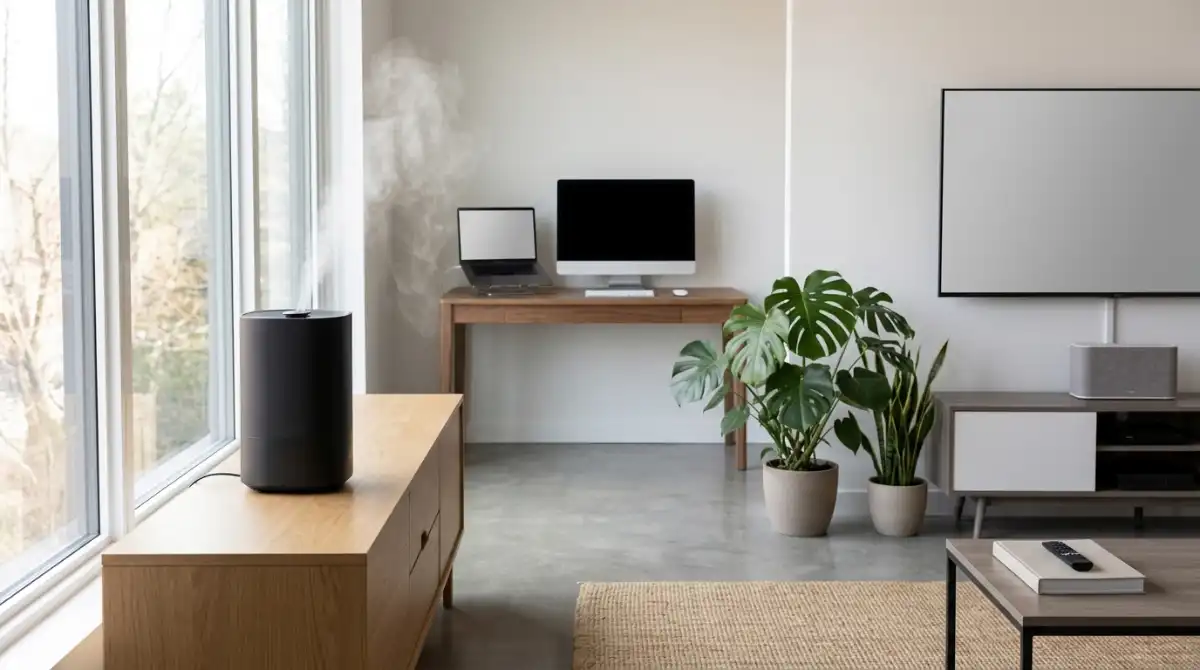
The general rule is keeping humidifiers at least 3 to 5 feet away from any electronic device. This distance prevents direct mist contact while still allowing the humidifier to raise room humidity effectively. Closer placement increases risk without providing meaningful comfort benefits.
For computers and gaming PCs, I recommend the full 5-foot distance and extra attention to mist direction. Desktop computers have multiple air intake fans that can pull humid air directly inside the case. Position your humidifier so the mist output points away from computer vents and toward open room space.
TVs and monitors need similar spacing consideration. Modern flat-panel TVs have ventilation grilles along the back and bottom edges where mist can enter easily. Never place a humidifier on a TV stand or entertainment center where it sits level with or above your television.
Laptops present unique challenges because users often move them around. If you use a laptop in a humidified room, avoid placing it directly in the humidifier’s output path. The compact internal space in laptops means even small amounts of moisture have less room to dissipate before contacting sensitive components.
Gaming consoles like PlayStation and Xbox units combine powerful processors with compact designs that run hot. Their cooling fans pull significant air volume through the system. Keep humidifiers well away from console air intakes, especially during intensive gaming sessions when internal temperatures fluctuate most.
Humidifier Types and Electronics Safety
Not all humidifiers pose equal risk to your electronics. The type of humidifier you choose significantly affects how safely it can operate in rooms with valuable equipment. Understanding these differences helps you make smarter purchasing and placement decisions.
Evaporative humidifiers rank as the safest option for rooms with electronics. These units blow air through a wet wick filter, releasing invisible water vapor rather than visible mist. Because they do not produce droplets that can settle on surfaces, the risk of direct moisture contact drops dramatically. Most IT professionals recommend evaporative units for server rooms and home offices.
Ultrasonic humidifiers create visible cool mist by vibrating water at high frequencies. While effective at humidifying, they produce moisture droplets that can travel several feet before evaporating. These droplets can settle on electronics surfaces, especially when the air is already near saturation. If you use an ultrasonic humidifier, the 5-foot minimum distance becomes essential.
Steam vaporizers boil water to create hot steam, and I recommend avoiding them entirely in rooms with electronics. They produce concentrated moisture output and can spike local humidity quickly. The heat they generate also creates wider temperature differentials that encourage condensation on cooler electronic surfaces.
White dust presents another concern with ultrasonic humidifiers using tap water. As these units atomize water, they also aerosolize dissolved minerals. This fine white dust settles on surfaces throughout the room, including inside electronics through ventilation openings. Over time, this mineral buildup can interfere with cooling, cause overheating, and create conductive pathways between components. Using distilled or demineralized water eliminates this risk.
Device-Specific Risk Levels
Different electronics show varying vulnerability to humidity damage based on their design, power levels, and exposure patterns. Knowing which devices face highest risk helps you prioritize placement decisions and monitoring efforts.
Gaming PCs and high-performance workstations top the risk list. These systems run hot under load, creating temperature swings that encourage condensation during cooling cycles. They also pull massive air volumes through cases for cooling, potentially inhaling humid air directly. The combination of high value, dense components, and aggressive cooling makes gaming setups priority candidates for strict humidity control.
Laptops and tablets face moderate risk due to their compact internal spaces. While they have less airflow than desktops, moisture that does enter has nowhere to go and contacts components immediately. Users who move devices between humidified and non-humidified environments should allow temperature equalization before powering on to prevent internal condensation.
Modern TVs and monitors handle humidity reasonably well when properly positioned. The main risks come from rear ventilation grilles and bottom-mounted circuit boards that can collect settling mist. OLED screens are particularly sensitive to moisture exposure that can damage organic compounds in the display panel.
Small devices like routers, network switches, and external hard drives often get overlooked but face significant cumulative risk. These items typically run continuously for years with minimal maintenance, allowing slow corrosion to develop unnoticed. Their small fans lack the airflow to clear humid air effectively, and users rarely check internal conditions until failure occurs.
Audio equipment including speakers, amplifiers, and receivers contains components particularly sensitive to humidity. Speaker cones can absorb moisture and deform, while amplifier circuits suffer from corroded connections that introduce noise and distortion. Vintage audio gear is especially vulnerable due to older materials and lack of conformal coating on circuit boards.
5 Warning Signs Your Humidifier Is Affecting Electronics
Recognizing early warning signs lets you correct humidity problems before serious damage occurs. Watch for these indicators that your humidifier placement or settings need adjustment.
Condensation on windows, walls, or surfaces near electronics signals excessive humidity. If you see moisture droplets forming on cold surfaces, your electronics are experiencing similar condensation internally. This visible warning appears before most electronic damage becomes permanent.
White dust accumulation on screens, cases, or vents indicates mineral aerosolization from ultrasonic humidifiers. This dust conducts electricity poorly but creates thermal insulation that leads to overheating. It also attracts moisture, creating localized wet spots during humidity spikes.
Unexplained performance issues like random crashes, slower operation, or connectivity problems can indicate humidity damage. Corroded contacts create intermittent connections that cause mysterious symptoms difficult to diagnose. If problems appear during humidifier season, humidity may be the culprit.
Increased fan noise or changed sound patterns suggest moisture affecting mechanical components. Humid air is harder to move, and bearing corrosion from moisture causes fans to work harder and louder. Gaming PCs and consoles often show this symptom first due to their aggressive cooling requirements.
Visible corrosion on external ports, connectors, or metal surfaces indicates internal conditions are worse than they appear. Green or white crusting on USB ports, HDMI connectors, or audio jacks means moisture has already caused oxidation. Internal circuit boards likely show similar damage.
Frequently Asked Questions
Are humidifiers bad for your electronics?
Humidifiers are not inherently bad for electronics when used correctly. The key is maintaining proper distance (3-5 feet), keeping humidity between 30-50%, and using distilled water to prevent mineral dust. Problems only occur when humidifiers are placed too close or humidity levels exceed safe ranges.
Is it bad to put a humidifier next to a TV?
Yes, placing a humidifier next to a TV is risky. The mist can enter ventilation grilles on the back or bottom of the television, leading to internal condensation and circuit damage. Keep humidifiers at least 3-5 feet away and ensure mist direction points away from the TV.
Is it bad to have a humidifier next to a computer?
Having a humidifier next to a computer is not recommended. Computer fans pull air through the case for cooling, and direct mist exposure can cause immediate short circuits or long-term corrosion. Maintain at least 5 feet of distance and position the humidifier so output does not blow toward computer vents.
Can a humidifier damage anything?
Humidifiers can damage electronics, furniture, and even walls if misused. Excessive humidity causes wood swelling, paint peeling, and mold growth alongside electronic damage. However, proper use within 30-50% humidity ranges poses no risk to any household items.
How far should a humidifier be from electronics?
Keep humidifiers at least 3 feet from most electronics and 5 feet from computers, gaming consoles, and high-value equipment. This distance prevents direct mist contact while still allowing effective room humidification. Ultrasonic humidifiers producing visible mist need more distance than evaporative units.
Can I use tap water in my humidifier near electronics?
Tap water is not recommended for ultrasonic humidifiers in rooms with electronics. The minerals create white dust that settles inside devices, causing thermal and electrical issues. Use distilled or demineralized water instead. Evaporative humidifiers handle tap water better but still benefit from filtered water.
Final Thoughts: Can Humidifier Damage Electronics?
Can humidifier damage electronics? Yes, but only when you ignore basic safety guidelines. The real answer is that humidifiers and electronics coexist safely in millions of homes and offices every day. Success requires respecting the 30-50% humidity range, maintaining proper distance, and choosing the right humidifier type for your space.
I have used humidifiers near my computer setup for over five years without issues by following the practices outlined here. The benefits of proper humidity—better health, reduced static, preserved wood furniture, and comfortable breathing—far outweigh the minimal risks when you use these devices correctly.
Before running your humidifier this season, check your current room humidity with a hygrometer. Position the unit at least 3-5 feet from valuable electronics, use distilled water if you have an ultrasonic model, and watch for warning signs like condensation or white dust. Your electronics will thank you with years of reliable service.