When I first started researching tablets for my home office, I was overwhelmed by the variety of screen sizes available. After testing dozens of tablets over the past year, I’ve learned that choosing the right size makes all the difference between a device you love using and one that collects dust in a drawer.
The tablet market in 2026 offers screen sizes ranging from pocket-friendly 7-inch models to laptop-replacing 13-inch powerhouses. Each size category serves different purposes, and understanding these distinctions helps you make an informed decision that matches your specific needs and lifestyle.
In this comprehensive guide, we’ll explore every tablet size category, examine their ideal use cases, and help you determine which dimensions work best for your intended purpose. Whether you’re looking for a portable e-reader, a digital canvas for artwork, or a productivity powerhouse, we’ll cover everything you need to know about tablet sizes and their applications.
Understanding Tablet Screen Sizes and Measurements
Before diving into specific size categories, let’s clarify how tablet sizes are measured and what these numbers actually mean for your daily use. Tablet screens are measured diagonally from corner to corner, typically expressed in inches. This measurement doesn’t include the bezels or frame around the screen.
When manufacturers advertise a “10-inch tablet,” they’re referring to the diagonal screen measurement. The actual device dimensions are larger due to the bezels and casing. For example, a 10.2-inch iPad measures approximately 9.8 x 6.8 inches for the entire device, with the screen occupying most of that space.
Screen aspect ratio also plays a crucial role in how a tablet feels in your hands. Most tablets use either a 4:3 ratio (more square-shaped, common in iPads) or 16:10 ratio (more rectangular, common in Android tablets). This ratio affects both the viewing experience and how comfortable the device is to hold in different orientations.
Resolution is another critical factor that works alongside screen size. A larger screen doesn’t automatically mean better image quality. Pixel density, measured in pixels per inch (PPI), determines how sharp and clear the display appears. A smaller tablet with high resolution can look sharper than a larger tablet with lower resolution.
Complete Tablet Size Categories and Specifications
Compact Tablets (7-8 inches)
Compact tablets represent the most portable category, with screens measuring between 7 and 8 inches diagonally. These devices typically weigh between 0.6 to 0.8 pounds and easily fit in large pockets or small bags. The actual device dimensions usually range from 7.5 x 5 inches to 8.5 x 5.5 inches.
The 7-inch size category was once dominated by budget tablets, but it’s becoming less common in 2026. Most manufacturers have shifted to the slightly larger 8-inch format, which offers better usability without sacrificing much portability. The 8.3-inch iPad mini exemplifies this sweet spot, providing a compact form factor that still delivers a satisfying viewing experience.
These smaller tablets excel at one-handed use, making them perfect for reading during commutes or browsing while standing. The lighter weight reduces hand fatigue during extended reading sessions, and the compact size makes them ideal travel companions. However, the smaller screen can feel cramped for productivity tasks or detailed work.
Standard Tablets (9-10 inches)
The 9 to 10-inch category has traditionally been the tablet sweet spot, offering an excellent balance between portability and screen real estate. These tablets typically weigh between 1 to 1.3 pounds, with device dimensions around 9.5 x 6.5 inches to 10 x 7 inches.
This size range dominated the early tablet market and remains popular for good reason. The screen is large enough for comfortable web browsing, video watching, and light productivity work, yet small enough to hold comfortably for extended periods. Most tablets in this category support stylus input, making them versatile for note-taking and casual drawing.
Standard-sized tablets work well for multiple users in a household, as they’re neither too large for children nor too small for adults. They fit easily in most bags and backpacks, making them practical for students and professionals who need a secondary device for presentations, research, or entertainment.
Large Tablets (11-12 inches)
Large tablets with 11 to 12-inch screens bridge the gap between standard tablets and laptop replacements. Weighing between 1.2 to 1.6 pounds, these devices measure approximately 10.5 x 7.5 inches to 11.5 x 8 inches overall.
This size category has grown significantly in popularity as tablets have become more powerful. The extra screen space makes multitasking more practical, allowing you to run two apps side by side comfortably. For creative professionals, the larger canvas provides more room for detailed work in drawing, photo editing, or design applications.
The 11-inch size has become particularly popular as it offers noticeably more screen space than 10-inch models while remaining relatively portable. Many users find this size ideal for replacing laptops for content consumption and light productivity tasks. However, the increased size and weight make them less comfortable for one-handed use or extended handheld reading.
Extra-Large Tablets (12.5+ inches)
Extra-large tablets with screens of 12.5 inches or larger represent the premium productivity category. These devices typically weigh between 1.5 to 2 pounds and measure around 11.5 x 8.5 inches or larger. The 12.9-inch iPad Pro and 13-inch tablets push the boundaries of what we traditionally consider a tablet.
These largest tablets truly compete with laptops in terms of screen space and functionality. The expansive display makes them excellent for professional creative work, from digital illustration to video editing. Split-screen multitasking becomes genuinely productive, allowing you to work with multiple full-sized applications simultaneously.
The trade-off for this screen real estate is reduced portability and increased weight. These tablets are less comfortable to hold for extended periods and typically require a table or lap desk for comfortable use. Most users pair them with keyboard cases, essentially creating a 2-in-1 laptop replacement rather than a traditional tablet.
Choosing the Right Tablet Size for Your Needs
For Reading and E-Books
If your primary use case is reading e-books, digital magazines, or articles, consider tablets between 7 and 10 inches. The 8-inch size hits the sweet spot for reading, closely mimicking the size of a paperback book while remaining light enough for one-handed use. The iPad mini at 8.3 inches or comparable Android tablets offer excellent text clarity and comfortable handling for extended reading sessions.
For those who read graphic novels, PDFs, or technical documents, a 10-inch tablet provides better readability without constant zooming and panning. The larger screen accommodates full magazine pages and complex layouts more comfortably. Consider the weight carefully though, as holding a heavier tablet for hours can cause hand fatigue.
For Media Consumption and Entertainment
Video streaming and gaming benefit from larger screens, making 10 to 11-inch tablets ideal for entertainment. This size range provides an immersive viewing experience while remaining portable enough for travel or bed use. The aspect ratio matters here too—16:10 displays work better for widescreen video content with minimal black bars.
For home entertainment where portability isn’t a primary concern, 12-inch or larger tablets deliver a premium viewing experience. The bigger screen makes sharing content with others easier and provides a more cinematic feel for movies and shows. Just remember that these larger tablets may be uncomfortable to hold during long viewing sessions without a stand or mount.
For Productivity and Work
Professional productivity typically benefits from 11-inch or larger screens. The extra screen real estate makes working with documents, spreadsheets, and presentations more comfortable. If you plan to use your tablet as a laptop replacement, consider 12-inch or larger models that provide sufficient space for serious work.
Students often find 10 to 11-inch tablets optimal for note-taking and research. This size accommodates split-screen functionality for referencing materials while taking notes, yet remains portable enough for daily campus carry. Stylus support becomes crucial for handwritten notes and annotations.
For Digital Art and Design
Digital artists and designers should prioritize the largest screen they can comfortably afford and carry. The 12.9-inch iPad Pro and similar large tablets provide the canvas space needed for detailed artwork. The extra screen space reduces the need for constant zooming and panning, improving workflow efficiency.
However, some artists prefer 11-inch tablets for their portability, allowing them to sketch anywhere inspiration strikes. The choice often depends on whether you prioritize mobility or screen space. Consider your typical working environment and whether you’ll primarily use the tablet at a desk or on the go.
Technical Specifications That Matter Beyond Size
While screen size is crucial, several other specifications significantly impact your tablet experience. Resolution and pixel density determine image sharpness—look for at least 200 PPI for comfortable reading and 260+ PPI for professional creative work. A 10-inch tablet with 2000 x 1200 resolution provides adequate clarity, while premium models offer 2360 x 1640 or higher.
Display technology affects color accuracy and viewing angles. IPS LCD panels offer good color reproduction and wide viewing angles at reasonable prices. OLED displays provide superior contrast and deeper blacks but typically cost more. For outdoor use, screen brightness becomes critical—look for tablets offering at least 400 nits, with 500+ nits preferred for sunny conditions.
Weight distribution matters as much as total weight. A well-balanced tablet feels lighter than its actual weight suggests. Tablets with batteries distributed evenly throughout the chassis are more comfortable to hold than those with weight concentrated in one area. The thickness also affects handling—thinner tablets feel more modern but may be less comfortable to grip for extended periods.
Aspect ratio influences both content consumption and productivity. The 4:3 ratio works well for reading, web browsing, and portrait-mode use. The 16:10 or 3:2 ratios better suit video content and landscape-oriented tasks. Some newer tablets experiment with different ratios to optimize for specific use cases.
Popular Tablet Models by Size Category
To help contextualize these size categories, let’s examine some current popular models. In the compact category, the iPad mini (8.3 inches) remains the premium choice, offering powerful performance in a portable package. Budget-conscious buyers might consider 8-inch Amazon Fire tablets for basic media consumption and reading.
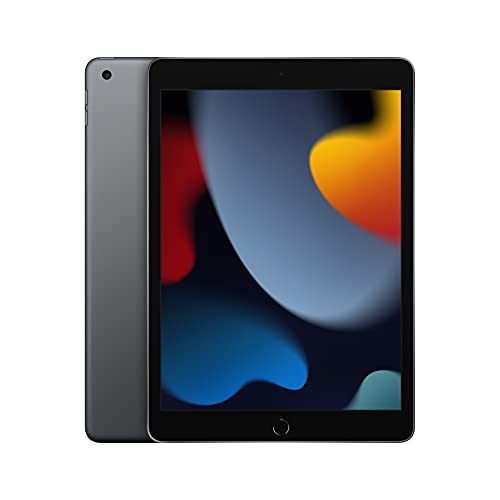
iPad 10th Gen
- 10.9-inch display
- A14 Bionic chip
- USB-C charging
- Magic Keyboard compatible
The standard 10-inch category offers the widest selection. The regular iPad (10.2 or 10.9 inches) provides excellent value for general use. Samsung’s Galaxy Tab S series in this size range offers premium Android alternatives with stunning OLED displays. Microsoft’s Surface Go series targets users wanting Windows compatibility in a compact form.
In the large tablet segment, the 11-inch iPad Pro and iPad Air deliver professional capabilities with improved portability compared to their larger siblings. Samsung’s Galaxy Tab S series also offers 11-inch models with included S Pen styluses. These tablets strike an excellent balance for users wanting substantial screen space without maximum size.
The extra-large category is dominated by the 12.9-inch iPad Pro, targeting creative professionals and power users. Samsung offers competing 12.4-inch Galaxy Tab models with similar capabilities. These tablets often cost as much as laptops but provide unique benefits for specific workflows, particularly in creative fields.
Ergonomics and Comfort Considerations
Hand size significantly influences which tablet size feels comfortable. Users with smaller hands often struggle with tablets larger than 10 inches in handheld use. Conversely, those with larger hands might find 7-8 inch tablets cramped for typing or gesture navigation. Test holding different sizes if possible before purchasing.
Usage position affects size preference too. If you primarily use tablets while lying down, lighter and smaller models prevent arm fatigue. For desk use with a stand, larger screens improve productivity without the weight concern. Lap use favors medium-sized tablets that balance screen space with stability.
Consider how you’ll transport your tablet. Smaller tablets fit in large jacket pockets or small purses, while 11-inch and larger tablets require dedicated bag space. If you commute via public transport, a tablet you can use one-handed while standing might be more practical than a larger model requiring two hands.
Accessory compatibility varies by size. Smaller tablets have fewer keyboard case options, and those available often feel cramped for extended typing. Larger tablets support full-sized keyboard accessories but add significant weight and bulk. Consider whether you’ll use accessories and factor their size and weight into your decision.
Future Trends in Tablet Sizes and Form Factors
The tablet market in 2026 is evolving beyond traditional rectangles. Foldable tablets are emerging, offering compact portability that expands to larger screens when needed. While still expensive and relatively rare, these devices could revolutionize how we think about tablet sizes by offering multiple sizes in one device.
We’re seeing a trend toward larger screens in thinner, lighter bodies. Manufacturers are reducing bezels and using lighter materials to make 11 and 12-inch tablets as portable as yesterday’s 10-inch models. This trend makes larger screens more accessible to users who previously found them too bulky.
Mini LED and OLED technology adoption is improving display quality across all size categories. These advances mean smaller tablets can offer visual experiences previously exclusive to larger, more expensive models. Better displays also enable effective use of smaller screens for tasks that previously required larger displays.
AI integration is beginning to influence tablet design and functionality. Intelligent screen splitting, adaptive interfaces, and context-aware features could make screen size less critical by optimizing the available space more effectively. These software improvements might allow smaller tablets to handle tasks currently requiring larger screens.
Making Your Final Decision
Start by honestly assessing your primary use case. If you’ll use your tablet mainly for reading and casual browsing, prioritize portability with an 8 to 10-inch model. For productivity and creative work, invest in an 11-inch or larger tablet that won’t limit your workflow. Mixed-use scenarios often favor the versatile 10 to 11-inch range.
Consider your environment and lifestyle. Frequent travelers benefit from compact tablets that fit easily in carry-on bags. Home users can enjoy larger screens without portability concerns. If you already own a laptop, a smaller tablet provides better device diversity than a large tablet that duplicates your laptop’s capabilities.
Budget impacts size options significantly. Larger tablets generally cost more, not just for the device but also for accessories. Premium features like high refresh rates, advanced stylus support, and cellular connectivity add substantial cost. Determine which features matter most for your use case and size preference.
Think long-term about how your needs might evolve. Students might start with note-taking but graduate to professional creative work. Parents might buy for children’s education but end up using tablets for work. Choosing a slightly larger, more capable tablet can provide room to grow into new use cases.
If you’re interested in setting up a comprehensive home technology system, you might also want to check out this mesh wifi setup guide to ensure your tablet has optimal connectivity throughout your home.
Frequently Asked Questions
What’s the most popular tablet size?
The 10 to 11-inch range remains most popular, offering an ideal balance between screen space and portability. This size works well for diverse use cases from entertainment to productivity, making it suitable for most users.
Can a large tablet replace a laptop?
Tablets 12 inches and larger can replace laptops for many tasks, especially with keyboard accessories. However, they may not suit users needing specific desktop software, extensive file management, or multiple external displays. Consider your specific workflow requirements.
What tablet size is best for children?
Children typically do best with 8 to 10-inch tablets. These sizes are manageable for smaller hands while providing adequate screen space for educational apps and videos. Durability and parental controls matter more than size for young users.
How do I measure my current tablet’s screen size?
Measure diagonally from one corner of the screen to the opposite corner, excluding the bezel. Use a ruler or tape measure and note the measurement in inches. This gives you the standard screen size specification.
Do larger tablets have better battery life?
Not necessarily. While larger tablets have bigger batteries, they also power larger, often higher-resolution screens. Battery life depends more on processor efficiency, screen technology, and usage patterns than size alone.
What’s the best tablet size for note-taking?
Students and professionals often prefer 10 to 11-inch tablets for note-taking. This size provides enough space for comfortable writing while remaining portable for daily carry. Good palm rejection and stylus support matter more than size for this use case.
Are smaller tablets being discontinued?
The 7-inch category has largely disappeared, but 8-inch tablets remain available. The iPad mini’s continued success demonstrates demand for compact tablets. However, the selection is limited compared to larger sizes.
What size tablet is best for digital art?
Professional artists typically prefer 12-inch or larger tablets for serious work. The extra canvas space reduces zooming and provides room for tool palettes. However, 11-inch tablets can work well for sketching and portable creativity.
Final Thoughts
Choosing the right tablet size significantly impacts your satisfaction with the device. We’ve explored how screen sizes from 7 to 13 inches serve different purposes, from portable e-readers to professional creative tools. The key is matching the size to your primary use case while considering factors like portability needs, budget constraints, and ergonomic preferences.
The current tablet market offers more size options than ever before, with each category refined for specific uses. Compact 8-inch tablets excel at reading and portability. Standard 10-inch models provide versatile functionality for most users. Large 11 to 12-inch tablets enable serious productivity and creative work. Extra-large 13-inch tablets compete directly with laptops for professional applications.
Remember that the “best” tablet size is highly personal. What works perfectly for one person might feel too small or too large for another. Consider trying different sizes in stores when possible, or take advantage of return policies to ensure your choice fits your needs. As tablets continue evolving with better displays, lighter materials, and innovative form factors, the relationship between size and capability will only become more nuanced.
Take time to evaluate your specific requirements, test different options when possible, and choose the size that best supports your digital lifestyle in 2026 and beyond. The right tablet size will feel like a natural extension of your daily routine rather than a compromise you have to work around.

![Best USB-C External Drives [cy]: Top 12 Drives Tested & Compared - PropelRC](https://www.guidespot.com/wp-content/uploads/2025/12/featured_image_m3aa9ouj-370x245.jpg "Best USB-C External Drives 2026: Top 12 Drives Tested")