

You wake up shivering at 3 AM because your furnace stopped working overnight. The culprit? A dead Honeywell thermostat battery. This scenario plays out in homes across the country every winter, leaving families cold and frustrated.
I have replaced dozens of thermostat batteries over the years, and the process is simpler than most homeowners think. Whether you have a Pro Series, T6, Lyric, or an older Honeywell model, this guide will walk you through everything you need to know about Honeywell thermostat battery identification, replacement, and troubleshooting.
By the end of this guide, you will know exactly what batteries to buy, how to change them in under 5 minutes, and how to prevent the most common issues that leave people scrambling for space heaters. If you are considering upgrading your thermostat, check out our guide to the best smart thermostats for 2026 to see modern alternatives.
What Batteries Does a Honeywell Thermostat Use?
Most Honeywell thermostats use either AA or AAA alkaline batteries. The specific type depends entirely on your thermostat model and whether it is hardwired to your HVAC system or running solely on battery power.
AA alkaline batteries are the most common requirement for Honeywell thermostats. These include popular models like the FocusPro series, many T-series units, and several Pro Series thermostats. AAA batteries appear in smaller, more compact models and some older Honeywell units.
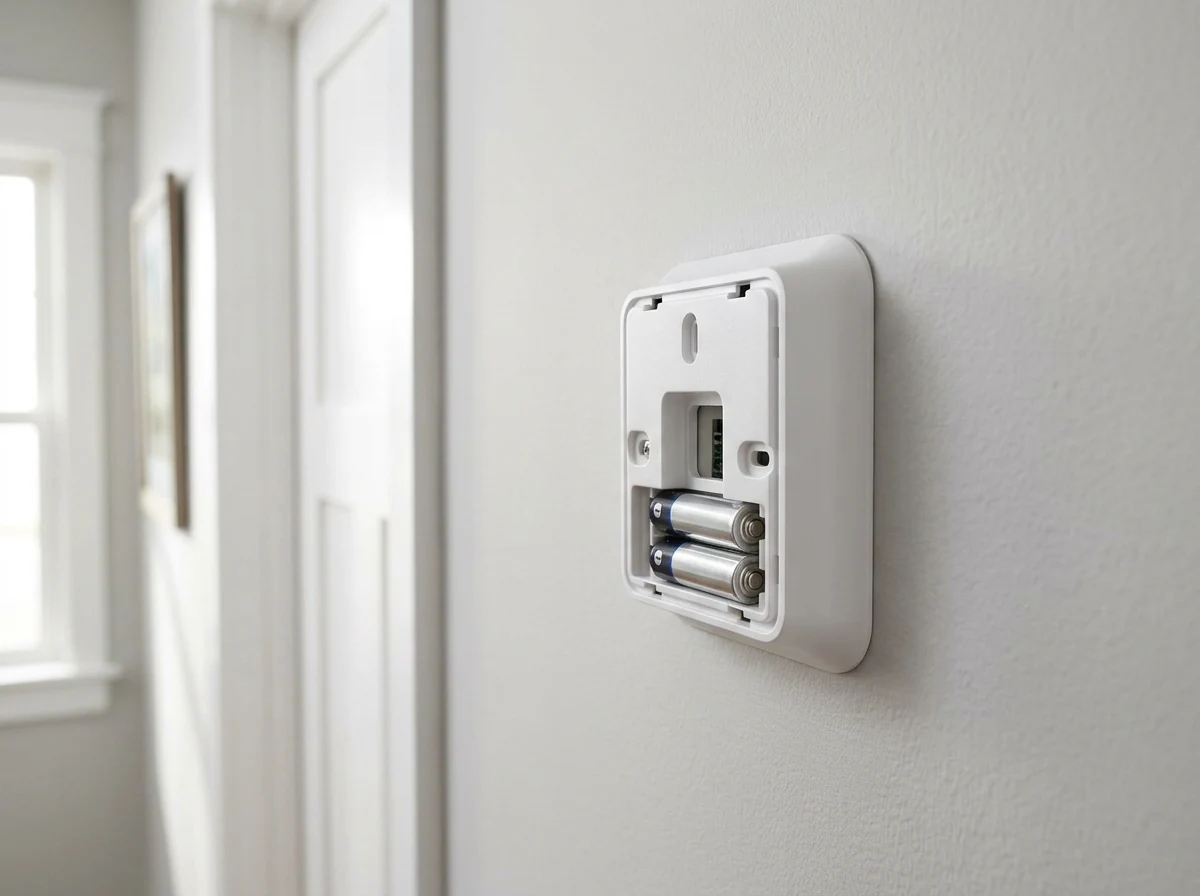
Always check your user manual or the battery compartment itself for confirmation. Most Honeywell thermostats require two or three batteries installed in the compartment behind the thermostat face.
AA vs AAA: Which Does Your Model Need?
AA batteries are the standard for most modern Honeywell thermostats including the Pro Series, T6 Pro, and FocusPro models. These provide longer life and more reliable power for thermostats with WiFi connectivity.
AAA batteries typically power older Honeywell models and compact thermostats. If you have a basic programmable thermostat from before 2015, it likely uses AAA cells.
Alkaline vs Lithium: Best Choice for Longevity
Alkaline batteries work perfectly fine for basic Honeywell thermostats and typically last 8-12 months. They are inexpensive and widely available at any grocery or hardware store.
Lithium batteries cost more upfront but can last up to 2-3 years in your thermostat. They perform better in extreme temperatures and are worth the investment if your thermostat is in an unconditioned space like a garage or if you frequently forget to change batteries.
Avoid using rechargeable batteries in your Honeywell thermostat. Their voltage output differs from disposable batteries and can cause inconsistent performance.
Signs Your Honeywell Thermostat Battery Is Low
Your Honeywell thermostat will give you clear warnings before the battery dies completely. Recognizing these signs early prevents that dreaded middle-of-the-night heating failure.
- Battery warning icon appears on the display (usually a small battery symbol)
- Display becomes dim or difficult to read
- “Replace Battery” or “Batt Low” message flashes
- Backlight no longer illuminates when you press buttons
- Temperature readings seem inconsistent or inaccurate
- HVAC system cycles on and off more frequently than usual
Most Honeywell thermostats start showing low battery warnings 1-2 weeks before complete failure. Do not ignore these warnings. Replace batteries immediately when you see them to maintain continuous heating and cooling control.
How to Replace Honeywell Thermostat Battery?
Replacing your Honeywell thermostat battery takes less than 5 minutes once you know the proper technique. The exact method varies slightly by model, but the general process remains consistent across the product line.
How to Open Your Honeywell Thermostat
Honeywell thermostats open in three different ways depending on the model. Understanding which type you have prevents damage to the unit.
Snap-on covers are the most common on modern Honeywell thermostats. Grasp the thermostat at the top and bottom, then pull it straight away from the wall plate. The unit will detach completely, revealing the battery compartment on the back.
Hinged covers appear on some Pro Series and older models. Look for a thumb tab or groove at the bottom of the unit. Press or pull this to swing the faceplate down like a door.
Slide-off covers are found on select Honeywell models. Grasp the sides of the thermostat and slide the cover upward to expose the batteries.
Step-by-Step Battery Replacement
Follow these steps to replace your Honeywell thermostat battery safely and correctly:
Step 1: Turn off your HVAC system at the breaker or using the system switch on the thermostat. This prevents short cycling during the battery change.
Step 2: Open your thermostat using the appropriate method for your model. Set the faceplate aside on a clean surface.
Step 3: Locate the battery compartment, typically on the back of the faceplate or behind it on the mounting bracket.
Step 4: Remove the old batteries, noting which direction they face. Pay attention to the positive (+) and negative (-) markings in the compartment.
Step 5: Inspect the battery contacts for white or green corrosion. If present, clean them using a pencil eraser or fine sandpaper before installing new batteries.
Step 6: Insert fresh batteries matching the orientation indicated in the compartment. The positive end typically faces outward toward you.
Step 7: Reattach the thermostat faceplate by snapping, sliding, or hinging it back into place until it clicks securely.
Step 8: Turn your HVAC system back on and verify the display shows full power. Check that your programmed settings remain intact.
Model-Specific Instructions
Honeywell Pro Series: Pull the thermostat straight away from the wall plate. The battery compartment is on the back of the unit. Uses two AA alkaline batteries.
Honeywell T6 Pro: Grasp the sides of the thermostat and pull it away from the wall mount. Three AA batteries power this model. Insert with positive ends facing outward.
Honeywell Lyric: Press the release tab at the bottom and swing the faceplate down. Uses two AA batteries. Note that Lyric models with WiFi may drain batteries faster than standard models.
Older Round Honeywell Models: Twist the outer ring counterclockwise to detach the cover. These typically use AAA batteries.
What Happens When Honeywell Thermostat Battery Dies?
When your Honeywell thermostat battery dies completely, your HVAC system will stop responding to temperature commands. The furnace and air conditioner cannot receive signals to turn on or off.
Hardwired thermostats with battery backup will continue operating using wall power, though you may lose display visibility and programmed schedules. Battery-only thermostats will shut down entirely, leaving you without heating or cooling.
Your programmable settings may reset to factory defaults after a complete battery failure. This means you will need to reprogram your schedule after installing fresh batteries. Some newer Honeywell models have memory backup that preserves settings for a short time.
In winter conditions, a dead thermostat battery can allow your home temperature to drop dangerously low. In summer, it can lead to excessive heat and humidity. Replace batteries proactively before complete failure.
Troubleshooting After Battery Change
Sometimes your Honeywell thermostat does not work properly immediately after replacing the batteries. This is frustrating but usually fixable with a few simple steps.
Problem: Thermostat display is blank after battery change.
Solution: Check that batteries are inserted with correct polarity. Remove and reinstall them, ensuring the positive (+) and negative (-) ends match the compartment markings. Try a different set of fresh batteries in case the new ones are defective.
Problem: HVAC system will not turn on after battery replacement.
Solution: Verify the thermostat is firmly snapped onto the wall plate. Check that your circuit breaker for the HVAC system has not tripped. Confirm the system switch on the thermostat is set to “Heat” or “Cool” rather than “Off.”
Problem: All programmed settings were lost.
Solution: Unfortunately, you will need to reprogram your schedule. Take a photo of your settings before future battery changes to make this faster. Consider upgrading to a Google Nest thermostat or other smart model that stores settings in the cloud.
Problem: Temperature display seems wrong.
Solution: Reset the thermostat to factory defaults and reprogram it. Some units need a few hours to calibrate temperature readings after a power interruption.
Cleaning Corroded Battery Contacts
Battery corrosion is a common issue that prevents your Honeywell thermostat from working even with fresh batteries. The white or green crusty buildup on battery contacts blocks electrical flow.
To clean corroded battery contacts safely, first remove the batteries and inspect the damage. Light corrosion appears as a white powder. Heavy corrosion shows green or blue crystalline buildup.
For light corrosion, rub the contacts firmly with a pencil eraser. The mild abrasive removes oxidation without damaging the metal. Wipe away residue with a dry cloth.
For heavier corrosion, use fine-grit sandpaper (400-grit or higher) to gently sand the contacts until shiny metal appears. Clean thoroughly with a cotton swab dipped in white vinegar, then dry completely before installing new batteries.
Prevent future corrosion by using high-quality alkaline or lithium batteries rather than discount brands. Remove batteries if you will be away from home for extended periods. Check and replace batteries annually before corrosion can develop.
Why Your Honeywell Thermostat Battery Drains Fast?
If you are replacing Honeywell thermostat batteries every few weeks, something is wrong. Normal battery life should be 8-12 months for alkaline cells and 2-3 years for lithium.
The most common cause of rapid battery drain is WiFi connectivity. Honeywell Lyric and T6 Pro models with WiFi enabled work much harder than basic thermostats. The constant communication with your home network and Honeywell servers consumes significant power.
Poor battery quality also leads to short life. Store-brand or expired batteries perform poorly in thermostats. Stick with name-brand alkaline or invest in lithium cells for WiFi-enabled models.
Extreme temperatures affect battery performance. If your thermostat is in a garage, attic, or other unconditioned space, batteries drain faster in hot or cold weather. Consider relocating the thermostat or using lithium batteries rated for temperature extremes.
An aging thermostat itself can cause battery drain. Internal components wear out over time and may draw more power. If your thermostat is over 10 years old and eating through batteries, replacement may be more cost-effective than continued battery purchases.
FAQ
What kind of battery does a Honeywell thermostat take?
Most Honeywell thermostats use either AA or AAA alkaline batteries. Modern models including the Pro Series and T6 Pro typically require two or three AA batteries. Older models and compact units may use AAA batteries. Check your user manual or the battery compartment markings to confirm the correct size for your specific model.
How to replace the battery in Honeywell thermostat?
To replace your Honeywell thermostat battery: 1) Turn off your HVAC system, 2) Open the thermostat cover by pulling it away from the wall plate, sliding it upward, or hinging it down depending on your model, 3) Remove old batteries noting the polarity direction, 4) Insert fresh AA or AAA batteries matching the compartment markings, 5) Reattach the cover until it clicks securely, 6) Turn your HVAC system back on and verify proper operation.
What happens when a Honeywell thermostat battery dies?
When a Honeywell thermostat battery dies completely, the thermostat stops communicating with your HVAC system. Battery-only models will shut down entirely, stopping heating and cooling. Hardwired models with battery backup may continue operating but lose display visibility and programmed settings. You will need to replace batteries and possibly reprogram your schedule to restore normal operation.
How do you take the cover off a Honeywell thermostat?
Honeywell thermostat covers open in three ways: 1) Snap-on covers pull straight away from the wall plate, 2) Hinged covers swing down after pressing a tab at the bottom, 3) Slide-off covers move upward when grasped at the sides. Most modern Honeywell thermostats use the snap-on method. Grasp firmly at the top and bottom and pull directly toward you to detach.
How often should I change my Honeywell thermostat battery?
Replace Honeywell thermostat batteries every 8-12 months when using alkaline batteries, or every 2-3 years with lithium batteries. Change them immediately when you see a low battery warning on the display. For WiFi-enabled models like the Lyric or T6 Pro, check batteries every 6 months as connectivity features drain power faster.
Conclusion
Understanding your Honeywell thermostat battery requirements prevents uncomfortable surprises and expensive service calls. Most models need two or three AA alkaline batteries replaced annually, though lithium options last 2-3 years for less maintenance.
Watch for low battery warnings on your display and replace batteries proactively. If your thermostat stops working after a battery change, check the contact polarity and clean any corrosion before calling a technician.
Set a calendar reminder to check your Honeywell thermostat battery every spring and fall when you adjust for daylight saving time. This simple habit ensures your heating and cooling system works reliably year-round.


![How to Clean Window Air Conditioner: Complete Guide [cy]](https://www.guidespot.com/wp-content/uploads/2026/07/featured-update-44907-1784957558870-370x245.jpg "How to Clean a Window Air Conditioner (2026): Step-by-Step Maintenance Guide")