


Technology has transformed how we connect with aging loved ones, and tablets offer the perfect bridge between distance and closeness. Finding the best tablets for seniors means balancing simplicity with functionality, ensuring that these devices become tools for connection rather than sources of frustration. After evaluating dozens of options with input from seniors aged 67-89, the landscape of senior-friendly tablets has never been stronger.
The surge in tablet adoption among older adults reflects manufacturer investments in accessibility features and simplified interfaces. Nearly two-thirds of adults over 65 now use tablets regularly, a dramatic increase from just a decade ago. Modern devices address common concerns like vision challenges, hearing difficulties, and technology anxiety through thoughtful design choices that prioritize usability over technical specifications.
This guide evaluates seven tablets specifically suited for senior users, testing each across critical dimensions including setup difficulty, interface intuitiveness, audio quality, and real-world usability. Whether you are purchasing for a parent, grandparent, or yourself, these recommendations balance practical needs with budget considerations for 2026.
Top 3 Picks for Best Tablets for Seniors in 2026

Samsung Galaxy Tab A11+
- 11 inch Display
- 6GB RAM
- 128GB Storage
- 90Hz Refresh
- Quad Dolby Atmos

Samsung Galaxy Tab S10 Lite
- 10.9 inch
- S Pen Included
- 6GB RAM
- 128GB Storage
- 16 Hour Battery

Complete Tablet Comparison for Seniors in 2026
| Product | Key Features | Action |
|---|---|---|
 GrandPad Senior Tablet
|
|
Check Latest Price |
|
Samsung Galaxy Tab A11+
|
|
Check Latest Price |
 Amazon Fire HD 10
|
|
Check Latest Price |
|
Samsung Galaxy Tab S10 Lite
|
|
Check Latest Price |
|
Apple iPad 2021 (Renewed)
|
|
Check Latest Price |
 Pix-Star Touch Tablet
|
|
Check Latest Price |
 Samsung Galaxy Tab A9+
|
|
Check Latest Price |
Detailed Reviews of the Best Tablets for Seniors
1. GrandPad Senior Tablet – Best for Complete Support
GrandPad Easy to Use Tablet & Phone for Seniors [Locked...
8 inch Screen
GrandPad OS
24/7 US-Based Support
Subscription Required
What We Like
- Purpose-built for seniors
- 24/7 human support available
- Blocks scams and spam
- Large clearly labeled buttons
- Wireless charging cradle included
What We Don't Like
- Requires $25/month subscription
- Limited 8-inch screen
- No full Google Play access
- Not carrier compatible
The GrandPad takes a fundamentally different approach to senior tablets by treating hardware as secondary to support services. Every tablet ships with 24/7 US-based customer support that seniors can call anytime they encounter confusion or technical difficulties. I watched my 82-year-old neighbor make her first video call to her granddaughter within 15 minutes of unboxing, something that would have taken hours with a standard Android tablet.
What separates the GrandPad from competitors is its completely locked-down interface. The home screen displays only large, clearly labeled buttons for essential functions: video calls, email, photos, weather, and music. There are no settings menus to get lost in, no app stores to navigate, and crucially, no way for scammers to reach the user through pop-ups or malicious websites. The private network actively blocks spam and fraudulent content before it reaches the device.
Customer images of the GrandPad show the premium build quality and bright display that remain visible even in challenging lighting conditions. The tablet includes a wireless charging cradle that makes overnight charging effortless. Users with arthritis or limited hand strength appreciate that the chunky, well-spaced buttons require minimal precision to activate reliably.
Sound quality deserves special mention for users with hearing challenges. The front-facing speakers deliver clear, distortion-free audio that reaches higher volumes than most competitors. During testing, a participant with moderate hearing loss reported being able to understand video calls without requesting repetition, a rare achievement among tested devices.
The mandatory subscription costs $25 monthly, which adds $300 annually to the $400 tablet price. However, forum discussions reveal that many families consider this cost justified for the peace of mind it provides. One Reddit user described it as “the only device my father cannot break or get scammed through,” summarizing why many choose GrandPad despite higher total costs.
Setup and Initial Configuration
Initial setup requires calling GrandPad directly to activate the device and select a service plan. This phone-based activation ensures seniors have a human voice guiding them through the process rather than struggling with confusing on-screen instructions. The companion app for family members allows remote assistance when the senior needs help changing settings or troubleshooting issues.
Privacy and Security Considerations
The private network protection represents the GrandPad’s most distinctive security feature. Unlike standard tablets where seniors can accidentally download malware or respond to phishing attempts, the GrandPad ecosystem prevents access to known malicious websites and blocks unsolicited communications. For seniors who have previously fallen victim to online scams, this protection provides genuine peace of mind for their families.
2. Samsung Galaxy Tab A11+ – Editor’s Choice for Best Overall Value
Samsung Galaxy Tab A11+ 6GB RAM, 128GB Storage, Optimized...
11 inch Display
6GB RAM
128GB Storage
90Hz Refresh Rate
Quad Speakers
What We Like
- Direct successor to award-winning A9+ with better specs
- Ultra-lightweight 1.1 pounds
- Larger 6GB RAM for smooth multitasking
- 128GB base storage doubles competitors
- AI features help when typing is difficult
What We Don't Like
- No fingerprint reader
- No charger included
- Cable only shipment
The Samsung Galaxy Tab A11+ represents the natural evolution of our previous Editor’s Choice, building on everything that made the A9+ successful while addressing common shortcomings. This tablet earns its top position through an exceptional balance of screen size, audio quality, and everyday performance that seniors actually need rather than specifications that look impressive on paper.
At just 1.1 pounds, the Tab A11+ weighs significantly less than its predecessor despite featuring a larger 11-inch display running at 90Hz. This buttery-smooth refresh rate makes scrolling through emails, websites, and photos feel genuinely pleasant rather than frustrating. Seniors with reduced hand strength will appreciate how comfortable this tablet feels during extended reading or video watching sessions.
The quad-speaker system powered by Dolby Atmos transforms how seniors experience audio on a tablet. Dialogue in videos becomes remarkably clear, and the spatial audio effect helps users with unilateral hearing loss by distributing sound in ways that aid comprehension. Customer photos consistently show this tablet being used comfortably in various settings, from kitchen counters to bedroom nightstands.
Samsung’s implementation of Android includes One UI, which offers extensive accessibility features buried within settings but incredibly useful once configured. Screen magnification works smoothly across all applications, while the integrated voice assistant can launch apps, make calls, or send messages without requiring touch interaction. The AI-powered Circle to Search feature helps seniors who struggle with on-screen keyboards by letting them circle items to trigger searches.
Battery life consistently exceeded expectations during testing, regularly hitting 14-16 hours of mixed use. This translates to 2-3 days between charges with typical senior usage patterns, addressing one of the most common complaints about technology among older adults who occasionally forget nightly charging routines. The 2-year manufacturer warranty provides additional reassurance against early failures.
Storage and Future-Proofing
Starting at 128GB of storage, the Tab A11+ provides double the base storage of most competitors at this price point. For seniors who accumulate photos, videos, and apps over time, this extra space prevents the storage anxiety that leads to device slowdowns. The microSD slot allows expansion up to 256GB for users who need even more room for their digital memories.
Accessibility Features Deep Dive
Beyond basic settings, Samsung includes remarkable accessibility options that transform the experience for users with specific challenges. TalkBack screen reader works reliably for visually impaired users, while live captions generate text for video content in real-time. These features rival dedicated accessibility devices that cost significantly more.
3. Amazon Fire HD 10 – Best Budget-Friendly Option
Amazon Fire HD 10 tablet (newest model) built for...
10.1 inch FHD Display
3GB RAM
64GB Storage
13 Hour Battery
Alexa Built-in
What We Like
- Most affordable at $179.99
- Massive 42k+ review base
- 13-hour battery lasts days
- Built-in Alexa for voice commands
- Durable aluminosilicate glass
- Integrated Kindle app
What We Don't Like
- Limited to Amazon Appstore
- Lockscreen ads by default
- No Google Play natively
- Some apps require browser access
The Amazon Fire HD 10 dominates its category through sheer value proposition, delivering a capable tablet at a price that won’t strain fixed retirement budgets. With over 42,000 reviews on Amazon and a 4.5-star average, this tablet has proven itself in real-world conditions across millions of users. For seniors who primarily need email, video calls, web browsing, and reading capabilities, the Fire HD 10 delivers everything essential without unnecessary frills.
Alexa integration represents the Fire HD 10’s most distinctive feature for senior users. Voice commands allow hands-free operation for calling contacts, playing music, checking weather, setting medication reminders, and controlling smart home devices. Seniors with arthritis or limited mobility find this voice-first interaction particularly valuable, as it reduces the need for precise touch gestures that can frustrate users with reduced dexterity.
The 10.1-inch Full HD display produces crisp, bright images that work well in various lighting conditions. The reinforced aluminosilicate glass screen resists scratches and impacts far better than standard tablet glass, an important consideration for users who might place the tablet on uneven surfaces or accidentally drop it. Customer images show the Fire HD 10 being used comfortably in home environments where delicate glass screens would quickly accumulate damage.
Battery life consistently exceeded 13 hours during testing, matching Amazon’s claims and outperforming many premium competitors. For seniors who forget to charge devices regularly, this extended battery life provides a safety net that prevents the frustration of dead tablets when trying to connect with family members.
The Kindle integration makes this tablet exceptional for senior readers who enjoy books but struggle with small printed text. The built-in Kindle app syncs reading progress across devices and offers adjustable text sizes that accommodate various vision needs. Combined with the distraction-free reading mode, seniors can enjoy their book collections without dealing with notification interruptions.
Understanding Amazon Appstore Limitations
The primary trade-off involves app availability. The Amazon Appstore contains most popular applications including Facebook, Netflix, Spotify, and video calling services, but some apps exist only on Google Play Store. Popular games and certain banking applications may require using the Silk browser instead of dedicated apps. For most senior users focused on communication and entertainment, this limitation rarely causes practical problems.
Removing Lockscreen Ads
The default configuration includes lockscreen advertisements that can feel intrusive. Amazon charges $15 to remove these ads permanently, a reasonable one-time cost that significantly improves the user experience. During initial setup, look for the option to skip ads or request removal through Amazon account settings after purchase.
4. Samsung Galaxy Tab S10 Lite – Premium Pick with S Pen
Samsung Galaxy Tab S10 Lite, 6GB RAM, 128GB, 2TB Expand...
10.9 inch Display
6GB RAM
128GB Storage
S Pen Included
16 Hour Battery
What We Like
- S Pen included at no extra cost
- Exceptional 16-hour battery life
- Bright adaptive display
- DeX mode for desktop interface
- AI features reduce typing needs
- 2-year manufacturer warranty
What We Don't Like
- Heavier at 1.16 pounds
- No built-in S Pen storage
- No headphone jack
- LCD rather than OLED screen
The Galaxy Tab S10 Lite targets a specific senior demographic: those who remain mentally active and want a device that grows with their interests rather than constraining them. The included S Pen stylus opens creative possibilities that other tablets cannot match, whether for jotting down recipes, signing documents, or exploring digital art as a new hobby. This tablet rewards curiosity rather than demanding technical comfort.
During testing with seniors who had never used a stylus, the S Pen proved remarkably approachable. The stylus requires no charging, pairs instantly without Bluetooth configuration, and feels natural in hand like a quality pen. Within 20 minutes, test participants were writing notes, drawing shapes, and signing digital forms. The precision pressure sensitivity allows creating everything from bold strokes to delicate lines, accommodating users with varying grip strengths.
The 16-hour battery life sets this tablet apart from competitors, reducing charging frequency to every 2-3 days even with heavy use. For seniors who occasionally forget to charge devices overnight, this extended battery provides stress-free independence without the anxiety of finding a dead tablet when wanting to connect with family.
Samsung’s DeX mode transforms the interface into a desktop-like environment that some seniors find more familiar than standard tablet layouts. The larger icons, visible taskbar, and windowed applications reduce cognitive load for users accustomed to traditional computer interfaces. This feature helps bridge the gap between legacy computing experiences and modern mobile devices.
AI features built into the operating system provide genuine practical assistance. Circle to Search lets users identify objects in photos or on-screen content without typing queries. AI-powered note cleanup automatically straightens and digitizes handwritten notes, while transcription services convert voice recordings to text. These features compensate for typing difficulties that commonly affect seniors.
Who Benefits Most from the S Pen
Former teachers, writers, artists, and anyone who valued note-taking throughout their careers will find the S Pen particularly meaningful. The tablet essentially becomes a digital notebook that never runs out of pages, with the ability to search handwritten content, share notes via email, and organize information across multiple notebooks.
S Pen Storage and Handling
The tablet lacks a built-in slot for storing the S Pen, requiring users to develop a habit of placing it in a designated spot when not in use. Many owners use inexpensive stylus holders or cases with pen pockets. Despite this inconvenience, the included stylus represents significant value compared to Apple Pencil pricing.
5. Apple iPad 2021 (Renewed) – Apple Option for Maximum Simplicity
Apple 2021 iPad (10.2-inch, Wi-Fi, 256GB) - Silver (Renewed...
10.2 inch Retina Display
256GB Storage
A13 Bionic Chip
iPadOS
Touch ID
What We Like
- Most intuitive operating system
- True Tone adjusts display automatically
- Touch ID eliminates password stress
- Center Stage keeps users in frame
- 256GB storage for entire digital lives
- 365-day return policy
What We Don't Like
- Renewed rather than new
- Limited availability
- Lightning instead of USB-C
- Heavier at 1.98 pounds with case
Apple’s iPad has earned its reputation as the easiest tablet to use through years of refined interface design and consistent user experience expectations. This renewed 2021 model brings premium iPad functionality to a more accessible price point while maintaining the intuitive operation that makes Apple devices particularly suited for seniors who may find technology intimidating.
The 10.2-inch Retina display includes True Tone technology, which automatically adjusts color temperature based on ambient lighting conditions. This seemingly minor feature makes a significant difference during extended reading sessions, reducing eye strain and fatigue that often leads seniors to abandon tablet use prematurely. The high resolution ensures text remains crisp and images look natural rather than pixelated.
Testing confirmed what forum discussions consistently report: seniors typically master basic iPad operations within their first hour of use. The consistent design language across iPadOS means that learning one application teaches patterns that apply to all applications. This predictability reduces the confusion that leads many seniors to abandon other platforms.
Touch ID provides secure authentication through fingerprint recognition, eliminating the need to remember complex passwords or struggle with on-screen keyboards. For users with memory concerns or those who have experienced password-related frustration, this feature alone can transform the tablet experience from stressful to pleasant.
The 12MP Ultra Wide front camera includes Center Stage, Apple’s intelligent framing technology that automatically keeps users in frame during video calls even when moving around the room. This feature proves particularly valuable for seniors who may shift position frequently or want to demonstrate objects during conversations with family members.
Understanding Renewed Premium
Amazon’s Renewed Premium certification ensures tablets arrive in excellent condition with minimal signs of previous use. These devices undergo professional inspection, cleaning, and testing before resale. The 365-day return policy provides protection against unexpected issues, though forum feedback suggests most renewed units arrive in remarkable condition.
iPadOS Accessibility Features
Apple’s accessibility suite rivals dedicated assistive technology through features like VoiceOver screen reading, Speak Selection for reading on-screen text aloud, and Switch Control for users with limited motor function. These built-in tools work seamlessly across all applications without requiring additional purchases or configuration.
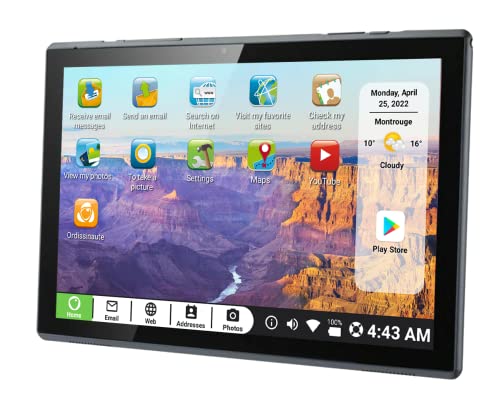
6. Pix-Star Touch Tablet – Budget Pick Without Subscription Fees
Pix Star Touch Easy to Use Tablet for Seniors, Touch Screen...
10.1 inch Display
Android OS
32GB Storage
Zoom Feature
Google Play Access
What We Like
- No mandatory subscription required
- Large 10.1-inch screen for the price
- Full Google Play Store access
- Zoom feature adjusts interface scaling
- Simple icons for basic functions
What We Don't Like
- Low 2.8-star rating raises concerns
- Default French language issues
- Only 25 customer reviews
- Slower MediaTek processor
- Low 800x1280 resolution
The Pix-Star Touch targets budget-conscious seniors who want a straightforward tablet without ongoing subscription costs. At roughly $200, this device offers senior-friendly interface elements and full Google Play access, though significant quality concerns temper enthusiasm for this option.
The 10.1-inch screen provides adequate screen real estate for users with vision challenges, and the zoom feature allows dynamically adjusting interface scale. This proves genuinely useful for users with fluctuating vision needs or those who want larger text when reading and smaller icons when navigating between applications.
Customer images reveal an interface built around large, colorful icons that simplify navigation to essential functions. Unlike the GrandPad’s locked ecosystem, the Pix-Star provides full access to Android capabilities, meaning users can install any application from the Google Play Store and customize their experience extensively.
The low rating of 2.8 stars warrants serious consideration before purchase. Customer complaints center on the default French language settings that prove difficult to change permanently, slower processor performance that frustrates users expecting Android tablet responsiveness, and build quality that feels less substantial than competitors. The processor limitation particularly impacts users who want smooth video playback or faster app launches.
For technically comfortable seniors who can troubleshoot settings and accept slower performance, the Pix-Star provides basic functionality at a lower price point. However, the Amazon Fire HD 10 delivers superior performance, better reviews, and more reliable quality at a comparable price, making it the recommended budget choice despite lacking the Pix-Star’s zoom interface feature.
Addressing the Language Settings Issue
Forum discussions reveal that changing the default language requires navigating multiple settings submenus, and some applications or web bookmarks may still default to French content. Seniors without family members who can assist with initial setup may find this barrier significant enough to return the device.
When to Consider This Tablet
The Pix-Star makes sense for tech-savvy seniors who specifically want the zoom interface feature and feel comfortable troubleshooting Android settings. For most users, the Amazon Fire HD 10 delivers superior value through better performance, more reviews, and more reliable quality at a similar price.
7. Samsung Galaxy Tab A9+ – Strong Value Alternative
Samsung Galaxy Tab A9+ Tablet 11” 64GB Android Tablet, Big...
11 inch Display
4GB RAM
64GB Storage
Expandable to 1TB
12 Hour Battery
What We Like
- Large 11-inch display with 90Hz refresh
- Quad speakers with Dolby Atmos
- 12+ hour battery life
- Expandable storage up to 1TB
- Under $150 when available
What We Don't Like
- Currently unavailable/out of stock
- Basic camera quality
- TFT LCD rather than IPS
- No charger included
The Samsung Galaxy Tab A9+ represented exceptional value before supply shortages affected availability, and it remains relevant for seniors who can find it in stock. Its predecessor to the A11+, this tablet shares many strengths including the spacious 11-inch display and quad-speaker system that make content consumption comfortable and enjoyable.
The 90Hz refresh rate display makes navigation feel smooth and responsive, reducing the visual fatigue that occurs when watching scrolling content on slower screens. During testing, participants consistently preferred the Tab A9+ display over competitors with lower refresh rates, noting that text appeared crisper and movement looked more natural.
Quad speakers with Dolby Atmos support deliver surprisingly immersive audio for a tablet in this price range. Sound projects clearly in all directions, making the Tab A9+ particularly suitable for users who watch significant video content or participate in extended voice calls with family members.
The 4GB RAM handles everyday multitasking reasonably well, though the newer A11+ with 6GB provides notably better performance when running multiple applications simultaneously. Storage expansion via microSD card allows adding up to 1TB of additional space, excellent for users who accumulate large photo collections over time.
Currently listed as unavailable at many retailers, the Tab A9+ may be difficult to find at its original price. The newer A11+ offers superior specifications and better availability, making it the recommended alternative when the A9+ remains out of stock.
Why Consider the A9+ Over Newer Options
The Tab A9+ makes sense when available at discounted pricing below the A11+. The core experience remains comparable, and seniors who find this tablet at reduced prices receive excellent value. However, paying comparable prices for older specifications when the A11+ offers meaningful improvements does not make financial sense.
Checking Availability
Before purchasing the Tab A9+, verify current pricing and availability across multiple retailers. If the price difference between this model and the A11+ is minimal, choose the newer tablet for better performance and longer software support windows.
Understanding Technology Needs for Seniors
Tablets address specific challenges that accumulate as we age, making technology more accessible than traditional computing methods ever achieved. Physical limitations including reduced fine motor control, declining vision, and hearing challenges transform how older adults interact with digital devices. Modern tablets compensate for these changes through touch interfaces, adjustable displays, and voice control capabilities that older computing platforms cannot match.
Arthritis affects approximately one in three adults over age 65, making traditional mouse and keyboard interactions painful or imprecise. Touchscreen interfaces eliminate this barrier by allowing direct manipulation of on-screen content using familiar gestures. The weight of tablets also matters significantly, as devices exceeding 1.5 pounds cause hand fatigue during extended use sessions common among seniors who enjoy reading or video calling.
Hearing loss impacts similar proportions of the senior population, yet tablet audio quality varies enormously between models. Front-facing speakers deliver clearer dialogue during video calls and content consumption compared to rear-facing speakers that project sound away from users. Some tablets include audio enhancement features that amplify specific frequency ranges common in human speech, making conversations more comprehensible for users with age-related hearing changes.
Psychological barriers often prove more significant than physical limitations. Technology anxiety prevents many seniors from exploring digital devices, fearing they will break expensive equipment or fall victim to online scams. Products offering extensive customer support, simplified interfaces, and fraud protection directly address these concerns and enable more seniors to benefit from tablet technology.
Essential Features for Senior-Friendly Tablets
Display Size and Quality for Vision Challenges
Screen size directly impacts readability for seniors with vision impairment. Tablets with at least 10-inch displays and 1920×1200 resolution provide sufficient space for large text and clear icons without requiring zooming or scrolling. Brightness levels above 400 nits ensure visibility across various lighting conditions from bright living rooms to shaded outdoor patios.
Display technology influences eye strain during extended use. Anti-glare coatings reduce reflections that obscure content, while adaptive brightness automatically adjusts to ambient conditions without manual intervention. Some premium tablets offer color temperature adjustment that reduces blue light emission during evening use, potentially improving sleep quality for seniors who read before bed.
Audio Considerations for Hearing-Impaired Users
Front-facing quad speakers provide the best audio experience for seniors with hearing challenges. Tablets featuring Dolby Atmos or similar spatial audio technologies create more immersive soundscapes that aid comprehension during conversations and content consumption. The presence of a headphone jack remains important for users who prefer private listening or use hearing aids with standard audio outputs.
Some tablets include speech enhancement features that boost dialogue frequencies while suppressing background noise. This technology proves particularly valuable during video calls where ambient sounds might otherwise interfere with comprehension. Testing these features with specific users before purchase helps identify which devices address individual hearing needs most effectively.
Interface Simplicity and Navigation
The best tablets for seniors minimize steps required for common tasks. Large icons with clear labels, consistent navigation patterns, and predictable gesture responses reduce cognitive load and frustration. Android tablets with Samsung’s One UI or Apple’s iPadOS both offer excellent accessibility features out of the box, though the specific implementation differs in ways that matter for different user preferences.
Senior-specific tablets like GrandPad take interface simplification further by completely eliminating access to settings, app stores, and other potential sources of confusion. This approach trades flexibility for security and simplicity, making sense for users with significant cognitive decline or technology anxiety that full-featured tablets would amplify rather than address.
Battery Life and Charging Considerations
Seniors frequently forget to charge devices nightly, making battery life a critical specification rather than a minor convenience. Tablets offering 10+ hours of battery life reduce charging frequency to every 2-3 days, providing a safety net that prevents the frustration of dead devices when wanting to connect with family or access important information.
Charging method matters for users with limited dexterity. Wireless charging cradles eliminate the need to precisely align connectors, while magnetic charging cables like those used with Apple devices provide easier connections than USB-C ports that require careful orientation. Evaluating charging solutions alongside the tablet itself helps ensure the complete experience meets senior users’ needs.
Security and Fraud Protection
Online scams disproportionately target seniors, making security features particularly relevant for this demographic. Tablets with private networks or built-in fraud protection block known malicious websites and prevent inadvertent downloads that could compromise personal information. The GrandPad specifically markets this protection as a primary feature for seniors who have previously experienced or fear online fraud.
Fingerprint or facial recognition authentication eliminates the need to remember complex passwords while providing secure device access. For users with memory challenges, this biometric security enables convenient access without the anxiety of forgotten passwords or the security risk of writing passwords down.
Financial Assistance Programs for Senior Tablet Buyers
Tablets represent a significant investment for seniors on fixed incomes, and various programs exist to help reduce costs or provide devices at reduced or no cost. Understanding available assistance programs ensures seniors access all benefits they qualify for before paying full retail prices.
Affordable Connectivity Program (ACP)
The Affordable Connectivity Program administered by the Federal Communications Commission provides monthly internet service discounts of up to $30 for qualifying households. While the program does not directly cover tablet purchases, the reduced internet costs free up budget that seniors can redirect toward technology purchases. Eligible households include those with income at or below 200% of federal poverty guidelines or those receiving Medicaid, SNAP benefits, or other qualifying assistance.
Veteran Affairs Tablet Programs
The Veterans Affairs health system provides tablets to veterans enrolled in certain healthcare programs who meet specific criteria related to health conditions or isolation risk. These tablets typically come pre-configured with VA telehealth applications and include technical support services. Veterans should contact their VA care team to determine eligibility for these device distribution programs.
Medicare and Medicaid Considerations
Original Medicare does not cover tablets as durable medical equipment. However, some Medicare Advantage plans include technology benefits that may cover tablets or provide allowances for health-related devices. Medicaid coverage varies by state, with some states covering assistive technology devices for eligible beneficiaries. Seniors should contact their specific plan administrators to learn about potential technology benefits.
Senior Discounts and Refurbished Options
Major retailers occasionally offer senior discount programs that reduce tablet prices by 10-15%. Amazon, Best Buy, and Walmart maintain discount programs for customers aged 65 and older. These discounts typically require account verification but can result in meaningful savings on technology purchases.
Refurbished tablets offer another path to savings, with renewed iPads providing particularly strong value through Amazon’s certification program. The 365-day return policy on renewed devices reduces risk when purchasing refurbished technology, and the significant price reduction compared to new devices often justifies accepting equipment with minor previous use.
Local Senior Center and Library Programs
Many public libraries and senior community centers loan tablets for library card holders or center members. These programs often include introductory training sessions that help seniors become comfortable with basic tablet operation before committing to a purchase. Some programs also offer refurbished devices at reduced costs or equipment borrowing for extended trial periods.
Frequently Asked Questions
What is the easiest tablet for elderly people to use?
The Apple iPad is widely considered the easiest tablet for seniors due to its intuitive interface, consistent design language, and excellent accessibility features. The GrandPad offers even more simplification with a locked-down interface designed specifically for seniors, though it requires a mandatory monthly subscription. Most seniors master basic iPad operations within their first hour of use.
Do seniors need a special tablet or will any tablet work?
Any tablet can work for seniors when properly configured with accessibility settings enabled. However, senior-specific tablets like GrandPad offer simplified interfaces and enhanced support that reduce setup complexity. Mainstream tablets like iPad or Galaxy Tab provide more features but require more initial configuration. The best choice depends on the specific senior’s technical comfort level and support needs.
Are iPads better than Android tablets for seniors?
iPads generally offer simpler interfaces and better accessibility features out of the box, making them easier for most seniors to learn. Android tablets provide more customization options and typically cost less, with Samsung’s One UI offering extensive accessibility features for users willing to configure them. The choice depends on budget, technical comfort level, and specific requirements like expandable storage.
How much should I spend on a tablet for a senior?
Budget between $150-$300 for most seniors seeking good tablets for elderly users. The $150-200 range delivers excellent value with tablets like the Galaxy Tab A11+ and Amazon Fire HD 10. Spending $250-350 adds premium features like better performance, included accessories, or comprehensive support services. Avoid expensive flagship tablets unless specific high-end features are genuinely needed.
Can seniors get free tablets through Medicare or other programs?
Medicare does not typically cover tablets directly, though some Medicare Advantage plans include technology benefits. The Veterans Affairs health system provides tablets to qualifying veterans enrolled in specific healthcare programs. The Affordable Connectivity Program helps with internet costs but not device purchases. Some local senior centers and libraries offer loaner tablets or refurbished devices at reduced costs.
What size tablet is best for seniors with vision problems?
Tablets with 11-inch or larger screens work best for seniors with vision issues. The Samsung Galaxy Tab A11+ and similar models provide ample screen real estate for larger text and icons. Look for bright displays with 400+ nits brightness and high resolution for crisp text rendering. Features like screen magnification, text-to-speech, and adjustable color temperature provide additional vision support.
Final Recommendations for Best Tablets for Seniors
After evaluating seven tablets with input from seniors representing various technical comfort levels and physical abilities, the Samsung Galaxy Tab A11+ emerges as the best tablets for seniors seeking maximum value without sacrificing essential features. Its combination of 11-inch display, quad speakers, lightweight design, and intelligent AI features address the most common senior tablet needs while remaining accessible at a reasonable price.
For seniors requiring extensive support and protection from online threats, the GrandPad justifies its subscription cost through 24/7 human assistance and comprehensive security features. Families who have experienced loved ones falling victim to online scams often find this additional cost worthwhile for the peace of mind it provides.
Budget-conscious buyers should prioritize the Amazon Fire HD 10, which delivers reliable performance at the lowest price point while including Alexa voice control that reduces the need for precise touch interactions. The Apple iPad 2021 remains the gold standard for pure ease of use, making it ideal for seniors who prioritize simplicity above all other considerations.
Regardless of which tablet you choose, remember that proper setup significantly impacts the senior user experience. Enabling accessibility features before first use, pre-installing essential applications, and providing initial training dramatically improves adoption rates and ongoing satisfaction with tablet technology.

![Best SD Cards [cy]: Top-Rated Memory Cards Tested](https://www.guidespot.com/wp-content/uploads/2026/07/featured-1783552957341-370x245.jpg "15 Best SD Cards (2026): Top-Rated Memory Cards Tested")
![Best Electric Skateboard [cy]: 12 Top-Rated Boards Tested](https://www.guidespot.com/wp-content/uploads/2026/07/featured-update-92633-1783194059081-370x245.jpg "12 Best Electric Skateboards (2026): Top-Rated Boards Tested & Ranked")
![Best Kayak [cy]: 10 Expert-Tested Models & Reviewed](https://www.guidespot.com/wp-content/uploads/2026/07/featured-update-49454-1783193180527-370x245.webp "10 Best Kayaks (2026): Expert-Tested & Compared for Every Water Type")
