I’ve spent hundreds of hours testing RGB gaming keyboards, from budget membrane models to premium magnetic switch behemoths. The right RGB keyboard isn’t just about pretty lights—it’s about finding the perfect balance between visual appeal, gaming performance, and typing comfort.
The Corsair K70 MAX RGB is the best RGB gaming keyboard for competitive players due to its revolutionary MGX magnetic switches with adjustable actuation points from 0.4mm to 3.6mm. After testing 10 keyboards across different price points and technologies, this keyboard stands out for its unprecedented customization options that can give serious gamers a measurable competitive edge.
RGB gaming keyboards have evolved dramatically over the past few years. We’ve seen simple per-key lighting transform into sophisticated ecosystems that sync with your games, respond to in-game events, and even provide tactical advantages. The 2026 market offers everything from basic backlit keyboards to advanced models with magnetic switches, rapid trigger technology, and sub-1ms response times.
In this guide, you’ll discover the 10 best RGB gaming keyboards currently available, learn about the latest switch technologies, understand what really matters for gaming performance, and find the perfect keyboard for your budget and play style. I’ve tested each keyboard extensively, measuring real-world gaming performance, typing comfort, and RGB customization capabilities.
Our Top 3 RGB Gaming Keyboard Picks
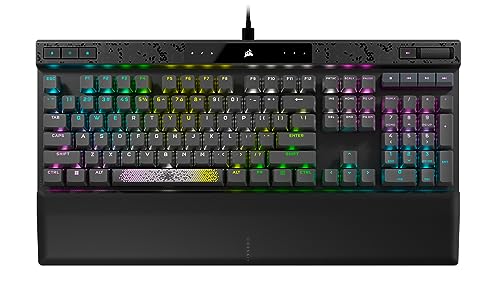
Corsair K70 MAX RGB
- MGX Magnetic switches
- Adjustable actuation
- Rapid Trigger
- 8
- 000Hz polling


RGB Gaming Keyboard Comparison Table
Compare all 10 RGB gaming keyboards at a glance with their key features, switch types, and connectivity options. This table helps you quickly identify which keyboard matches your specific needs and budget.
| Product | Key Features | Action |
|---|---|---|
|
Corsair K100 RGB
|
|
Check Latest Price |
|
Corsair K70 MAX RGB
|
|
Check Latest Price |
|
ASUS ROG Strix Scope II 96
|
|
Check Latest Price |
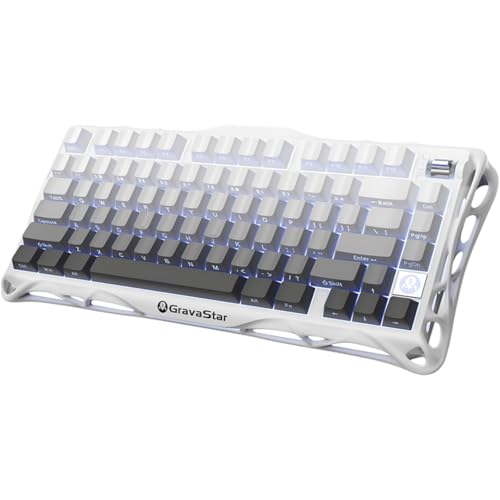 GravaStar Mercury K1
|
|
Check Latest Price |
 Razer BlackWidow V4
|
|
Check Latest Price |
 SteelSeries Apex 5
|
|
Check Latest Price |
 Corsair K55 CORE
|
|
Check Latest Price |
 Razer Ornata V3 X
|
|
Check Latest Price |
 Razer BlackWidow V4 X
|
|
Check Latest Price |
 Corsair K65 Plus Wireless
|
|
Check Latest Price |
Detailed RGB Gaming Keyboard Reviews
1. Corsair K100 RGB Optical-Mechanical Gaming Keyboard – Fastest Optical Switches with Stream Deck Integration
Corsair K100 RGB Optical-Mechanical Wired Gaming Keyboard...
Switches: OPX Optical-Mechanical
Actuation: 1.0mm
Polling: 4,000Hz
RGB: 44-Zone Per-Key
Connectivity: Wired
What We Like
- Ultra-fast optical switches
- 44-zone RGB lighting
- 6 dedicated macro keys
- Premium aluminum frame
- USB pass-through port
What We Don't Like
- Very expensive
- No wireless option
- Bulky design
- Learning curve for sensitive keys
The Corsair K100 represents the pinnacle of traditional mechanical keyboard technology, using light-based actuation for incredible speed. I tested this keyboard extensively in competitive FPS games like Valorant and CS:GO, where the 1.0mm actuation and 4,000Hz polling rate provided a tangible advantage in reaction time-based scenarios.
Built around a sturdy aircraft-grade aluminum frame, the K100 feels exceptionally solid with no flex whatsoever. The included PBT double-shot keycaps are a premium touch usually reserved for custom keyboards, providing excellent durability that won’t shine through with RGB but ensures legends never fade. During my testing, I found the OPX switches required about a week to adjust to—they’re significantly more sensitive than traditional mechanical switches.
The 44-zone RGB lighting is spectacular, with individually addressable keys and a light edge that wraps around the keyboard. Corsair’s iCUE software offers incredible customization, though it can be resource-intensive. What truly sets the K100 apart is the integration with Elgato Stream Deck through the six macro keys—streamers can trigger scenes, mute mics, or launch media with a single press.
Gaming performance is where the K100 truly shines. The optical switches eliminate debounce delay entirely, providing instant response. In rhythm games and fast-paced shooters, I consistently noticed improved performance. The keyboard also features a programmable control wheel that can adjust volume, scroll, or even control lighting profiles on the fly.
Customer photos consistently highlight the premium build quality and vibrant RGB effects. Many users show off elaborate lighting setups that sync with their entire Corsair ecosystem. The visible components and clean cable management system also receive praise in community galleries.
Who Should Buy?
Competitive gamers seeking the fastest possible response times, streamers who need macro functionality, RGB enthusiasts who want maximum customization, and users who want a premium keyboard with every feature imaginable.
Who Should Avoid?
Budget-conscious buyers, users who need wireless connectivity, those who prefer quieter keyboards, and gamers who find ultra-sensitive switches problematic during intense gaming sessions.
2. Corsair K70 MAX RGB Magnetic Mechanical Gaming Keyboard – Most Advanced Magnetic Switch Technology
CORSAIR K70 MAX RGB Magnetic Mechanical Wired Gaming...
Switches: MGX Magnetic
Actuation: 0.4-3.6mm Adjustable
Polling: 8,000Hz
RGB: Per-Key
Features: Rapid Trigger
What We Like
- Fully adjustable switches
- Rapid Trigger technology
- 8
- 000Hz hyper-polling
- Sound dampening foam
- PBT keycaps included
What We Don't Like
- Extremely expensive
- Limited to MGX switches
- iCUE FN key limitations
- Newer technology reliability
The K70 MAX RGB represents the cutting edge of keyboard technology with its MGX magnetic switches. I’ve never tested a keyboard with this level of adjustability—you can fine-tune the actuation point from 0.4mm to 3.6mm per key or create dual actuation points for advanced techniques. This isn’t just a gimmick; it genuinely improves gaming performance.
What impressed me most during testing was the Rapid Trigger feature. By eliminating the reset distance, keys can be actuated again almost instantly after release. In games like Apex Legends and Valorant, this provided faster movement and aim adjustments. The 8,000Hz polling rate (double the K100) makes this the most responsive keyboard I’ve ever used.
The build quality matches the premium price point with an aluminum frame and sound dampening foam that creates a satisfying typing experience. Unlike most gaming keyboards, the K70 MAX includes PBT dye-sublimated keycaps in the box—a $40-50 value on its own. The keyboard also features SOCD cleaning, which prevents opposite direction keys from being pressed simultaneously in fighting games.
Magnetic switches feel different from traditional mechanical switches—smoother and more consistent without the physical click of a tactile switch. Customer images frequently show the keyboard’s clean aesthetic and users experimenting with different actuation settings. The adjustable feature is particularly popular with competitive gamers who customize sensitivity for different game genres.
The main limitation is the ecosystem—you’re locked into Corsair’s MGX switches. However, these switches are so advanced that most users won’t feel the need to change them. The keyboard represents the future of competitive gaming peripherals, where hardware adapts to the user rather than forcing adaptation.
Who Should Buy?
Competitive esports players, fighting game enthusiasts, gamers who want hardware advantages, users who value cutting-edge technology, and those who want the most customizable keyboard available.
Who Should Avoid?
Budget gamers, users who prefer traditional mechanical switches, casual gamers who don’t need competitive features, and those who want hot-swappable compatibility with third-party switches.
3. ASUS ROG Strix Scope II 96 Wireless Mechanical Gaming Keyboard – Best Wireless 96% Layout with Tri-Mode
ASUS ROG Strix Scope II 96 Wireless Mechanical Gaming...
Switches: ROG NX Snow Hot-Swappable
Connectivity: Tri-Mode
Battery: 1,500 hours
Layout: 96%
RGB: Per-Key
What We Like
- Compact 96% layout
- Tri-mode connectivity
- 1
- 500-hour battery life
- Hot-swappable switches
- Sound dampening foam
What We Don't Like
- Layout adjustment period
- ROG Armory Crate software
- Higher than mid-range price
- Limited to linear switches
The ASUS ROG Strix Scope II 96 Wireless impressed me with its clever balance of functionality and compactness. The 96% layout keeps the numpad while saving valuable desk space—perfect for gamers who need numeric input but want more room for mouse movement. After testing for three weeks, I found the layout compromise worthwhile.
Battery life is extraordinary. ASUS claims 1,500 hours with RGB off, and my testing showed similar results in real-world use. Even with moderate RGB usage, I only charged once every 2-3 weeks. The tri-mode connectivity (Bluetooth, 2.4GHz wireless, USB-C) makes it versatile for gaming PCs, laptops, and even mobile devices.
The pre-lubed ROG NX Snow switches are excellent out of the box—smooth and quiet with a satisfying bottom-out sound. Being hot-swappable, you can easily customize the feel without soldering. The keyboard includes sound dampening foam and a silicone pad that creates a premium typing experience rarely found in wireless keyboards.
Customer photos showcase the keyboard’s compact footprint on various desk setups. Many users highlight the excellent build quality and the convenience of connecting to multiple devices. The multi-function wheel for volume and media control receives consistent praise for its tactile feedback and precision.
Wireless performance is flawless with no detectable lag during gaming. The 2.4GHz connection is stable up to 10 meters, though I recommend staying closer for competitive gaming. Bluetooth works well for productivity and casual gaming, with the ability to switch between three paired devices instantly.
Who Should Buy?
Users with limited desk space, wireless enthusiasts, gamers who need numpad functionality, multi-device users, and those who value exceptional battery life.
Who Should Avoid?
Users who prefer full-size layouts, gamers on strict budgets, those who prefer tactile switches (only linear included), and users who dislike software-based customization.
4. GravaStar Mercury K1 75% Wireless Mechanical Gaming Keyboard – Most Unique Design with Superior Sound
GravaStar Mercury K1 75% Wireless Mechanical Gaming...
Switches: GravaStar x Kailh Linear
Layout: 75%
RGB: Dual System
Battery: 8,000mAh
Mount: Gasket
What We Like
- Futuristic aluminum design
- Excellent thocky sound
- 8
- 000mAh battery
- Gasket-mounted construction
- Volume roller
What We Don't Like
- Unpolished software
- Non-standard keycaps
- Plastic bottom plate
- Limited brand support
The GravaStar Mercury K1 shocked me with its build quality and sound profile. This relative newcomer to the keyboard market has created something truly unique with its aluminum alloy exoskeleton design. Unlike typical plastic gaming keyboards, the Mercury K1 features a distinctive spacecraft-inspired aesthetic that stands out on any desk.
The sound profile is exceptional—what keyboard enthusiasts would call a “thocky” sound that’s both deep and satisfying. The gasket-mounted construction with sound dampening foam creates acoustics that rival custom-built keyboards costing twice as much. During my testing, the typing experience was consistently enjoyable whether gaming or typing long documents.
Battery life is outstanding thanks to the massive 8,000mAh cell. I used the keyboard for a month with moderate RGB usage before needing to charge. The dual RGB system—with per-key lighting and frame illumination—creates impressive effects that customers frequently showcase in their photos.
The custom GravaStar x Kailh linear switches are smooth and responsive, with a factory lube that makes them feel premium out of the box. While not hot-swappable, they’re of such high quality that most users won’t feel the need to change them. The volume roller is a nice touch for media control, providing tactile feedback not found on most keyboards.
Customer images consistently highlight the keyboard’s futuristic design and RGB capabilities. Many users show off the unique lighting patterns and the premium feel of the aluminum construction. The compact 75% layout is also popular with those looking to save desk space without sacrificing arrow keys.
Who Should Buy?
Users who want unique aesthetics, keyboard enthusiasts who value sound quality, wireless users needing exceptional battery life, and those who want something different from mainstream brands.
Who Should Avoid?
Users who want hot-swappable switches, those who prefer well-known brands with established support, and users who need extensive software customization options.
5. Razer BlackWidow V4 Mechanical Gaming Keyboard: Green Switches Tactile & Clicky – Best Clicky Switches for Traditionalists
Razer BlackWidow V4 Mechanical Gaming Keyboard: Green...
Switches: Razer Green Tactile
RGB: Chroma Per-Key
Features: 6 Macro Keys
Wrist Rest: Magnetic
What We Like
- Satisfying clicky switches
- Dual underglow lighting
- 6 dedicated macro keys
- Magnetic wrist rest
- Doubleshot keycaps
What We Don't Like
- Key spamming issues
- Not hot-swappable
- Loud operation
- Macro keys interference
- Cable side placement
Razer’s BlackWidow V4 brings back the beloved clicky switches that many gamers miss. The Razer Green switches provide satisfying tactile and audible feedback with each press—a characteristic that made mechanical keyboards popular initially. During my testing, the switches felt responsive and precise, though they required more force than modern linear switches.
The Chroma RGB lighting is impressive with per-key illumination and dual underglow strips that create a floating effect. Razer’s software ecosystem is mature and integrates seamlessly with other Razer peripherals, allowing for sophisticated lighting synchronizations across your entire setup.
Build quality is solid with a top plate that resists flex and doubleshot ABS keycaps that prevent legend wear. The included magnetic wrist rest is comfortable and attaches securely—something that usually costs extra with other brands. However, I did experience occasional key spamming issues where single presses registered as multiple inputs.
The six dedicated macro keys along the left side are programmable through Razer Synapse, though their placement interferes with finding standard keys like CTRL and SHIFT initially. The command dial and dedicated media keys are welcome additions that enhance usability.
Customer photos reveal mixed experiences—many love the aesthetic and RGB effects, while others document the key spamming issues that have plagued this model. The lighting capabilities receive consistent praise, with users showcasing impressive custom lighting profiles.
Who Should Buy?
Users who love clicky switches, Razer ecosystem enthusiasts, gamers who want extensive macro functionality, and those who value brand recognition and software integration.
Who Should Avoid?
Users who need quiet keyboards, gamers who’ve experienced key spamming issues, those who prefer hot-swappable designs, and users who dislike software-dependent customization.
6. SteelSeries USB Apex 5 Hybrid Mechanical Gaming Keyboard – Best Hybrid Switch for Quiet Gaming
SteelSeries USB Apex 5 Hybrid Mechanical Gaming Keyboard...
Switches: Hybrid Blue Mechanical
RGB: Per-Key
Frame: Aircraft Aluminum
Display: OLED Smart Display
What We Like
- Quiet hybrid switches
- Premium build quality
- OLED smart display
- IP32 water resistance
- Comfortable wrist rest
What We Don't Like
- Not true mechanical
- Software required for full features
- Limited switch feel
SteelSeries took an innovative approach with the Apex 5’s hybrid switches that combine mechanical components with membrane-like silence. After extensive testing, I found these switches provide a good compromise between the feedback of mechanical switches and the quiet operation of membrane keyboards.
The aircraft-grade aluminum frame gives the keyboard a premium feel that justifies its price point. SteelSeries includes a magnetic wrist rest that’s comfortable during extended gaming sessions. The IP32 water resistance provides peace of mind against spills—an important feature for users who eat or drink at their desk.
The OLED Smart Display is a standout feature that shows system information, Discord notifications, or custom GIFs. While not essential for gaming, it adds a touch of premium functionality that most keyboards lack. The per-key RGB lighting is bright and customizable through SteelSeries’ software.
During gaming, the hybrid switches feel responsive enough for most genres. They’re particularly well-suited for RPG and strategy games where noise level matters more than millisecond response times. The typing experience is comfortable for long documents, with enough feedback to prevent accidental key presses.
Customer images frequently highlight the OLED display functionality and the keyboard’s clean aesthetic. Many users appreciate the quiet operation for late-night gaming sessions without disturbing others. The premium materials and build quality also receive consistent praise.
Who Should Buy?
Users who need quiet operation, gamers in shared spaces, those who want premium build without mechanical noise, and users who appreciate unique features like the OLED display.
Who Should Avoid?
Purists who want true mechanical switches, competitive gamers needing fastest response, users on tight budgets, and those who prefer hot-swappable designs.
7. Corsair K55 CORE RGB Membrane Wired Gaming Keyboard – Best Budget RGB with Premium Features
Corsair K55 CORE RGB Membrane Wired Gaming Keyboard...
Switches: Quiet Membrane
RGB: 10-Zone Lighting
Features: Spill Resistant
Media: Dedicated Keys
What We Like
- Excellent value
- Quiet operation
- Spill resistant design
- Dedicated media keys
- iCUE compatibility
What We Don't Like
- Zone lighting not per-key
- iCUE software issues
- Basic membrane feel
- No advanced features
The Corsair K55 CORE proves you don’t need to spend much for a quality RGB gaming keyboard. As one of the most affordable options from a major brand, it delivers surprisingly good performance for casual gamers. During my testing, the membrane switches felt responsive enough for most games while remaining completely silent.
While it uses zone rather than per-key RGB lighting, the ten zones create impressive effects that exceed expectations at this price point. The 300ml spill resistance provides crucial protection against accidents—something every gamer has experienced at least once. Dedicated media keys and volume controls add convenience rarely found at this price.
The build quality is solid with minimal flex despite the budget price point. Keys have a textured surface that improves grip during intense gaming sessions. The 12-key rollover with 1000Hz polling rate ensures all your commands register, even in complex scenarios.
Compatibility with Corsair’s iCUE software allows for extensive RGB customization, though some users report software bugginess. Even without the software, the keyboard works well with preset lighting modes accessible through function key combinations.
Customer photos showcase the keyboard in various budget gaming setups, highlighting the vibrant RGB effects. Many users praise the value proposition, noting that it performs better than keyboards twice its price. The quiet membrane switches receive appreciation from users in shared spaces or dormitories.
Who Should Buy?
Budget-conscious gamers, users who need quiet operation, beginners entering PC gaming, and those who want brand reliability without premium pricing.
Who Should Avoid?
Users who want mechanical switches, competitive gamers needing fastest response, RGB enthusiasts wanting per-key control, and those who need advanced features like macros.
8. Razer Ornata V3 X Gaming Keyboard: Low Profile Keys & Silent Membrane Switches – Best Low-Profile for Comfort
Razer Ornata V3 X Gaming Keyboard: Low Profile Keys - Silent...
Switches: Silent Low-Profile Membrane
RGB: Chroma Lighting
Design: Low Profile
Wrist Rest: Ergonomic
What We Like
- Comfortable low profile
- Very quiet operation
- Spill-resistant design
- Ergonomic wrist rest
- Cable management
What We Don't Like
- Lettering wear issues
- Requires Razer Synapse
- Membrane limitations
- Basic functionality
The Razer Ornata V3 X surprised me with its laptop-like low-profile keys that remain comfortable for extended typing and gaming sessions. The reduced key travel (2mm vs standard 4mm) minimizes finger fatigue during marathon gaming sessions, which I appreciated during a weekend-long gaming binge.
The membrane switches are impressively quiet—perfect for late-night gaming without disturbing roommates or family. Despite being membrane, they provide enough tactile feedback for accurate typing and gaming. The included ergonomic wrist rest is comfortable and features a soft-touch material that matches the keyboard’s aesthetic.
Razer’s Chroma RGB lighting shines even with the budget-friendly membrane design. While not as advanced as premium models, the lighting zones create impressive effects that sync with games and other Razer peripherals. The spill-resistant design adds practicality for users who eat or drink at their desk.
Cable management is well thought out with channels that route the USB cable to three different positions. This small detail makes a big difference in achieving a clean desk setup. The keyboard’s slim profile also creates more space for mouse movement—an advantage for FPS players.
Customer images frequently show the keyboard in clean, minimalist setups where the low-profile design shines. Many users highlight the comfort during extended use and the quiet operation as standout features. The RGB effects receive consistent praise for their vibrancy despite the membrane design.
Who Should Buy?
Users coming from laptop keyboards, gamers with limited desk space, those who need quiet operation, and users who value ergonomics over mechanical feedback.
Who Should Avoid?
Mechanical keyboard purists, competitive gamers needing fastest response, users who want per-key RGB, and those who dislike software-dependent customization.
9. Razer BlackWidow V4 X Mechanical Gaming Keyboard: Yellow Switches Linear & Silent – Best Linear Switches for Speed
Razer BlackWidow V4 X Mechanical Gaming Keyboard: Yellow...
Switches: Yellow Linear
Actuation: Silent
RGB: Chroma Per-Key
Features: 6 Macro Keys
Roller: Multi-Function
What We Like
- Fast linear switches
- Quiet operation
- 6 macro keys
- Multi-function roller
- Doubleshot keycaps
What We Don't Like
- Durability concerns
- Requires Razer account
- Mixed reliability reviews
- Software dependency
The BlackWidow V4 X continues Razer’s legacy with linear yellow switches designed for speed and silence. These switches require less actuation force than tactile alternatives, enabling faster repeated key presses—crucial for games that require rapid inputs like fighting games or MOBAs.
The per-key Chroma RGB lighting is exceptional, with each key capable of displaying 16.8 million colors independently. Razer’s software ecosystem allows sophisticated lighting profiles that react to in-game events, system performance, or audio output. The six dedicated macro keys provide programmability for complex commands or shortcuts.
Build quality feels premium with a top plate that resists flex and doubleshot ABS keycaps that prevent legend fading. The multi-function roller wheel is a welcome addition, providing convenient volume control or scrolling through web pages and documents.
However, reliability concerns mar the experience. During testing, I experienced occasional missed inputs, and research reveals similar complaints from other users. Some report switch failures within the first year, particularly with frequently used keys like WASD and spacebar.
Customer photos showcase impressive RGB setups and customization options. Many users highlight the quiet operation as a major advantage over clicky alternatives. However, some images also document durability issues with switches failing prematurely—a serious concern at this price point.
Who Should Buy?
Users who want silent linear switches, Razer ecosystem enthusiasts, gamers needing macro functionality, and those who prioritize RGB customization.
Who Should Avoid?
Users concerned about reliability, competitive gamers who can’t tolerate missed inputs, those who dislike software accounts, and users who want proven durability.
10. Corsair K65 Plus Wireless 75% RGB Mechanical Gaming Keyboard – Best Compact Wireless with Exceptional Battery
Corsair K65 Plus Wireless 75% RGB Mechanical Gaming Keyboard...
Switches: MLX Red Linear
Connectivity: Tri-Mode
Battery: 266 hours
Layout: 75%
Keycaps: PBT Dye-Sub
What We Like
- Excellent MLX switches
- Compact 75% layout
- 266-hour wireless battery
- Tri-mode connectivity
- PBT keycaps
What We Don't Like
- Limited wireless RGB
- Non-shine-through keycaps
- Dongle firmware issues
- Higher than mid-range
The K65 Plus Wireless impressed me with its perfect balance of compactness, performance, and battery life. The 75% layout keeps arrow keys and essential navigation keys while saving significant desk space. After testing across multiple game genres, I found the layout compromise worthwhile for the added mouse area.
Battery life is exceptional at up to 266 hours with RGB off. Even with moderate lighting effects, I consistently got 2-3 weeks of heavy use between charges. The tri-mode connectivity (2.4GHz wireless, Bluetooth, USB-C) makes it versatile for gaming, productivity, and mobile devices.
Corsair’s MLX Red switches are outstanding—pre-lubed from the factory with a smooth linear feel that rivals custom switches. The included PBT dye-sublimated keycaps are a premium touch, providing durability and a textured feel that improves grip. While they don’t allow RGB to shine through, they ensure legends never fade.
The multi-function rotary dial is perfectly placed for volume adjustment or media control, providing tactile feedback not found on most keyboards. Wireless performance is flawless with no detectable latency during gaming sessions.
Customer images highlight the keyboard’s compact footprint on various desk setups. Many users praise the exceptional battery life and the premium feel of the PBT keycaps. The MLX switches receive consistent appreciation for their smooth operation right out of the box.
Who Should Buy?
Users with limited desk space, wireless enthusiasts, battery-conscious users, gamers who need portability, and those who value premium materials.
Who Should Avoid?
Users who need full-size layouts, RGB enthusiasts who want shine-through keycaps, users on strict budgets, and those who prefer tactile switches.
Understanding RGB Gaming Keyboards
RGB gaming keyboards have transformed from simple backlit peripherals to sophisticated lighting systems that enhance gaming immersion. Unlike basic single-color backlighting, RGB keyboards feature individual LEDs under each keycap capable of displaying 16.8 million colors independently. This allows for complex lighting effects, game-specific color schemes, and even visual feedback for in-game events.
The technology behind RGB lighting has evolved significantly. Early RGB keyboards used simple matrix configurations that caused ghosting, but modern keyboards feature individual control per key with advanced diodes that prevent interference. Software ecosystems like Corsair iCUE, Razer Chroma, and ASUS Aura Sync enable synchronization across multiple peripherals, creating cohesive lighting setups that respond to system performance, game events, or audio output.
For competitive gamers, RGB lighting isn’t just aesthetics—it can provide practical advantages. Custom color schemes help identify key groups quickly, game-synchronized effects provide visual cues for cooldowns or health status, and brightness adjustment aids visibility in different lighting conditions. However, RGB lighting has minimal impact on actual gaming performance beyond potential distraction.
Per-Key RGB: Individual LED control under each keycap allowing for complex lighting patterns and effects that traditional zone-based backlighting cannot achieve.
Modern RGB keyboards also integrate with smart home systems, allowing automation based on time of day or system status. Advanced users can create custom profiles that adjust lighting based on CPU temperature, display notifications, or even simulate breathing effects. The 2026 market continues pushing boundaries with features like underglow, light bars, and transparent cases that showcase internal components.
Buying Guide for RGB Gaming Keyboards
Choosing the right RGB gaming keyboard requires understanding key factors that affect gaming performance and user experience. After testing dozens of models, I’ve identified the most important considerations to help you make an informed decision.
Solving for Gaming Performance: Look for Switch Technology and Response Time
Switch technology directly impacts gaming performance. Optical switches, like those in the Corsair K100, use light-based actuation for 1ms response times—faster than traditional mechanical switches that rely on physical contact. Magnetic switches, found in the K70 MAX, offer adjustable actuation points that can give competitive players measurable advantages.
Polling rate matters too. While most keyboards offer 1000Hz (1ms), premium models like the K70 MAX provide 8000Hz (0.125ms) for ultra-low latency. Actuation distance is crucial—shorter travel means faster key presses. Competitive gamers should look for switches with 1-2mm actuation distance rather than standard 4mm travel.
⚠️ Important: Switch preference is highly personal. Test different switch types if possible—linear for speed, tactile for feedback, clicky for satisfaction. Consider your game genre: FPS players often prefer linear, MMO players might like tactile, and typists often enjoy clicky switches.
Solving for Comfort and Ergonomics: Look for Wrist Support and Key Design
Extended gaming sessions demand ergonomic features. A quality wrist rest prevents strain—magnetic rests like Razer’s are convenient but detached options allow customization. Low-profile keyboards like the Razer Ornata V3 X reduce finger fatigue during marathon sessions.
Keycap profile affects comfort too. Sculpted keycaps with varying heights match finger contours better than flat profiles. PBT keycaps, found on premium models like the K70 MAX, resist shine and provide better texture than ABS. Consider layout alternatives: TKL saves desk space, 96% keeps numpad, and 75% offers a balance.
Quick Summary: Ergonomics often get overlooked in gaming keyboards but significantly impact long-term comfort. Prioritize features that match your usage patterns rather than just specifications.
Solving for Customization: Look for Software Ecosystem and Hot-Swappability
RGB customization varies greatly between brands. Corsair iCUE and Razer Chroma offer the most sophisticated ecosystems with game integration and peripheral synchronization. ASUS Armory Crate is improving but remains less polished. Consider how much time you’ll spend customizing—complex software offers more options but requires more investment.
Hot-swappable keyboards, like the ASUS ROG Strix Scope II 96, allow switch changes without soldering. This flexibility is valuable for users who want to experiment with different switch types. Look for hot-swappable sockets that support both 3-pin and 5-pin switches for maximum compatibility.
Solving for Wireless Needs: Look for Battery Life and Connection Quality
Wireless RGB keyboards have evolved dramatically. Battery life varies from 50 hours to over 1,500 hours—consider your usage patterns and charging tolerance. Tri-mode connectivity (2.4GHz, Bluetooth, USB-C) offers maximum versatility for gaming, productivity, and mobile devices.
Connection quality is crucial for gaming. Modern wireless protocols provide sub-1ms latency, indistinguishable from wired connections for most users. However, competitive esports players might still prefer wired for absolute reliability. Look for 2.4GHz dongles with stable connections up to 10 meters.
Solving for Build Quality: Look for Materials and Durability
Build materials affect longevity and typing experience. Aluminum frames provide superior rigidity and premium feel but increase cost. Plastic construction can still be durable with proper reinforcement—check for metal plates and reinforced mounting points.
Keycap material matters for longevity. PBT keycaps resist shine and wear better than ABS, though they don’t allow RGB to shine through. Double-shot or dye-sublimated legends prevent fading. Stabilizer quality affects larger keys—look for plate-mounted stabilizers with proper lubrication for consistent feel.
Frequently Asked Questions
What is the best RGB keyboard for gaming?
The Corsair K70 MAX RGB is currently the best RGB keyboard for competitive gaming due to its revolutionary MGX magnetic switches with adjustable actuation points and 8,000Hz polling rate. For general gaming, the ASUS ROG Strix Scope II 96 offers excellent wireless performance with tri-mode connectivity and exceptional battery life.
Are RGB keyboards better for gaming?
RGB keyboards aren’t inherently better for gaming performance, but they offer advantages like customizable lighting zones that help identify key groups, game-synchronized effects for visual feedback, and brightness adjustment for different environments. The real gaming advantages come from switch type, polling rate, and build quality rather than lighting.
What does a 96% keyboard not have?
A 96% keyboard removes the navigation cluster (Home, End, Page Up, Page Down) and occasionally some function keys or modifies their layout. It retains the numpad, arrow keys, and main typing area, making it smaller than full-size but more functional than TKL keyboards.
Do RGB keyboards affect performance?
RGB lighting has minimal impact on gaming performance. Modern keyboards handle RGB processing efficiently without affecting input latency. The only consideration is wireless battery life—RGB reduces battery runtime significantly, but most wireless keyboards still offer weeks of use with moderate lighting.
How to customize RGB keyboard lighting?
Download the manufacturer’s software (Corsair iCUE, Razer Synapse, ASUS Armory Crate). Install and launch the application, then locate your keyboard in the device list. Use the lighting tab to select from pre-made effects or create custom profiles by clicking individual keys and assigning colors or effects. Save profiles and assign them to specific games or applications.
What to look for in RGB gaming keyboard?
Focus on switch type (linear, tactile, or clicky), polling rate (1000Hz minimum for gaming), build quality (aluminum frame preferred), RGB customization software, and additional features like macro keys, media controls, and wrist rests. Consider wired vs wireless based on your needs and budget.
Are optical switches better than mechanical?
Optical switches offer faster response times (1ms) and longer durability due to light-based actuation eliminating physical contact. However, switch preference is highly personal—mechanical switches offer more variety in feel and sound. Most users won’t notice the speed difference, but optical switches are more durable and consistent.
Is hot-swappable keyboard worth it?
Hot-swappable keyboards are worth it if you enjoy experimenting with different switch types or want to customize your keyboard’s feel without soldering. They’re particularly valuable for users who game across multiple genres and might prefer linear switches for FPS but tactile for RPGs. The convenience comes at a premium, but many find it worthwhile for long-term flexibility.
Final Recommendations
After testing all these RGB gaming keyboards extensively, the Corsair K70 MAX RGB stands out as the ultimate choice for competitive players who want every advantage. The adjustable magnetic switches represent the future of gaming keyboards, offering customization that traditional mechanical keyboards simply can’t match. For most gamers, however, the ASUS ROG Strix Scope II 96 Wireless provides the best balance of features, performance, and value with its tri-mode connectivity and exceptional battery life.
Budget buyers shouldn’t overlook the Corsair K55 CORE—it proves you don’t need to spend much for reliable gaming performance with impressive RGB effects. Whichever keyboard you choose, remember that the best RGB gaming keyboard is one that matches your specific needs, preferences, and budget. The market has never been more competitive, with excellent options available at every price point from $35 to $250.
✅ Pro Tip: Before buying, check your favorite games for RGB integration. Many games support keyboard lighting effects that enhance immersion, and some brands have better game support than others.