![Best Printers For College Students [cy]: 8 Models Tested & Reviewed](https://www.guidespot.com/wp-content/uploads/2026/07/featured-update-74261-1784120967820.webp "8 Best Printers for College Students (2026): Budget-Friendly Picks")
Maintenance Disclaimer: Inkjet printers require regular use to prevent the print heads from clogging. If you plan to leave your printer unused during summer or winter breaks, consider running a single test page every two weeks or opting for a laser printer, which uses dry toner that never dries out.
The best printers for college students are not automatically the smallest or the cheapest. A good dorm printer has to match the work you actually hand in: black-and-white reading packets, color charts, scanned forms, or a last-minute essay when the library is closed.
I refreshed this 2026 guide using current product information for eight available models, looking at printer type, functions, paper handling, duplexing, wireless options, and the kind of coursework each model suits. Rather than claiming one printer works for every student, the goal is to make the trade-offs easy to spot before move-in day.
Start with a simple question: will you print mostly text, need color and scans, or print enough that refillable ink makes sense? Students in forum discussions repeatedly mention the same frustrations—library trips, surprise ink needs, cramped desks, and Wi-Fi that refuses to cooperate—so those practical details guide the recommendations below.
Our Top 3 Student Printers for Dorm Desks and Deadline Weeks

The Epson EcoTank ET-2800 is the broadest fit for a student who needs color, copies, and scans while wanting to avoid frequent cartridge changes. Its included ink supply and cartridge-free system make it the logical long-term choice for regular printing.
For essay-heavy majors that do not require color, the Brother HL-L2405W is the faster, simpler text specialist. The HP DeskJet 2827e is the compact all-in-one option for light printing, scanning, and copying when a low-commitment starting point matters most.
Compare All Eight College Printer Picks
| Product | Key Features | Action |
|---|---|---|
|
Epson EcoTank ET-2800
|
|
Check Latest Price |
 HP DeskJet 2827e
|
|
Check Latest Price |
 Brother HL-L2405W
|
|
Check Latest Price |
 Canon PIXMA MG3620
|
|
Check Latest Price |
 Canon PIXMA TS6520
|
|
Check Latest Price |
 Canon PIXMA TR4720
|
|
Check Latest Price |
 HP Smart Tank 5000
|
|
Check Latest Price |
 Canon PIXMA TR160
|
|
Check Latest Price |
Use the table as a short list, not as a substitute for checking your university’s network policy. The Brother is print-only and monochrome; the TR4720 is built around document handling; and the TR160 travels well but does not scan or copy. Those distinctions matter more than a single overall rank.
1. Epson EcoTank ET-2800 – Best Overall for Regular Color Printing
What We Like
- Cartridge-free system
- High ink yield
- Print scan and copy
- Wi-Fi plus USB
What We Don't Like
- Manual duplex only
- No automatic document feeder
The EcoTank ET-2800 is an all-in-one color inkjet built around refillable reservoirs rather than small cartridges. Epson lists up to 4,500 black pages or 7,500 color pages per ink set, which makes the model especially appealing when lecture notes, diagrams, and course packets keep coming.
It prints, scans, and copies, so it covers the ordinary dorm tasks that a print-only laser cannot. Wireless printing and USB give students a second connection route if a shared wireless setup becomes difficult.
Cartridge-Free Ink for a Multi-Year Purchase
The strongest reason to choose this Epson is its ink system. A student who expects steady color work can refill bottles instead of replacing a set of cartridges, and the stated page yield makes the ongoing supply plan easier to understand.
That does not mean an ink tank is the right answer for every dorm. It asks for a larger initial commitment and is most sensible when the printer will see regular use rather than sit untouched for long stretches.
Everyday Print, Scan, and Copy Tasks
For coursework, the all-in-one format is useful when you need a digital copy of a signed form, a book excerpt, or handwritten notes. The ET-2800 is rated for up to 10 ISO pages per minute, a reasonable pace for routine assignments rather than a high-speed print station.
The trade-off is duplexing: this model does not automate two-sided printing. If you often submit long drafts on both sides, plan to turn the stack manually or consider one of the Canon duplex models below.
Who Should Pick the ET-2800
Choose it for moderate or frequent color printing, a need for scanning and copying, and a plan to keep the printer through several school years. Skip it if your work is strictly black text, automatic duplexing is non-negotiable, or your printing is so rare that a toner-based laser is more practical.
2. Brother HL-L2405W – Best Laser Printer for Text-Heavy Majors
Brother HL-L2405W Wireless Compact Monochrome Laser Printer...
Mono laser
30 ppm
250-sheet tray
What We Like
- Fast text output
- Large paper tray
- Dual-band Wi-Fi
- USB connection
What We Don't Like
- Black and white only
- No scanner or copier
The Brother HL-L2405W is a compact monochrome laser printer for students who mainly produce essays, outlines, readings, and forms. It leaves out color, scanning, and copying in favor of black-and-white output rated at up to 30 pages per minute.
That narrow focus is a benefit for the right workload. Students in printer forums often favor a black-and-white Brother laser for years of text documents, particularly when the alternative is an inkjet that may sit unused between assignments.
Dry Toner Suits Infrequent Printing
Laser printers use toner, a dry powder, rather than liquid ink. For occasional use, that matters because toner does not face the same nozzle-drying concern as an inkjet that has been idle for a long break.
This is not a color-project machine. If your syllabus calls for full-color charts, photographs, or design proofs, you will still need access to a campus printer or a separate color model.
A Paper Tray That Reduces Interruptions
The 250-sheet tray is unusually generous for a student-oriented printer and is useful during a busy week of reading packets. A manual feed slot also gives you a route for envelopes and specialty sheets without emptying the main tray.
It supports dual-band 2.4 GHz and 5 GHz Wi-Fi, plus USB. That dual-band specification is helpful in a dorm, although a campus network may still require registration or block device-to-device discovery.
Best Fit and Limitations
Pick the HL-L2405W if fast, crisp monochrome documents are your priority and you do not need an all-in-one. It is also a sensible best printer for occasional student use when a text-only workflow is acceptable; avoid it if color, copies, or scans are part of your weekly routine.
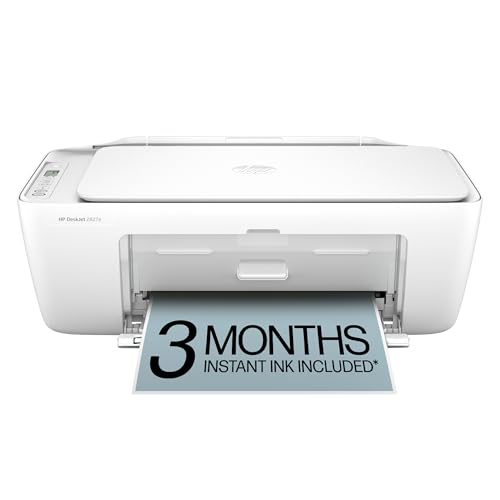
3. HP DeskJet 2827e – Best Budget All-in-One for Light Use
HP DeskJet 2827e Wireless All-in-One Color Inkjet Printer...
All-in-one inkjet
Print scan copy
60-sheet tray
What We Like
- Compact body
- Low-entry all-in-one
- HP app
- Self-healing Wi-Fi
What We Don't Like
- Manual duplex
- Small 60-sheet tray
The DeskJet 2827e is a compact color all-in-one for a student who needs basic printing, scanning, and copying without a large machine taking over the desk. It has a 60-sheet input tray and is rated for up to 7.5 black pages per minute and 5.5 color pages per minute.
HP positions the model around its app, self-healing Wi-Fi, and AI formatting for web pages and emails. Those features can help clean up a print from an online article, but they do not replace checking formatting before a deadline.
Compact All-in-One Basics
Students with an occasional assignment and the need to scan a page will get more flexibility here than from a print-only laser. The icon LCD keeps the control panel simple, while the HP app supports printing, scanning, copying, and mobile fax from compatible devices.
Its small tray is the main reality check. It is suited to a few documents at a time, not to unattended batches of readings or a roommate pair printing many long papers.
Instant Ink Terms Need a Close Read
HP+ activation includes a three-month Instant Ink trial for this model. The offer becomes a subscription after the trial unless it is cancelled, so read the current terms and select a plan only if its page allowance fits your actual pattern.
Students who dislike subscriptions can use compatible standard supplies instead. In either case, traditional cartridges are usually a better match for light use than for a high-volume print habit.
Who It Serves Best
Choose the 2827e for a compact dorm room printer that handles basic color work and occasional scans. Look elsewhere if you need automatic two-sided output, a large paper supply, or low consumable interruption across a demanding course load.
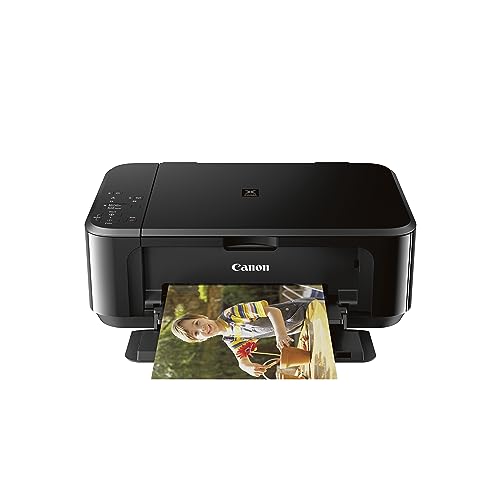
4. Canon PIXMA MG3620 – Best Value for Automatic Two-Sided Papers
Canon Pixma MG3620 Wireless All-in-One Color Inkjet Printer...
All-in-one color
Auto duplex
100-sheet capacity
What We Like
- Automatic duplex
- 100-sheet tray
- Print scan and copy
- Mobile printing
What We Don't Like
- Cartridge system
- Older model design
The Canon PIXMA MG3620 provides color printing, copying, and scanning in a compact design, but its standout student feature is automatic two-sided printing. It also has a 100-sheet capacity, giving it more breathing room than the HP budget model.
Canon rates it at 9.9 images per minute in black and 5.7 in color. It is not intended to compete with a laser’s speed, yet it is a capable choice for coursework where duplex printing matters as much as a quick first page.
Automatic Duplex Makes Paper Work Easier
Automatic two-sided printing is a modest feature with a major practical payoff. It removes the manual flipping step from double-sided drafts, helps keep a long handout compact, and lowers the chance of putting an entire stack back in the wrong way.
For students who regularly annotate printed readings, duplexing is a stronger day-to-day advantage than cosmetic extras. The 100-sheet input capacity is also better suited to a shared dorm printer than a very small tray.
Mobile Documents and Standard Supplies
The MG3620 supports printing and scanning from mobile devices, which is useful for a tablet-based class workflow. As with any cartridge inkjet, factor replacement cartridges into the ownership decision rather than judging it by the printer alone.
Its established design is not the newest in this lineup, but the combination of auto duplex, 100-sheet handling, and all-in-one functions remains relevant. It is a clear choice for the student who wants those basics in one small package.
Choose It for Paper-Saving Coursework
Choose the MG3620 when automatic duplexing and a useful tray size are higher priorities than tank-style ink capacity. It is less compelling for very frequent color printing, where an ink tank can reduce cartridge changes, or for fast text-only output, where a laser leads.
5. Canon PIXMA TS6520 – Best Compact All-in-One for MacBook Users
Canon PIXMA TS6520 Wireless Color Inkjet Printer Duplex...
Color all-in-one
Auto duplex
Dual-band Wi-Fi
What We Like
- AirPrint and Mopria
- Auto duplex
- OLED display
- Print scan and copy
What We Don't Like
- Cartridge-based ink
- No automatic document feeder
The Canon PIXMA TS6520 replaces the unavailable TS6420a in this update. It is a compact color all-in-one with a scanner, copier, automatic two-sided printing, a 100-sheet tray, and a 1.42-inch monochrome OLED display.
Canon lists up to 14 black and 9 color images per minute, putting it among the quicker compact inkjets here. Its two-cartridge hybrid ink system is designed for sharp documents alongside color pages and borderless photos up to letter size.
Dual-Band Wi-Fi and Native Mobile Standards
This is the best printer for a college student with a MacBook when native AirPrint matters, because it also supports the Canon PRINT app and Mopria Print Service. Dual-band 2.4 GHz and 5 GHz Wi-Fi gives it flexibility on home-style networks.
Still, no printer can bypass a dorm’s network rules. A managed network may isolate devices, require a device MAC address to be registered, or limit peer discovery; ask campus IT before assuming wireless printing will work as it does at home.
A Useful Small-Space Feature Set
The TS6520 balances small-room practicality with features students notice: a status display, integrated scan/copy functions, and automatic duplex. That is a more complete set than a portable printer, without stepping up to an ADF-oriented office machine.
It does not include an automatic document feeder, so multi-page scanning still means placing pages one by one. Students who routinely digitize a thick packet should choose the TR4720 instead.
Who Should Buy the TS6520
Pick this Canon for a balanced compact printer with current Apple and Android-friendly standards, color capability, and automatic duplex printing. Consider an ink tank for frequent output, or a laser if every page is black text and scans are unnecessary.
6. Canon PIXMA TR4720 – Best for Scanning Multi-Page Course Documents
Canon PIXMA TR4720 All-in-One Wireless Printer, Home Use...
4-in-1 inkjet
ADF and fax
Auto duplex
What We Like
- Automatic document feeder
- Auto duplex
- Print copy scan fax
- 100-sheet capacity
What We Don't Like
- Slower color output
- Cartridge-based ink
The PIXMA TR4720 is the document-handling pick. It prints, copies, scans, and faxes, while an automatic document feeder separates it from the flatbed-only all-in-ones in this roundup.
It also adds automatic two-sided printing and a 100-sheet capacity. Canon lists black documents at approximately 8.8 images per minute and color documents at approximately 4.4, so it favors convenience across tasks over raw print speed.
The ADF Matters for Repeated Scanning
An automatic document feeder is useful when you need to scan multiple pages in sequence: signed paperwork, class notes, readings, or an application packet. It reduces the repeated lifting and alignment that makes a flatbed scanner tedious for a stack.
The fax function will not matter to every student, but it is part of the 4-in-1 package. Think of the TR4720 as a mini document station rather than a photo-first printer.
Duplex Printing and Mobile Workflows
Automatic duplex printing keeps long document jobs straightforward, while mobile printing supports sending a file from a phone or tablet. Before relying on a mobile workflow, print a one-page test and confirm the file’s margins and scaling.
Color documents print more slowly than black text. That is not a problem for an occasional chart or form, but a student who frequently produces large color packets may be happier with an ink tank.
Best for Research Assistants and Admin Tasks
Choose the TR4720 if batch scanning is part of your real routine and you still want a color all-in-one. Skip it if you only need rapid black text, since the Brother laser is purpose-built for that role.
7. HP Smart Tank 5000 – Best Ink Tank for High-Volume Students
HP Smart Tank 5000 Wireless All-in-One Ink Tank Printer...
Ink tank all-in-one
Up to 2 years ink
100-sheet tray
What We Like
- Included ink
- Refillable tanks
- Print scan and copy
- Mess-free bottle system
What We Don't Like
- Manual duplex only
- Slower color printing
The HP Smart Tank 5000 is an all-in-one refillable ink tank printer for the student who expects a steady stream of pages. HP states that it includes up to two years of original ink and up to 6,000 black or color pages, depending on use.
It prints, scans, and copies, with a 100-sheet input capacity. Black output is rated up to 10 pages per minute and color up to 5, which is adequate for class documents but not designed for fast color batches.
Refillable Tanks Without Cartridge Swaps
HP’s bottle system is designed to refill through easy-access tanks without squeezing the bottles. That is helpful for students concerned about frequent cartridge replacements, although any ink refill is best done slowly on a protected surface before moving day.
The high stated included yield gives this printer a clear advantage for a color-heavy major, shared room, or student organization. A light user should still consider whether that capacity is more than they need.
Formatted Web and Email Printing
HP includes AI formatting intended to remove unwanted webpage and email content before printing. Treat it as a time-saving tool, then preview the page; course citations, headers, and tables deserve a final check before they go onto paper.
Manual duplex is the major limitation. For two-sided documents, you must turn pages yourself, so students who print duplex packets every week may prefer the Canon MG3620, TS6520, or TR4720.
Who Gets the Most From the Smart Tank
Choose the Smart Tank 5000 for sustained printing with color, scanning, and copying in one device. It is not the best fit for a student who prints only a few pages each month or who needs automatic duplexing above all else.
8. Canon PIXMA TR160 – Best Portable Printer for Commuters
Canon PIXMA TR160 Wireless Portable Lightweight Compact...
Portable inkjet
4.5 pounds
Wireless Direct
What We Like
- Light 4.5-pound design
- Wireless Direct
- AirPrint and Mopria
- 50-sheet tray
What We Don't Like
- Print-only
- No duplex
- Small paper capacity
The Canon PIXMA TR160 is the outlier in this group: a 4.5-pound portable inkjet meant to fit in a bag or backpack. It prints documents and photos up to letter size but does not copy or scan.
Its 50-sheet tray and 1.44-inch OLED display are appropriate for a small mobile device. This is the best printer for a college student dorm setup only when portability is a genuine need, not merely a nice extra.
Wireless Direct Solves a Specific Problem
Wireless Direct allows a compatible device to connect to the printer without a wireless router. That is useful for a commuter, a study group away from a standard network, or a dorm where the network does not permit printer discovery.
The TR160 also supports Canon PRINT, Apple AirPrint, and Mopria Print Service. Those options make it easy to send files from common student devices, but they do not add scanning or automatic two-sided output.
Travel-Friendly, Not a Bulk-Printing Workhorse
A portable chassis is valuable if you truly carry the printer between home, campus, and internships. It is less appealing on a fixed desk, where the smaller tray and print-only design are compromises compared with a standard all-in-one.
There is no duplex feature, so long documents take more attention. Its five-color hybrid ink system supports both sharp text and color details, but students with sustained output should select an ink tank or laser instead.
Who Should Choose the TR160
Pick the TR160 for real mobility and router-free printing. Avoid it if the printer will live in one dorm room and you need copies, scans, large batches, or automated two-sided papers.
Do You Need a Personal Printer in College?
A personal printer is worthwhile when access matters as much as output. If your campus print quota is generous, the library is close, and you print rarely, buying a machine may be unnecessary. If you often need documents at night, prefer marking up paper, or regularly scan forms, having one nearby can remove a recurring hassle.
Look at your own syllabus and campus rules before buying. Count the likely pages for readings, drafts, lab reports, and applications; then check whether residence halls allow printers and whether campus printing already covers your volume.
Printer Decision Matrix: Match the Type to Your Coursework
Occasional, Mostly Black-and-White Documents
A monochrome laser such as the Brother HL-L2405W is the clearest choice if most pages are text and weeks may pass between jobs. Dry toner avoids the inkjet nozzle-drying concern that comes with long idle periods, and the printer can be ready for an unexpected essay.
Color Assignments and Routine Scanning
Choose a color all-in-one if charts, color handouts, copies, and scans are a normal part of your classes. The DeskJet 2827e fits light needs; the Canon TS6520 adds automatic duplex and current mobile standards; and the TR4720 is stronger when multi-page scanning is routine.
High-Volume Color Printing
An ink tank makes the most sense when you know the printer will be used often. The Epson EcoTank ET-2800 and HP Smart Tank 5000 replace cartridges with refillable reservoirs and include substantial stated ink supplies, making them better candidates for repeated output over time.
A Printer Shared With a Roommate
Sharing can make sense, but agree on paper, consumables, and access before a deadline. A larger tray, automatic duplexing, or an ink tank may matter more for two users; write down how you will replace supplies and keep the printer in a spot where both people can reach it.
Inkjet vs. Laser vs. Ink Tank for College
Cartridge inkjets are the familiar all-rounders. They are commonly compact and can print color, scan, and copy, so they suit lighter workloads or students who need several functions without a large device. Their drawback is the recurring cartridge system, which is why it pays to check supply availability before choosing one.
Monochrome lasers are best when text is the priority. They are fast, use dry toner, and avoid color and scanner features that some students never use. The limitation is obvious: a laser like the Brother cannot print color graphics, and it cannot digitize a document without a separate scanner.
Ink tank printers suit students who expect regular color printing over a long period. Their refillable systems and stated page yields can mean fewer supply changes, but they make less sense when a printer will mostly sit idle. Select the type that matches your volume, not the type that sounds most economical in the abstract.
Dorm Wi-Fi, MacBook, and Mobile Printing Checklist
Before opening the box, ask residence-life or campus IT whether personal printers are permitted and whether the Wi-Fi isolates devices. A printer can support Wi-Fi and still fail to appear on a campus network if that network blocks local device discovery.
For a MacBook or iPhone: choose AirPrint support, then test one small PDF first.
For Android: look for Mopria Print Service or the maker’s current mobile app.
For any laptop: retain a USB cable as a fallback if supported by the printer.
For dorm Wi-Fi: ask whether device registration, a MAC address, or a separate IoT network is required.
For mobile-only printing: confirm the app can find the printer on your actual network, not just your home network.
For a network dead end: the Canon TR160’s Wireless Direct mode can connect a compatible device without a router.
Do not rely on Google Cloud Print; that service was discontinued in 2020. Current routes are AirPrint, Mopria Print Service, a manufacturer app such as HP or Canon PRINT, Brother Mobile Connect, or a direct USB connection when the model supports it.
How We Evaluate Student Printers?
This updated shortlist is based on current product information supplied for the listed models, including official feature descriptions, stated output speeds, connectivity, paper capacity, included supplies, and customer rating data. It is not a claim that every model was physically tested under identical dorm conditions.
For a final choice, verify the retailer listing, manufacturer support page, current consumable terms, and your school’s Wi-Fi policy. Product details and availability change, so the printer that fits your needs should win over a generic “best” label.
Best Printers for College Students FAQs
What are the best printers for college students?
Do college students use printers?
Is it worth buying a printer as a student?
What type of printer is best for occasional use?
Which Student Printer Should You Choose?
For most students who want color, scanning, copying, and a refillable ink system, choose the Epson EcoTank ET-2800. Choose the Brother HL-L2405W for fast text documents and occasional use, the Canon TS6520 for a compact MacBook-friendly all-in-one, and the Smart Tank 5000 when repeated color printing is part of the plan.
The best printers for college students in 2026 are the ones that fit both the coursework and the dorm. Check the network policy, measure the desk, decide whether color and scanning are actually needed, and select the model that removes the most friction from your week.
A reliable printer is essential for late-night paper submissions, but it’s only one part of an efficient dorm setup. If you are handling large research files and data-heavy assignments, make sure your computer can handle the load—see our Best Laptops With High-End Graphics Cards Guide for hardware that will last through your entire degree. And to keep your tech clean and pristine during long study marathons, our Safe Display & Cleaning Guide will help you keep your monitors and printer touch-screens free of fingerprints and dust.

![Best Gaming Mice [cy]: Expert Reviews of 12 Top Models](https://www.guidespot.com/wp-content/uploads/2026/07/featured-update-43907-1783632861121-370x245.jpg "12 Best Gaming Mice (2026): Expert-Tested for Speed, Precision & Comfort")
![Best Flight Sticks of [cy]: 8 Controllers Tested for Realism](https://www.guidespot.com/wp-content/uploads/2026/07/featured-update-85916-1783632666924-370x245.jpg "Best Flight Sticks 2026: 10 Controllers Tested for Realism")