

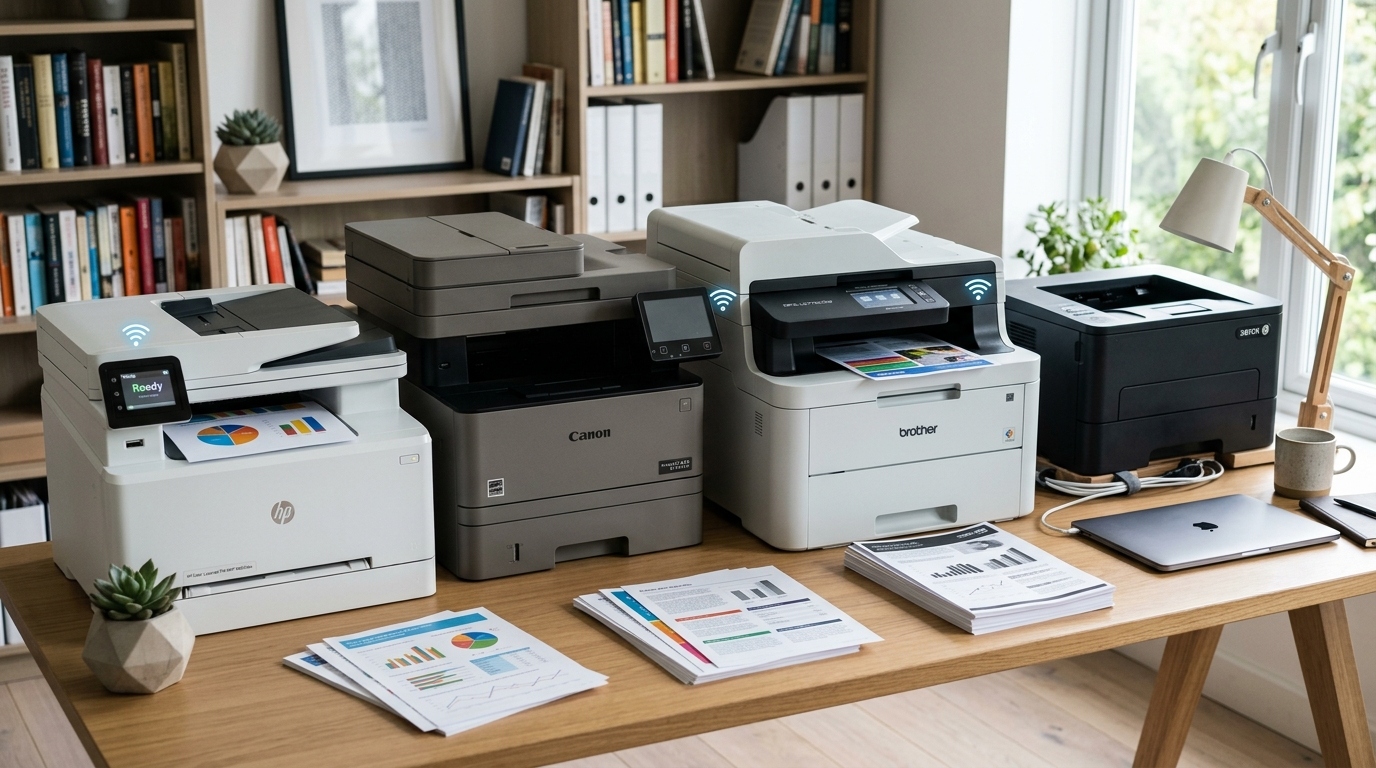
Installation Warning: Laser printers reach high internal temperatures during the fusing process. Always leave at least 6 inches of clearance around the ventilation ports to prevent overheating. If you experience a paper jam, always power down the unit before reaching into the fuser area, as it can remain dangerously hot for several minutes after printing.
A home-office printer earns its space when a signed contract, tax form, or shipping label has to come out cleanly on the first try. I assessed the best laser printers for home office work around the things that interrupt a workday: whether they scan a stack without babysitting, wake reliably for a phone print, handle two-sided reports, and make future toner decisions clear.
The split is simple for most people. Choose monochrome if nearly every page is text; choose color only when proposals, worksheets, charts, or client handouts need it. A multifunction printer pays off when copying and scanning are routine, while a print-only machine can be smaller and less distracting.
This 2026 update compares eight available models from Brother, Canon, and HP. I have not treated a quoted speed or a marketplace star score as a lab result; instead, the recommendations weigh the documented feature set, current listing status, cartridge policy, and the practical concerns repeatedly raised by home-office owners.
One recurring lesson from user discussions is that “no fuss” matters more than a long feature list. That is why this guide calls out paper capacity, automatic duplex printing, automatic document feeder capacity, Wi-Fi options, and the limits of color laser output before asking you to choose a model.
Three Laser Printers That Fit Real Home-Office Workflows

The Brother DCP-L2640DW is the sensible default for a document-first setup because it combines a 50-sheet feeder, scan/copy functions, a 250-sheet tray, and automatic two-sided output. It is the best all-in-one laser printer for home use here when color is not part of the job.
The Brother HL-L2405W makes more sense when you only print occasional letters, returns, invoices, and drafts. Its large tray is unusually useful for a compact print-only monochrome laser printer, though manual two-sided printing asks you to reload pages.
For people who genuinely need color plus scanning, copying, and faxing, the Brother MFC-L3720CDW has the fuller workflow. Its slower stated output is less attractive for long print runs, but its ADF, touchscreen, Wi-Fi Direct, and cloud shortcuts make it a better match for a busy color home office than a bare print-only unit.
A Quick Comparison of All Eight Home-Office Picks
Start with function, not the badge. The comparison below separates print-only from all-in-one choices and highlights duplexing, tray capacity, and connections, which are more telling for a home workstation than headline speed alone.
| Product | Key Features | Action |
|---|---|---|
|
Brother DCP-L2640DW
|
|
Check Latest Price |
 Brother HL-L2405W
|
|
Check Latest Price |
 HP LaserJet Pro MFP 3101sdw
|
|
Check Latest Price |
 HP Color LaserJet Pro MFP 3301sdw
|
|
Check Latest Price |
 Canon imageCLASS LBP122dw
|
|
Check Latest Price |
 HP Color LaserJet Pro 3201dw
|
|
Check Latest Price |
 Canon Color LBP646Cdw
|
|
Check Latest Price |
 Brother MFC-L3720CDW
|
|
Check Latest Price |
For ownership cost, do not guess from the machine’s initial ticket. Compare the ISO yield printed on each replacement cartridge, then divide the cartridge’s current retailer cost by that yield; compare black-only pages separately from a color document that consumes cyan, magenta, yellow, and black.
Cartridge pricing moves too often to put a frozen figure in this guide. Brother’s monochrome TN830 and TN830XL family is a straightforward high-yield path for the two Brother black-and-white models, Canon’s compact unit uses 071 or 071 high-capacity toner, and the color choices have four consumables to budget for.
HP buyers should read the cartridge policy before checkout. The HP models here are designed for cartridges with HP chips or circuitry and may reject cartridges using non-HP chips, so their long-term consumables route is less flexible than a shopper may expect.
In-Depth Reviews of the Best Laser Printers for Home Office
1. Brother DCP-L2640DW – A Document Workhorse With Scanning Built In
Brother DCP-L2640DW Wireless Compact Monochrome...
36 ppm mono
Print scan copy
50-sheet ADF
Auto duplex
What We Like
- Fast monochrome output
- ADF and flatbed scanner
- Automatic duplex
- 250-sheet tray
What We Don't Like
- Monochrome only
- 700-page starter toner
For most document-heavy desks, this Brother is the easiest recommendation because it is not merely a printer. The DCP-L2640DW combines black-and-white printing, copying, and scanning in one compact business-style machine, so signed paperwork does not require a separate scanner or a trip to a copy shop.
I would place it first for a consultant, accountant, remote employee, or small seller who handles packets rather than photos. Its stated 36 pages per minute gives it enough headroom for reports, and the 250-sheet tray means a ream can sit ready without frequent refills.
ADF scanning makes paperwork less tedious
The 50-sheet automatic document feeder is the feature that separates this model from cheaper print-only choices. Feed a multi-page agreement or receipts through it, rather than placing every sheet on the flatbed one at a time; it is a meaningful time saver for recurring administrative work.
The ADF does not turn this into a duplex-scanning specialist, so users who often digitize two-sided documents should confirm the workflow they can accept. For one-sided forms and ordinary copying, it is a strong home-office fit.
Two-sided reports without page handling
Automatic duplex printing is a practical paper-saving feature, not decorative spec-sheet filler. It lets you send a two-sided PDF and walk away, which makes this the best black and white laser printer for home use among the models here for lengthy reports, manuals, and client packets.
Brother rates the machine at up to 36 ppm for monochrome output. Actual throughput varies with document layout and duplexing, but the class of speed is right for a desk that prints in bursts throughout the day.
Network choices for a fixed or flexible desk
Dual-band wireless, Ethernet, and USB cover several setup styles. Ethernet is the low-drama choice when the printer stays near a router or switch; dual-band Wi-Fi suits a shared household, and USB remains a fallback for a single computer.
Brother Mobile Connect adds phone-based printing, scanning, and basic management. Before judging any wireless printer as unreliable, put the phone and printer on the same local network, complete firmware updates, and give the device a reserved address in the router if it repeatedly disappears.
Toner planning before the starter cartridge runs out
The box includes starter toner rated for 700 pages, which matters because it will not last as long as a full replacement. For regular use, compare genuine TN830 against TN830XL based on current cost per ISO-rated page, not the box price alone.
Forum discussions consistently favor Brother monochrome machines for being ready after periods of light use. Toner does not behave like liquid ink that can dry in a print head, though a printer still benefits from a clean, dry location and paper kept out of humidity.
2. Brother HL-L2405W – The Straightforward Budget Monochrome Choice
Brother HL-L2405W Wireless Compact Monochrome Laser Printer...
30 ppm mono
Print-only
250-sheet tray
Dual-band Wi-Fi
What We Like
- Affordable mono printing
- Large paper tray
- Manual feed slot
- Dual-band wireless
What We Don't Like
- No scanner or copier
- Manual duplex
The HL-L2405W is for the person who has stopped asking a printer to do everything. It prints black text, connects by Wi-Fi or USB, takes a useful amount of paper, and avoids adding a scanner that will sit unused.
That narrow purpose makes it a credible best laser printer for personal use. Writers, students, remote workers printing occasional forms, and households that need labels or return documents can keep the setup focused and the footprint manageable.
A 250-sheet tray in a print-only body
Paper capacity is the surprise strength. A 250-sheet tray means the printer is ready for a substantial batch of drafts or invoices, while the manual feed slot gives envelopes and specialty sheets a direct path.
This is more convenient than tiny tray printers for anyone who prints every week but does not need an ADF. It also helps keep unused paper enclosed instead of stacked on a desk where it can curl or collect dust.
Know what manual duplex asks of you
The tradeoff is manual duplex, not automatic two-sided printing. The printer can guide the process, but you retrieve and reload sheets for the reverse side; that is fine for a short packet and tiresome for a long report.
If two-sided printing is a weekly routine, move up to the Canon LBP122dw or the Brother DCP-L2640DW. If most jobs are one page, this compromise may never matter.
Wireless printing without an oversized machine
Built-in 2.4 GHz and 5 GHz Wi-Fi is more useful in a crowded home than a single-band connection. Use the manufacturer setup flow with the printer near the router for the first connection, then relocate it only after a test print from each main computer.
Brother Mobile Connect gives this lean printer a way to receive mobile jobs. Mac and Windows users should still install the current driver where needed, while phone users should look for the device through the supported mobile workflow rather than an obsolete cloud-print service.
A sensible toner family for light or regular use
Like the Brother all-in-one, this model uses TN830 or TN830XL genuine toner. The high-yield option deserves a current cost-per-page calculation if you print often; occasional users may prefer to buy only when the existing cartridge is near empty.
Its limitation is also its virtue: there is no flatbed, no copier, and no fax feature to learn. Buy it when printing is the entire assignment, not when you expect to scan tax records next week.
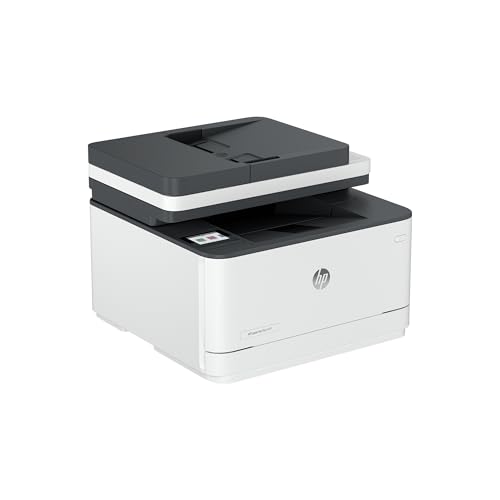
3. HP LaserJet Pro MFP 3101sdw – A Fast HP Monochrome All-in-One
HP LaserJet Pro MFP 3101sdw Wireless Black and White...
35 ppm mono
Print scan copy
50-sheet ADF
Auto duplex
What We Like
- Fast black output
- ADF and auto duplex
- AirPrint and Mopria
- Ethernet available
What We Don't Like
- Monochrome only
- HP-chip cartridge restriction
The HP LaserJet Pro MFP 3101sdw aims at a home business or small team that wants a more office-like black-and-white device. It prints, scans, and copies, includes a 50-sheet ADF, and has automatic duplex printing for reduced paper handling.
It is a good fit when several people share one printer or when scan-and-copy tasks appear as often as print jobs. At up to 35 ppm, it has nearly the same output class as the Brother DCP-L2640DW, but the supply policy should be part of the decision.
Speed and paper handling for a small team
The 250-sheet input tray and automatic two-sided printing suit reports, forms, and internal documents. A stated 35 ppm is about brisk turnaround for this category; first-page-out behavior, document coverage, and duplex mode still affect the real wait.
The 50-sheet ADF is the useful companion feature. It lets a small team turn a paper stack into a digital file or copies with less manual effort, provided the originals are in good condition and fed squarely.
AirPrint, Mopria, Ethernet, and local control
This is an AirPrint laser printer as well as a Mopria-capable option, which reduces friction for common Apple and Android printing tasks. It also offers Wi-Fi, Ethernet, and USB, allowing a home office to favor a wired connection when a wireless network is overloaded.
For a shared desktop, Ethernet is worth choosing if a cable route is possible. It avoids some wireless handoff problems and keeps the machine reachable even when phones and laptops move between network bands.
The HP cartridge policy is a real tradeoff
HP says this printer is intended to work with cartridges using HP chips or circuitry and may block alternatives using non-HP chips or circuitry. That does not make it unsuitable, but it means shoppers should price genuine cartridges and expected yield before committing.
This point comes up often in owner discussions because toner spending can outweigh a machine’s initial cost over its working life. Treat firmware prompts carefully, read release notes, and do not assume every third-party cartridge option will remain usable after an update.
Who should pick HP’s monochrome MFP?
Pick it if fast monochrome output, a feeder, and familiar mobile standards matter more than cartridge freedom. Skip it if you need color or want to keep your supply choices as open as possible.
The lack of color is not a fault for text-based work. It is an advantage if invoices, legal-style documents, and spreadsheets dominate, since a single black cartridge is easier to plan for than a four-toner color set.
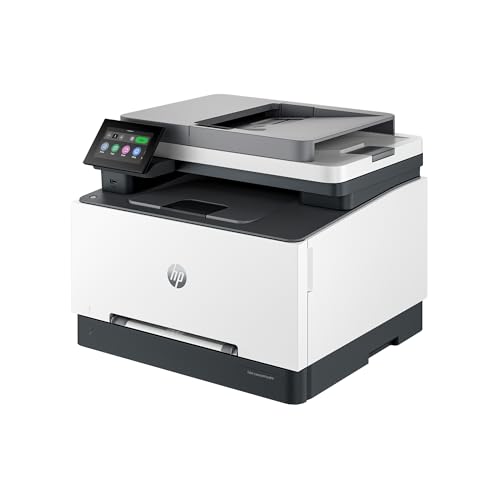
4. HP Color LaserJet Pro MFP 3301sdw – Premium Color With Full Office Functions
HP Color LaserJet Pro MFP 3301sdw Wireless All-in-One Color...
26 ppm color
Print scan copy
ADF and duplex
250-sheet tray
What We Like
- Color all-in-one
- Auto duplex
- ADF
- TerraJet color output
What We Don't Like
- Four toner cartridges
- HP-chip cartridge restriction
The HP Color LaserJet Pro MFP 3301sdw is for a professional whose printed materials need more than black text. It adds color print, scan, and copy functions to a 250-sheet tray, automatic duplexing, and an ADF, making it a full home-office hub rather than a color add-on.
Use it for charts, training handouts, proposals, branded worksheets, and business documents where consistent color carries information. It is not a photo-first machine; color laser technology is best at crisp documents and graphics, not gallery-quality photographic prints.
Color documents at a stated 26 ppm
HP rates both black and color output at up to 26 ppm. That is a solid category speed for a person who creates regular client-facing documents, although full-color pages with dense graphics can take longer to process than simple text.
The TerraJet toner system is positioned for vivid business color. Keep expectations grounded: paper choice, artwork, coverage, and monitor calibration all influence what you see on the page.
ADF and automatic duplex support a paper workflow
Color models make the most sense when the entire workflow benefits, and this one can scan and copy as well as print. The ADF helps with multi-page source material, while auto duplex turns a long color document into a more compact two-sided handout.
That capability distinguishes it from the color print-only machines below. If scanning is rare, a print-only color unit can be the better use of desk space; if it is weekly work, an all-in-one is easier to live with.
Calculate the real four-cartridge commitment
This HP uses 218A standard or 218X high-yield cartridges. A sensible total-cost estimate starts with your normal monthly black pages, then separately estimates color coverage, because a colorful page draws from multiple cartridges and does not compare fairly with a text page.
Buyers should also factor in HP’s original-chip restriction. This is a premium choice for people who value the documented feature package and accept OEM supply planning, not for those looking for a highly flexible third-party toner route.
When professional color is worth the desk space?
Choose the 3301sdw when polished color, scanning, copying, and automatic two-sided work all appear in the same week. It is a better professional fit than an inkjet for durable text and occasional pauses between print jobs.
Skip it if black text is nearly all you print, or if photos are the main output. A monochrome laser has simpler supplies, and a photo-oriented inkjet has a different strength.
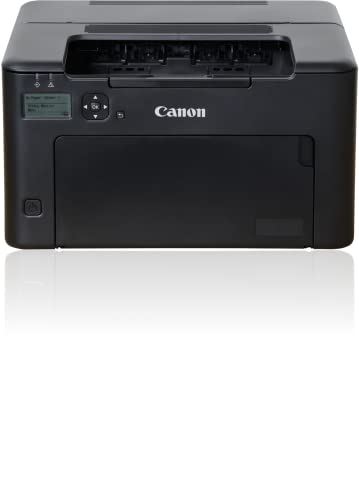
5. Canon imageCLASS LBP122dw – Compact Automatic Duplex for Tight Desks
Canon imageCLASS LBP122dw - Monochrome Duplex Wireless Laser...
30 ppm mono
Print-only
Auto duplex
150-sheet capacity
What We Like
- Compact 12.4-pound design
- Automatic duplex
- 30 ppm output
- Mobile printing
What We Don't Like
- Print-only
- 150-sheet paper capacity
Not every desk has room for an all-in-one. The Canon imageCLASS LBP122dw is a small, print-only monochrome option designed for personal printing, but it still includes automatic duplexing rather than asking the user to turn a stack by hand.
At 12.4 pounds, it is the easiest model here to place on a shelf, rolling cart, or small side table. That makes it appealing to apartment dwellers, students, and remote workers whose office is one corner of a living space.
Small footprint, not a small output class
Canon rates this unit at up to 30 ppm for black-and-white output. That is enough pace for occasional bursts of home-office documents, and the compact dimensions make the printer easier to keep accessible instead of stored away.
The 150-sheet capacity is the tradeoff. It is sufficient for personal use, but someone who prints large reports or several reams a month will appreciate a 250-sheet tray more.
Automatic duplex at the compact end of the market
Automatic duplex is unusually valuable in a small print-only printer because it prevents paper from piling up. It is a direct fit for two-sided school papers, reading copies, shipping records, and home-business forms.
It also makes this an appealing best laser printer for home use when space outranks scan/copy functions. You get a more polished result without the physical size of a multifunction printer.
Mobile support and Chromebook-friendly use
The Canon PRINT app supports mobile printing, and the product information lists Chromebook compatibility. Confirm the setup process with your specific Chromebook or home router before a deadline, especially if the printer will be used by several people.
For any wireless issue, try a direct USB connection first to confirm the printer itself is working. Then revisit Wi-Fi credentials, router band settings, and the current Canon software rather than repeatedly adding the printer as a new device.
Toner and the limits of the minimalist approach
The LBP122dw uses Canon 071 or 071 high-capacity toner. High-capacity toner can reduce replacement frequency, but the right comparison remains the current cost per yield-rated page at your expected print volume.
There is no scanner, copier, ADF, or large drawer. That is exactly right for one-person text printing and exactly wrong for someone who needs to digitize a signed packet every month.
6. HP Color LaserJet Pro 3201dw – Color Print-Only for Frequent Documents
HP Color Laserjet Pro 3201dw Wireless Color Laser Printer...
26 ppm color
Print-only
Auto duplex
250-sheet tray
What We Like
- Color and mono output
- Auto duplex
- 250-sheet tray
- Dual-band Wi-Fi
What We Don't Like
- No scanner or copier
- HP-chip cartridge restriction
The HP Color LaserJet Pro 3201dw is aimed at a document-heavy office that needs color but already has another way to scan. It removes the ADF and flatbed to focus on printing, while keeping automatic duplexing, a 250-sheet tray, and stated output of up to 26 ppm in black or color.
This is the better HP color route for a professional who produces color reports and worksheets but almost never copies paperwork. The missing multifunction hardware can be a benefit when desk tasks are print-focused.
A color printer built around a full paper tray
The 250-sheet input tray helps when color jobs arrive in batches. Instead of feeding a few sheets at a time, you can leave standard paper loaded and use the machine as a regular document printer for a small office.
Automatic two-sided printing helps control paper use for proposals and reference materials. It does not make dense graphic files instant, but it makes the repetitive mechanics of two-sided jobs much easier.
Dual-band Wi-Fi is helpful, not magic
HP lists dual-band self-reset Wi-Fi, intended to detect and resolve connection trouble. That is useful in a home with many devices, but printer reliability still depends on router placement, stable firmware, and keeping the printer on a network that laptops and phones can reach.
During setup, print a network report and record the IP address. If a device loses the printer after sleep, a reserved address and current driver often create a more stable fix than reinstalling the whole system.
TerraJet color and original-chip supply planning
TerraJet toner is intended to produce vivid business color. Like the HP color all-in-one, this printer works only with cartridges using original HP chips or circuitry and can block cartridges that do not meet that condition.
That makes supply research mandatory for a budget color laser printer search. Check the current yield and cost of all four replacement colors before choosing a model simply because its body price appears attractive.
A focused choice with a clear limitation
Buy the 3201dw for color print output, two-sided work, and a reasonably large tray when scanning is not required. Its stated 26 ppm speed makes more sense for recurring document work than for an occasional personal print station.
Pass on it if your home office routinely scans contracts or copies forms. The HP 3301sdw or Brother MFC-L3720CDW is a much more complete workspace tool.
7. Canon Color imageCLASS LBP646Cdw – A Color Print-Only Alternative With Broad Mobile Support
Canon Color imageCLASS LBP646Cdw Wireless Laser...
26 ppm color
Print-only
Auto duplex
AirPrint and Mopria
What We Like
- Fast color output
- Auto duplex
- AirPrint and Mopria
- Ethernet and Wi-Fi
What We Don't Like
- No scan or copy
- Substantial color-laser size
The Canon Color imageCLASS LBP646Cdw fills a useful gap: it is a current color print-only model for people who want business documents, not an all-in-one. It replaces the unavailable Canon model in the prior version of this guide and brings 26 ppm color and monochrome output, automatic duplexing, and a 250-sheet cassette.
It is a strong option when a scanner already exists or documents are born digital. Canon’s stated feature set also makes it friendlier for mixed-device homes than some older color printers, with Wi-Fi, USB, Ethernet, AirPrint, Mopria, and Canon PRINT support.
Document color without the multifunction bulk
At up to 26 ppm in color or monochrome, this Canon belongs in the same speed tier as the HP color machines reviewed above. It suits presentations, color-coded handouts, and correspondence where laser-sharp text matters more than photographic gradients.
Print-only does not mean tiny. The product information describes a 44-pound-class color laser, so measure the shelf and allow room for opening the cassette and reaching cables before bringing it into a compact office.
AirPrint, Mopria, Wi-Fi, and Ethernet choices
For Apple households, native AirPrint support is a major convenience because it can send a local job without a separate cloud-print account. Mopria provides a comparable mobile-print path for many Android users, while wired Ethernet can anchor the printer on a fixed desk.
This mix makes it an especially good candidate for Mac, Windows, and phone users sharing one machine. Run one test print from each platform during setup, including a duplex job, rather than discovering a driver gap on a deadline.
Paper capacity and two-sided print work
The 250-sheet standard cassette handles an ordinary workweek without constant loading, and the one-sheet multipurpose tray is available for an envelope or specialty page. Automatic duplexing adds the expected professional finish for reports and reference copies.
There is no scanner, copier, or fax function. That limitation should steer buyers who receive paper records toward an all-in-one, but it lets a digital-first desk avoid paying for functions it will not use.
Canon 075 and high-capacity toner decisions
The LBP646Cdw uses Canon genuine 075 or 075 high-capacity toner. With color laser, calculate a replacement plan from all four cartridges and the coverage of your actual documents, not from a black-text example.
This model earns the color print-only recommendation when flexible connections and automatic duplex matter as much as output speed. It is not the right pick for photo specialists or anyone who regularly scans physical paperwork.
8. Brother MFC-L3720CDW – The Full-Feature Color All-in-One
Brother MFC-L3720CDW Wireless Color Laser Printer with...
19 ppm color
Print scan copy fax
50-sheet ADF
Auto duplex
What We Like
- Color all-in-one
- ADF and auto duplex
- Wi-Fi Direct
- Cloud shortcuts
What We Don't Like
- Modest 19 ppm speed
- Large multifunction footprint
The Brother MFC-L3720CDW replaces the unavailable Brother color model previously listed and is the most complete color office machine in this lineup. It prints, scans, copies, and faxes, with a 50-sheet ADF, automatic duplex printing, a 250-sheet adjustable tray, and a touchscreen designed for regular workflow use.
It is my pick for the person who needs a best color laser printer for home office duties, not just a color printer. The 19 ppm rated speed is modest compared with HP and Canon color print-only units, but the time saved by its scan/copy/fax tools can matter more than raw pages per minute.
A real color workspace instead of a single-purpose printer
The 50-sheet automatic document feeder is the centerpiece for administrative work. It makes copying or scanning a group of pages less of a manual project, while the flatbed remains useful for a delicate original or a single page.
Fax may be irrelevant for many homes, yet some medical, legal, and property workflows still need it. The value is not that every buyer will use every mode, but that the right buyer can keep several tasks in one location.
Connectivity for guests, phones, and a shared household
Dual-band Wi-Fi, Wi-Fi Direct, and USB support a range of ways to connect. Wi-Fi Direct is especially handy when a guest or a phone needs a direct local connection without joining the main household network.
The 3.5-inch color touchscreen offers customizable shortcuts and access to listed cloud services such as Google Drive, Dropbox, and OneNote. Those are workflow shortcuts, not a replacement for normal local AirPrint or Mopria-style printing, so set up the connection style your household actually uses.
The 19 ppm speed has a specific audience
At up to 19 ppm for color and black-and-white pages, the MFC-L3720CDW will not win a long-batch speed contest. It is better for a home office that produces frequent small and medium jobs while also scanning, copying, or occasionally faxing.
If your work means printing hundreds of finished color pages at once, the 26 ppm HP or Canon print-focused models deserve a closer look. If each job includes a scan, copy, or file-management step, the Brother’s broader feature set pulls ahead.
Color toner and an honest fit check
As with every color laser printer, plan for four consumables and compare yield against your page mix. Color laser works well for sharp charts, legible forms, and colorful business communication, but a photo-focused buyer will be happier with a different printer category.
Choose this Brother when scan/copy functions, a feeder, Wi-Fi Direct, and color documents belong in the same home office. Avoid it if your priority is the fastest possible color print-only engine or the smallest possible device.
Understanding Laser Printer Technology for Home Offices
A laser printer uses an electrostatic image and powdered toner, then fuses that toner to paper with heat and pressure. The process produces crisp, smudge-resistant text and is well suited to document printing, whereas an inkjet sprays liquid ink onto the page.
Toner cartridge: A replaceable container of powder used by a laser printer. Its stated ISO page yield is the starting point for comparing running costs, though real yield changes with coverage, page design, and print settings.
For home-office use, the advantage is readiness. A laser printer can sit unused for a while without the nozzle-clogging concern associated with many liquid-ink systems, making it appealing for people who print unpredictably but need clean text when the moment arrives.
Modern machines also offer automatic duplex printing, wireless printing, Ethernet, mobile apps, and automatic document feeders. These are not exclusive to laser printers, but they make a laser device a strong document tool for a remote-work desk.
How to Choose a Laser Printer for Your Home Office?
The best choice begins with the output you actually make, then works backward to supplies, room, and network access. A printer that is impressive on paper but has no scanner, a tiny tray, or a costly supply policy for your volume becomes a daily annoyance.
Decide monochrome versus color before comparing models
Choose monochrome when you mostly print text, invoices, forms, labels, drafts, and legal-style documents. A single black toner cartridge is easier to track, the machines are generally more compact, and a Brother or Canon monochrome model can be a very good best laser printer for personal use.
Choose color when color itself communicates something: client proposals, classroom material, presentation charts, branded handouts, or marked-up designs. Do not choose color laser primarily for photographs; it has a document and graphic strength rather than an inkjet photo strength.
Decision shortcut: Need scan/copy plus black text? Start with the Brother DCP-L2640DW or HP 3101sdw. Need color plus scan/copy? Start with the Brother MFC-L3720CDW or HP 3301sdw. Need only printing? Compare the compact Canon LBP122dw, Brother HL-L2405W, Canon LBP646Cdw, and HP 3201dw.
Match print volume to tray capacity, duplexing, and speed
For occasional printing, a compact unit with a 150-sheet tray may be more than enough. For regular weekly documents, a 250-sheet tray is noticeably less disruptive, and a manual feed slot is useful for envelopes or specialty pages.
Automatic duplex printing matters when you routinely create reports, packets, or reading copies. Manual duplex is acceptable for a few pages, but it adds an error-prone reload step when work piles up.
Pages per minute should be read as a maximum rating, not a promise that every file will finish at that pace. Duplex documents, dense graphics, Wi-Fi conditions, and a printer warming from sleep all affect the experience; for most home offices, dependable output is more valuable than chasing the biggest ppm figure.
Choose scan and copy hardware based on your paper intake
An all-in-one printer is worth its footprint when you scan signed agreements, receipts, records, or worksheets more than occasionally. A flatbed is useful for a single page or fragile original, while an automatic document feeder makes a stack manageable.
Check whether the machine has the kind of two-sided scanning your workflow needs rather than assuming “ADF” covers every job. For ordinary one-sided source documents, a 50-sheet ADF is a major quality-of-life feature.
Set up current mobile and network printing options
Google Cloud Print is discontinued and should not guide a purchase. For current home-office use, look instead for Apple AirPrint on Apple devices, Mopria support on Android, a manufacturer mobile app, Wi-Fi Direct where helpful, Ethernet for a stable fixed location, and explicit Chromebook compatibility when applicable.
A good setup sequence is simple: update the printer firmware, connect it to the preferred network band, install current software on the main computer, then print a test document from a phone and each computer. If the printer regularly vanishes after sleep, reserve its network address through the router and check power-saving settings before replacing hardware.
Wi-Fi Direct is useful for an occasional direct connection, but it is not always the best permanent home network setup. A printer on normal Wi-Fi or Ethernet is easier to share with a household, while USB is a reliable fallback for one desk.
Build a toner and firmware checklist before you buy
Use the same formula for every model: current cartridge cost divided by the manufacturer’s stated ISO page yield. Do that separately for black-and-white printing and for the realistic color coverage of your work, then multiply by your expected monthly page count.
High-yield toner can reduce the replacement frequency, but it only wins if you will use it before your needs change. Keep at least one realistic spare plan for deadline-sensitive work, especially with color printers where one depleted color can stop a job.
Also check chip and firmware policy. HP explicitly states that the models in this guide work with cartridges that have HP chips or circuitry and may block non-HP-chipped cartridges; anyone who values broad third-party toner choice should treat that as a decision factor, not fine print.
Measure the room, the paper path, and the noise reality
Measure more than the top of a cabinet. Leave room to open trays, load paper, reach the rear for cables, and access toner doors; color laser printers in particular can be much heavier and deeper than their product photos suggest.
Put a laser printer on a stable surface with ventilation around it, away from loose dust and drinks. A surge-protected power strip is sensible for a home office, and a location outside a quiet call area may be welcome when printing noise would interrupt meetings.
Best Laser Printer for Home Office FAQs
Is it worth buying a laser printer for home use?
u003cstrongu003eYes, if you mainly print documents.u003c/strongu003e A laser printer produces crisp text, uses toner that does not face the same nozzle-clogging issue as inkjet ink, and can be economical at regular text volume. Choose an inkjet instead if photo printing is your main task.
What is the best laser printer for personal use?
u003cstrongu003eThe Canon imageCLASS LBP122dw is a strong personal-use choiceu003c/strongu003e when you want a compact black-and-white printer with automatic duplexing. Pick the Brother HL-L2405W if you prefer a 250-sheet tray and can accept manual two-sided printing.
Which laser printer is best for office use?
u003cstrongu003eThe Brother DCP-L2640DW is the best fit for most document-first home offices.u003c/strongu003e It combines 36 ppm monochrome output, print-scan-copy functions, a 50-sheet ADF, automatic duplexing, and a 250-sheet tray. For color all-in-one work, consider the Brother MFC-L3720CDW.
Why are laser printers being phased out?
u003cstrongu003eLaser printers are not being phased out.u003c/strongu003e Inkjet choices have improved and paperless workflows have reduced demand in some homes, but laser printers remain a practical option for fast, durable text documents, intermittent use, and business-style paper handling.
How do I choose between a monochrome and color laser printer?
u003cstrongu003eBuy monochrome for text, forms, and invoices; buy color for charts, handouts, and client-facing documents.u003c/strongu003e Color laser printers need four toner cartridges and more desk space, while monochrome machines usually cost less to supply and are simpler to maintain.
Final Recommendations for Home-Office Laser Printing
The Brother DCP-L2640DW remains the best laser printer for home office users who need crisp monochrome output plus regular scanning and copying. Its 50-sheet ADF, 250-sheet tray, automatic duplexing, and multiple connection choices suit the broadest set of document workflows.
Choose the Brother HL-L2405W when you want a simple, personal print-only monochrome machine with a large tray. Choose the Canon LBP122dw when desk space and automatic duplexing are the priority, and select the HP 3101sdw when you prefer its black-and-white all-in-one feature set and are comfortable with its cartridge policy.
For color, the Brother MFC-L3720CDW is the strongest all-in-one fit, the HP 3301sdw is the premium color multifunction route, and the Canon LBP646Cdw or HP 3201dw makes sense when scanning is unnecessary. Compare current toner yield and supply terms one last time, measure your space, and choose the machine that removes work from your week in 2026.

![Best Photo Printers [cy]: 12 Expert-Tested Models for Every Budget](https://www.guidespot.com/wp-content/uploads/2026/07/featured-update-69920-1784153841296-370x245.jpg "12 Best Photo Printers (2026): Top-Rated Models Tested for Color & Detail")
![Best Receipt Printers [cy]: 12 Models Tested for Business](https://www.guidespot.com/wp-content/uploads/2026/07/featured-update-73966-1784153701943-370x245.jpg "Best Receipt Printers (2026): 12 Reliable Models Tested for Speed & Connectivity")
![Best Resin 3D Printers [cy]: Complete Reviews of 11 Top Models](https://www.guidespot.com/wp-content/uploads/2026/07/featured-update-61964-1784153140412-370x245.jpg "10 Best Resin 3D Printers (2026): Tested & Ranked for Precision & Speed")