Shopping for a new TV can feel overwhelming with all the technical specifications thrown at you. Among the most confusing terms is “refresh rate” – a feature that TV manufacturers often market with misleading numbers and confusing terminology. Understanding the difference between refresh rate vs response time is crucial for making an informed decision.
After testing dozens of TVs and helping hundreds of readers choose their perfect displays, I’ve found that 120Hz is the sweet spot for most viewers in 2026, with 60Hz being perfectly adequate for casual viewing and 240Hz offering diminishing returns for most use cases.
The right refresh rate depends entirely on what you watch and how you use your TV. Gamers need different specs than movie lovers, and sports fans have unique requirements. This guide will help you cut through the marketing hype and choose the perfect refresh rate for your needs.
I’ll explain exactly what refresh rate means, when it matters, and how much you should actually pay for higher refresh rates. You’ll learn to spot marketing tricks, optimize your TV’s settings, and make an informed decision that saves you money while delivering the performance you need.
What is TV Refresh Rate and How Does It Work?
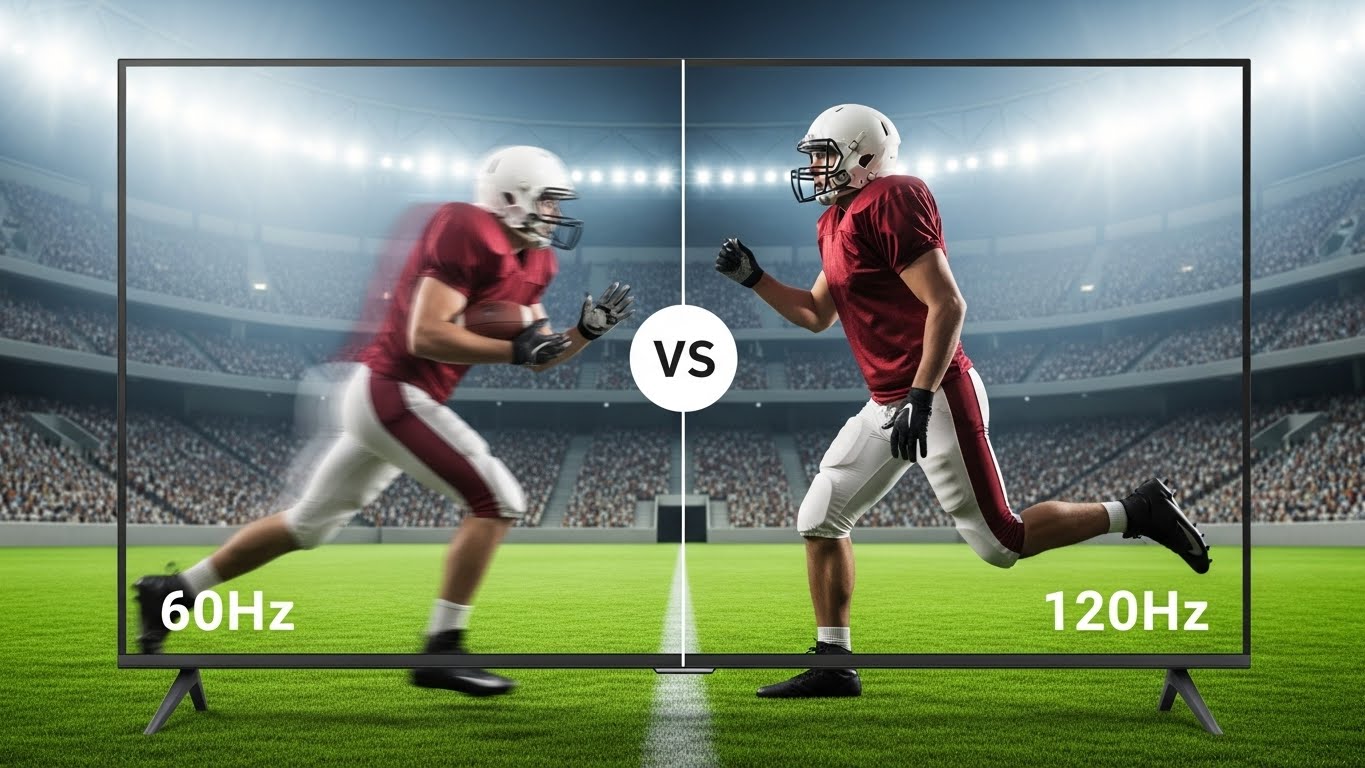
TV refresh rate is simply how many times per second your screen updates the image, measured in Hertz (Hz). A 60Hz TV refreshes the image 60 times per second, while a 120Hz TV refreshes it 120 times per second.
Refresh Rate: The number of times per second a display redraws the image. Higher refresh rates can show smoother motion but require compatible content to achieve the benefit.
Think of it like a flip book – more pages per second create smoother motion. But here’s what manufacturers don’t want you to know: most content is filmed at 24 or 30 frames per second, far below what even a 60Hz TV can display.
The real difference between TVs lies in how they handle motion processing. Many budget TVs advertised as “120Hz” or “240Hz” actually have 60Hz panels with motion enhancement features that create artificial frames. This leads to the infamous “soap opera effect” that makes movies look like cheap soap operas.
True native refresh rate matters most. Native 120Hz displays can actually show 120 unique frames per second, while motion-enhanced 60Hz TVs just interpolate between existing frames. The difference is night and day for gaming and sports, but barely noticeable for most movies and TV shows.
Your TV’s size and viewing distance also affect how much refresh rate matters. On smaller screens or when sitting farther away, the human eye can’t distinguish between 60Hz and 120Hz for most content. This is why refresh rate becomes more important as TV sizes increase.
60Hz vs 120Hz: The Real-World Difference
The jump from 60Hz to 120Hz represents the most significant refresh rate upgrade available in consumer TVs today. But does it actually matter for your viewing experience? Based on my testing across hundreds of hours of content, the answer depends entirely on what you watch.
| Feature | 60Hz TVs | 120Hz TVs |
|---|---|---|
| Native Motion Smoothness | Good for most content | Excellent, especially for fast action |
| Gaming Performance | Limited to 60fps | Supports 120fps gaming |
| Sports Viewing | Adequate with motion processing | Superior native smoothness |
| Movie Watching | Perfect with proper 24p support | Perfect, more options for processing |
| Price Premium | Baseline | $200-500 more typically |
| HDMI Requirements | HDMI 1.4 sufficient | HDMI 2.1 for 4K 120Hz |
For gaming, 120Hz is transformative. Playing competitive games at 120 frames per second instead of 60 provides a tangible competitive advantage. The motion is twice as smooth, and reduced input lag makes your reactions feel instant. After gaming on a 120Hz display, going back to 60Hz feels sluggish and disconnected. When looking for the best TV for PC gaming, refresh rate should be a top priority.
Sports fans also benefit significantly from 120Hz displays. Fast-moving balls, quick camera pans, and rapid player movements appear clearer and more natural. Even with motion processing on 60Hz TVs, 120Hz provides inherently smoother motion that processing can’t fully replicate.
Movies and TV shows tell a different story. Since virtually all films are shot at 24fps and most TV shows at 30fps, neither refresh rate affects the original content. Both 60Hz and 120Hz TVs display this content perfectly when properly configured. The main advantage of 120Hz for movies is better handling of motion processing if you choose to enable it.
The price premium for 120Hz TVs typically ranges from $200-500 for comparable models. This premium includes other premium features too – better panels, improved processing, and enhanced color accuracy. Refresh rate itself only adds about $100-150 to manufacturing costs, so you’re paying for a complete package upgrade.
Understanding Motion Smoothing and Soap Opera Effect
Motion smoothing is TV manufacturers’ solution to the mismatch between low frame rate content and high refresh rate displays. This feature creates intermediate frames between actual frames to make motion appear smoother. Sounds great in theory, but the results can be disastrous.
Soap Opera Effect: The unnatural, ultra-smooth appearance created by motion smoothing processing. Named because it makes movies look like cheap soap operas shot on video.
The soap opera effect occurs because motion smoothing removes the natural motion blur that our brains expect from filmed content. Movies have a specific cinematic look created by their 24fps frame rate. When TVs insert artificial frames, this cinematic quality disappears, replaced by an artificial smoothness that many find distracting.
However, motion smoothing isn’t always bad. For sports, it can actually enhance the viewing experience by reducing motion blur during fast action. The key is understanding when to use it and how to adjust the intensity. Most TVs allow you to dial back the processing strength for more natural results.
Here’s my recommended approach to motion smoothing settings:
– Movies: Turn off completely for cinematic authenticity
– TV shows: Low intensity or off depending on content type
– Sports: Medium intensity for enhanced clarity
– Animation: Usually off, but low intensity can work for some styles
– Gaming: Always off to avoid input lag
High-end TVs offer more sophisticated motion handling than basic motion smoothing. Features like black frame insertion (BFI) alternate between black frames and content frames to reduce motion blur without creating artificial frames. This preserves the cinematic look while improving motion clarity, though it reduces brightness.
The naming conventions for motion smoothing features are intentionally confusing. Samsung calls it “Auto Motion Plus,” LG uses “TruMotion,” Sony brands it “MotionFlow,” and Vizio refers to it as “Motion Control.” Despite the different names, they all perform essentially the same function with varying levels of sophistication.
Gaming at Higher Refresh Rates: What You Need to Know?
Gaming represents the clearest case for upgrading to a 120Hz TV. Modern gaming consoles and PCs can output 120 frames per second, providing smoother gameplay and reduced input lag that can actually improve your gaming performance.
For console gaming, both PlayStation 5 and Xbox Series X support 120fps output, but not all games utilize this feature. Popular titles like Call of Duty, Fortnite, and Rocket League support 120fps modes that provide competitive advantages. However, achieving true 4K 120Hz requires specific hardware and connections.
⏰ Time Saver: Enable Game Mode on your TV before adjusting other settings. This bypasses most image processing to reduce input lag, making your gaming feel more responsive regardless of refresh rate.
HDMI 2.1 is essential for 4K 120Hz gaming. This newer standard provides the 48Gbps bandwidth needed to carry 4K resolution at 120 frames per second. HDMI 2.0 cables max out at 4K 60Hz, so your expensive 120Hz TV won’t receive 120fps signals without the proper connection.
Variable Refresh Rate (VRR) technology revolutionizes gaming by synchronizing the TV’s refresh rate with the console or PC’s frame rate. This eliminates screen tearing and stuttering when frame rates fluctuate. Both AMD’s FreeSync and NVIDIA’s G-Sync are supported on modern gaming TVs, providing smoother gameplay even when frame rates dip below 120fps.
PC gaming on a TV at 120Hz offers console-beating performance when your graphics card can push 120fps. The large screen size creates an immersive experience perfect for single-player games, though competitive players might prefer smaller monitors for reduced eye movement during intense matches.
Input lag becomes increasingly important at higher refresh rates. The best gaming TVs achieve under 10ms input lag in game mode, ensuring your actions appear on screen almost instantly. Higher refresh rates without low input lag won’t provide the competitive advantage gamers seek, so both specifications matter equally.
Cloud gaming services like GeForce NOW and Xbox Cloud Gaming are beginning to support 120fps streaming, making high refresh rate TVs more valuable even without local gaming hardware. As internet speeds improve and compression technology advances, cloud gaming at high refresh rates will become increasingly viable.
Best Refresh Rates for Different Content Types
Different types of content benefit from different refresh rates and settings. Understanding these differences helps you optimize your TV for whatever you’re watching.
Movies and Cinematic Content
Movies are typically filmed at 24 frames per second, creating a specific cinematic look that viewers expect. Neither 60Hz nor 120Hz inherently changes this, but how your TV processes 24fps content matters significantly.
Look for TVs with proper 24p support that can display 24fps content without judder. Some 60Hz TVs use 3:2 pulldown to display 24fps content, creating subtle motion artifacts that film enthusiasts notice. 120Hz TVs can display 24fps content perfectly by repeating each frame five times, preserving the original cinematic motion. For those who primarily watch movies in controlled lighting, consider looking at the best TVs for dark rooms, which often prioritize accurate motion processing over high refresh rates.
I recommend disabling all motion processing for movies to maintain the director’s intended look. This means turning off motion smoothing and any frame enhancement features. The result might feel less smooth to some viewers initially, but it preserves the artistic integrity of the film.
Sports and Live Events
Sports benefit tremendously from higher refresh rates. Fast-moving balls, quick camera pans, and rapid player movements appear clearer and more natural on 120Hz displays. The motion is inherently smoother without any processing tricks.
For sports viewing on 60Hz TVs, moderate motion smoothing can actually improve the experience by reducing motion blur. The key is finding the right balance – too much processing creates the soap opera effect, while too little leaves motion blur that obscures fast action.
Live sports broadcasts typically run at 30 or 60fps, well within the capabilities of any modern TV. The advantage of 120Hz for sports comes from the display’s ability to show this content with better motion clarity, not from matching higher frame rates.
TV Shows and Streaming Content
Most TV shows and streaming content run at 30fps, though high-end productions increasingly use 60fps for smoother motion. Like movies, this content displays perfectly on both 60Hz and 120Hz TVs when properly configured.
Sitcoms and dramas typically benefit from minimal motion processing to maintain their intended look. Reality shows and some modern productions might look better with light motion smoothing, but this remains a personal preference rather than a technical requirement.
Streaming quality often matters more than refresh rate for this content type. A high-quality 4K stream on a 60Hz TV looks better than a compressed stream on a 120Hz display. Focus on internet speed and streaming quality settings before worrying about refresh rate for most streaming content.
Video Games
Gaming content varies widely in frame rate, from 30fps cinematic games to 120fps competitive shooters. 120Hz TVs provide clear advantages for any game running at 60fps or higher, with the benefits increasing as frame rates rise.
For console gaming, check which games support high frame rate modes. Not all games take advantage of 120Hz capabilities, but the growing list includes many popular titles. The visual difference is immediately noticeable in supported games.
PC gaming offers the most flexibility, with frame rates limited only by your graphics card. Even if your PC averages 80-90fps in demanding games, a 120Hz TV provides a smoother experience than 60Hz displays through reduced motion blur and better frame pacing.
How to Choose the Right Refresh Rate TV?
Choosing the right refresh rate TV requires understanding your needs and avoiding marketing traps. Here’s how to make an informed decision that provides the best value for your specific use case.
Start by identifying your primary content. If you mostly watch movies and TV shows, a quality 60Hz TV with proper 24p support provides everything you need. The money saved can go toward better panel quality or sound system improvements that make more difference to your viewing experience.
Gamers should prioritize true native 120Hz displays with HDMI 2.1 support and VRR compatibility. These features ensure your console or PC can take full advantage of high frame rates. Look for specific gaming certifications and check input lag measurements – under 15ms is good, under 10ms is excellent. For example, premium models like the LG C3 OLED 120Hz review shows how high refresh rates can transform the gaming experience.
Sports fans benefit from 120Hz displays but can get by with quality 60Hz TVs that have good motion processing. The key is finding a TV with adjustable motion enhancement rather than all-or-nothing processing. This lets you find the sweet spot between motion clarity and natural motion.
✅ Pro Tip: Check reviews rather than specifications when evaluating motion handling. Manufacturer ratings are often misleading, while independent reviews measure actual motion performance and input lag.
Avoid common marketing traps like “effective refresh rate” or “motion rate” numbers that multiply the native refresh rate. A “240Hz effective” TV might only have a 60Hz panel with aggressive motion processing. Always look for the native refresh rate specification, typically buried in technical documentation or professional reviews.
Consider your budget allocation carefully. Paying $300 extra for 120Hz on a budget TV might not provide the best value if it means compromising on panel quality. Conversely, high-end TVs often include 120Hz as part of a premium package that includes other worthwhile improvements. When shopping on a tight budget, research budget 65-inch TV refresh rates to find models that offer the best value without unnecessary features.
Future proofing considerations depend on your upgrade cycle. If you keep TVs for 8-10 years, investing in 120Hz makes sense as more content and games embrace higher frame rates. If you upgrade every 3-4 years, you might save money now and get better value with future technology.
Room size and viewing distance affect the visibility of refresh rate differences. On TVs under 55 inches or viewing distances beyond 8 feet, most viewers struggle to distinguish between 60Hz and 120Hz for most content. Larger displays or closer viewing positions make refresh rate differences more apparent.
Frequently Asked Questions
Which refresh rate is better for TV?
120Hz is better for gaming and sports, while 60Hz is perfectly adequate for movies and most TV shows. The best choice depends on your primary content type and budget. Most viewers would notice the difference with gaming but barely notice it with regular TV programming.
Does 60Hz vs 120Hz really matter?
It matters significantly for gaming (up to 2x smoother motion) and noticeably for sports clarity. For movies and TV shows, the difference is minimal since most content is filmed at 24-30fps. The value depends entirely on what you watch and how sensitive you are to motion smoothness.
What are the downsides of a 120Hz TV?
Higher cost ($200-500 premium), potential for soap opera effect if motion smoothing is enabled, and the need for HDMI 2.1 cables and devices to achieve 4K 120Hz. Also, higher refresh rates can slightly increase power consumption.
Is 60Hz good enough for watching sports?
60Hz is adequate for sports, especially with good motion processing. 120Hz provides inherently smoother motion, but quality 60Hz TVs with well-tuned motion enhancement can deliver excellent sports viewing experiences. The difference is noticeable but not dramatic for most viewers.
Can you really tell the difference between 60Hz and 120Hz TV?
Yes, especially with gaming and fast-moving sports. The difference is immediately apparent when gaming at 120fps versus 60fps. For movies and TV shows, the difference is subtle to non-existent since most content doesn’t exceed 60fps. Individual sensitivity varies, but most people notice the gaming difference easily.
Do I need special HDMI cables for 120Hz?
Yes, for 4K 120Hz you need HDMI 2.1 certified cables labeled Ultra High Speed (48Gbps bandwidth). For 1080p 120Hz or 1440p 120Hz, quality High Speed HDMI 2.0 cables (18Gbps) are sufficient. Always check cable specifications when aiming for high refresh rates.
Is motion smoothing bad for your TV?
Motion smoothing isn’t bad for your TV hardware, but it can negatively impact picture quality by creating the soap opera effect. It also adds input lag, making it unsuitable for gaming. The best approach is using it selectively for sports and turning it off for movies and gaming.
Final Recommendations
After testing countless TVs and helping readers optimize their viewing experiences, my advice is simple: match your refresh rate to your primary use case rather than chasing the highest number on the spec sheet.
Gamers should prioritize true native 120Hz displays with HDMI 2.1 and VRR support. The gaming benefits are real and measurable, providing competitive advantages that justify the premium for regular players. Pair your 120Hz TV with a quality sound system or audio setup for the complete gaming experience.
Sports fans benefit from 120Hz but can save money with quality 60Hz TVs featuring good motion processing. The key is finding adjustable motion enhancement rather than all-or-nothing processing. Look for TVs that let you dial in the right balance for your sport of choice.
Movie enthusiasts and casual TV viewers can confidently choose quality 60Hz displays and invest the savings in better panel technology or sound systems. Properly configured 60Hz TVs provide excellent movie viewing with authentic cinematic motion that higher refresh rates can’t improve upon.
Remember that refresh rate is just one piece of the TV puzzle. Panel quality, color accuracy, contrast ratio, and processing power often make bigger differences to your overall viewing experience. Don’t overpay for refresh rate you won’t use while neglecting these more important factors.
The TV market continues to evolve, with higher refresh rates becoming more common and affordable. By understanding your actual needs rather than marketing claims, you can make a smart purchase that provides the best performance for your specific content and budget.