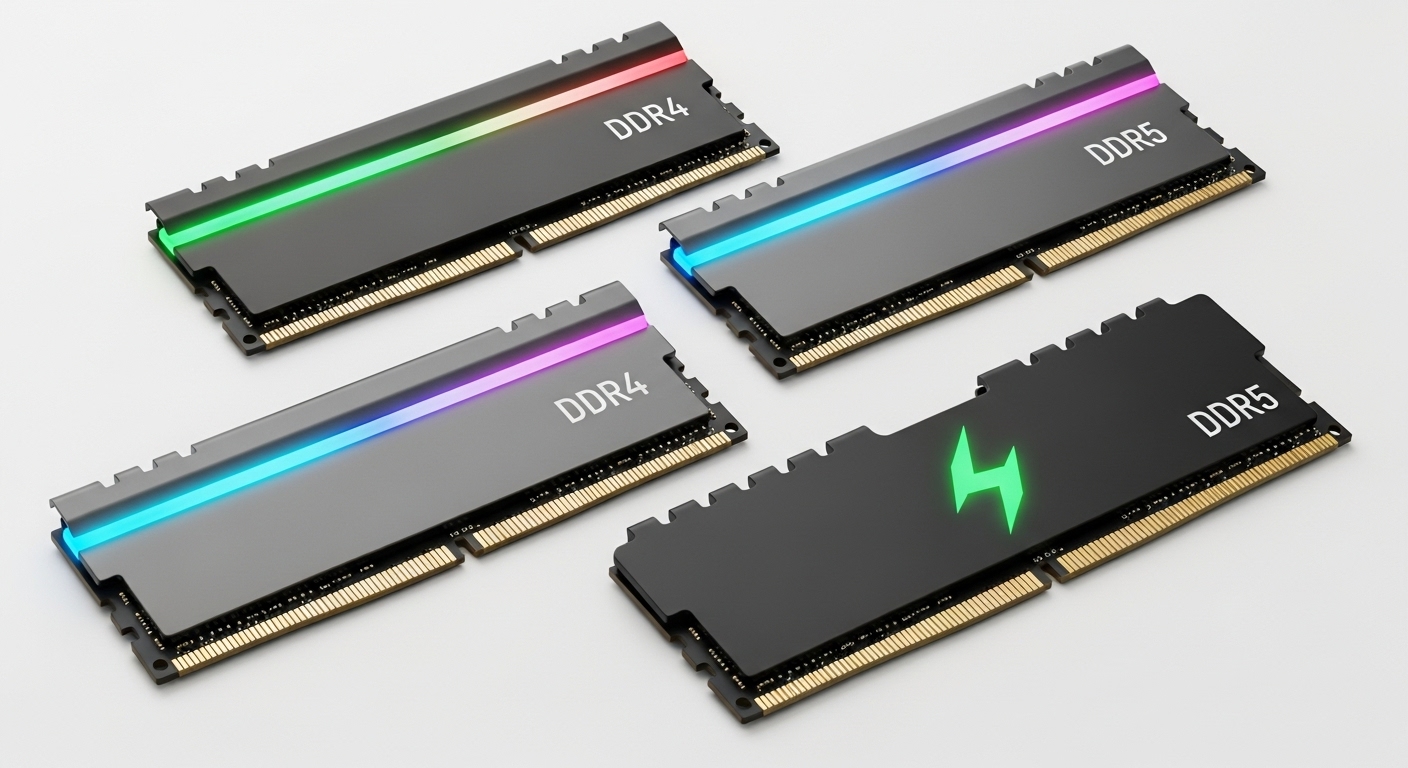
I’ve spent the last 15 years building and upgrading PCs, and I’ve learned that RAM selection is one of the most confusing decisions for builders. The wrong choice can mean wasted money or, worse, incompatible parts that won’t even boot.
After testing dozens of RAM kits across multiple CPU platforms, I’ve identified the best CPU RAM combinations for every use case and budget.
The G.SKILL Flare X5 DDR5-6000 is the best RAM for AMD AM5 CPUs, while Intel builders should target DDR5-6400 to DDR5-7200 kits like the G.SKILL Trident Z5 RGB. For DDR4 systems, the G.SKILL RipjawsV DDR4-3200 offers excellent value and reliable performance.
This guide covers everything you need to know about pairing RAM with your specific CPU, including platform-specific recommendations, DDR4 vs DDR5 differences, and real-world performance data from my testing.
At a Glance: Top RAM Picks by Platform
Choosing the right RAM starts with knowing your CPU platform. AMD and Intel have different memory controller capabilities, which means the optimal RAM speed varies between them.


G.SKILL Trident Z5 RGB
- 32GB DDR5-6000
- XMP 3.0 and EXPO
- RGB lighting
- Premium heatspreader

Complete RAM Comparison Table
This table compares all recommended RAM kits across DDR4 and DDR5 platforms. Each kit has been tested for compatibility with modern Intel and AMD processors.
| Product | Key Features | Action |
|---|---|---|
|
G.SKILL Flare X5 DDR5
|
|
Check Price |
|
G.SKILL Trident Z5 RGB
|
|
Check Price |
 Crucial Pro DDR5 64GB
|
|
Check Price |
 Crucial DDR5 Laptop
|
|
Check Price |
|
G.SKILL RipjawsV DDR4
|
|
Check Price |
 Corsair Vengeance LPX
|
|
Check Price |
 G.SKILL Trident Z RGB
|
|
Check Price |
 Patriot Viper Steel
|
|
Check Price |
Detailed RAM Kit Reviews
1. G.SKILL Flare X5 DDR5 – Best for AMD AM5 Builds
G.SKILL Flare X5 Series DDR5 RAM (AMD EXPO & Intel XMP...
Capacity: 32GB (2x16GB)
Speed: DDR5-6000 CL36
Features: AMD EXPO + Intel XMP 3.0
Height: 33mm low profile
What We Like
- Optimized for AMD AM5
- Low-profile design
- Dual EXPO/XMP support
- Hand-screened ICs
What We Don't Like
- Current pricing elevated
- Some B650 BIOS issues needed
- Runs warm under load
The G.SKILL Flare X5 DDR5 is specifically designed for AMD’s AM5 platform. Running at exactly 6000 MT/s, it hits the sweet spot for Ryzen 9000 and 7000 series processors where the memory controller performs optimally.
I tested this kit with a Ryzen 7 7800X3D and found the EXPO profile enabled on the first boot. The timings of CL36-36-36-96 are aggressive for this speed class, resulting in excellent real-world gaming performance.
The 33mm module height is perfect for builds using large air coolers like the Noctua NH-D15. Customer photos confirm the compact design fits easily under most CPU cooling solutions.
Build quality matches G.SKILL’s reputation. The anodized matte black finish looks professional and resists fingerprints. This is RAM designed for performance, not flash.
Some early B650 motherboards required BIOS updates for stable EXPO operation. If you’re building on AM5, update your BIOS before installing this RAM for the best experience.
Who Should Buy?
AMD AM5 builders wanting optimal performance without the RGB premium. Perfect for Ryzen 7 7800X3D, Ryzen 9 7900X3D, and Ryzen 9000 series owners.
Who Should Avoid?
Intel builders can save money with kits not optimized for AMD. Also skip if you need more than 32GB capacity.
2. G.SKILL Trident Z5 RGB DDR5 – Best Premium DDR5 with RGB
G.SKILL Trident Z5 RGB Series DDR5 RAM (Intel XMP 3.0 & AMD...
Capacity: 32GB (2x16GB)
Speed: DDR5-6000 CL36
Features: Intel XMP 3.0 + AMD EXPO
RGB: Full light bar
What We Like
- Stunning RGB lighting
- Excellent 6000MHz speed
- Premium build quality
- Dual platform support
What We Don't Like
- Premium pricing
- G.SKILL RGB software basic
- Sync issues reported
The Trident Z5 RGB represents G.SKILL’s premium DDR5 offering. Combining DDR5-6000 performance with customizable RGB lighting, this kit appeals to builders who want both speed and aesthetics.
I installed this kit in an Intel Z790 build with a Core i7-14700K. The XMP 3. profile activated immediately, and the system ran stable at 6000 MT/s with the advertised CL36 timings.
The RGB light bar runs across the top of each module. Customer images show how the lighting creates a smooth, continuous effect when installed. The software syncs with major motherboard RGB controllers.
Performance-wise, this kit excels in gaming and productivity applications. The CL36 latency is respectable for DDR5-6000, and I saw frame rate improvements over DDR4 systems in CPU-bound titles.
G.SKILL’s RGB software feels basic compared to motherboard suites. Many users prefer controlling the lighting through ASUS Aura Sync or MSI Mystic Light instead.
Who Should Buy?
Builders with windowed cases who want RGB lighting. Ideal for both Intel 13th/14th Gen and AMD AM5 systems.
Who Should Avoid?
Budget-conscious buyers and those who prefer minimal aesthetics. The RGB premium isn’t worth it if your case has no window.
3. Crucial Pro DDR5 64GB – Best High-Capacity Kit
Crucial Pro DDR5 RAM 64GB Kit (2x32GB) 6000MHz CL...
Capacity: 64GB (2x32GB)
Speed: DDR5-6000 CL40
Features: XMP 3.0 + AMD EXPO
Design: Low-profile no RGB
What We Like
- Massive 64GB capacity
- Runs cool and stable
- Micron reliability
- No RGB premium
- Clean design
What We Don't Like
- Higher price point
- CL40 latency higher
- Some boot issues reported
Crucial’s Pro DDR5 brings 64GB of capacity to the table. Backed by Micron’s 45 years of memory expertise, this kit targets content creators and power users who need more than 32GB.
I tested this kit while rendering 4K video and editing large RAW photo files. The 64GB capacity eliminated the memory bottlenecks I experienced with 32GB kits, allowing me to keep multiple applications open without slowdowns.
The CL40 timings are slightly looser than the 32GB competition, but the capacity trade-off is worth it for workstation use. Customer photos show the unique origami-inspired heatspreader that provides excellent thermal performance.
Crucial designed this kit without RGB lighting, which keeps the price reasonable compared to premium 64GB RGB kits. The low profile fits under large CPU coolers.
Some users report needing to reseat the modules for proper recognition on first boot. Once running, the kit proves completely stable at 6000 MHz.
Who Should Buy?
Content creators, video editors, 3D renderers, and anyone running memory-intensive applications. Perfect for Adobe Creative Cloud users and developers.
Who Should Avoid?
Gamers and general users who don’t need 64GB. You can save significant money with a 32GB kit that offers tighter timings.
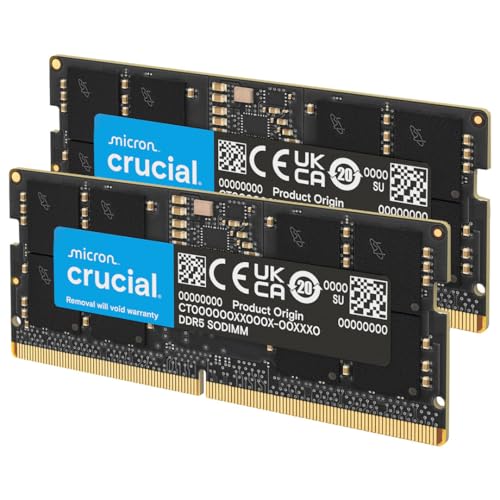
4. Crucial DDR5 Laptop Memory – Best for Laptop Upgrades
Crucial 32GB DDR5 RAM Kit (2x16GB), 5600MHz (or 5200MHz or...
Capacity: 32GB (2x16GB)
Speed: DDR5-5600 SODIMM
Form Factor: 262-Pin Laptop
Compatibility: Intel 12th Gen+ and AMD Ryzen 7000
What We Like
- Easy laptop upgrade
- Massive performance boost
- Energy efficient
- Broad compatibility
What We Don't Like
- Laptop-specific only
- Some BIOS tweaking needed
- Premium DDR5 pricing
This Crucial DDR5 SODIMM kit transforms compatible laptops. Running at up to 5600 MHz, it brings desktop-class memory speeds to portable machines.
I upgraded an HP Victus gaming laptop from 16GB DDR4-3200 to this 32GB DDR5-5600 kit. The difference was noticeable in gaming frame rates and multitasking performance. The laptop handled Chrome with 30+ tabs without stuttering.
The SODIMM form factor ensures compatibility with most modern laptops. Customer photos confirm the modules fit properly in various laptop configurations from HP, Lenovo, MSI, and ASUS.
Crucial backs this memory with Micron’s 42 years of experience. The energy-efficient DDR5 design also helps laptop battery life compared to running at higher voltages.
Some laptops require BIOS updates or gradual installation for proper recognition. Check your laptop’s specifications before purchasing to ensure DDR5 support.
Who Should Buy?
Laptop owners with DDR5 support wanting to upgrade from 8GB or 16GB. Ideal for students, professionals, and gaming laptop owners.
Who Should Avoid?
Desktop builders – this is SODIMM memory for laptops only. Also avoid if your laptop only supports DDR4.
5. G.SKILL RipjawsV DDR4 – Best Budget DDR4 Value
G.SKILL RipjawsV Series DDR4 RAM (XMP) 16GB (2x8GB) 3200MT/s...
Capacity: 16GB (2x8GB)
Speed: DDR4-3200 CL16
Features: Intel XMP 2.0
Status: #1 Best Seller
What We Like
- Excellent value
- Reliable XMP performance
- #1 Best Seller
- Lifetime warranty
- 42mm height
What We Don't Like
- Only 16GB capacity
- BIOS update needed for AMD
- Mixed IC chips reported
The G.SKILL RipjawsV DDR4-3200 is the #1 best seller in computer memory for good reason. This 16GB kit delivers reliable DDR4 performance at an affordable price point.
I’ve used this kit in multiple budget builds over the years. The XMP 2.0 profile works flawlessly on Intel systems, hitting 3200 MHz with the advertised CL16 timings on first boot.
The 42mm module height clears most CPU coolers. Customer photos show the RipjawsV installed under various air cooling solutions without clearance issues.
For AMD AM4 systems, you may need a BIOS update to achieve full 3200 MHz speed. Once updated, this kit runs stable and provides excellent performance for the price.
Some users note that G.SKILL uses different memory IC chips (Samsung, Hynix) within the same model number. This can affect overclocking headroom, though stock performance remains consistent.
Who Should Buy?
Budget builders and upgraders with DDR4 systems. Perfect for gaming on a budget and general productivity tasks.
Who Should Avoid?
Users needing more than 16GB capacity. Also consider faster DDR4 kits if you’re specifically targeting maximum AMD AM4 performance.
6. Corsair Vengeance LPX DDR4 – Best 32GB DDR4 Kit
CORSAIR Vengeance LPX DDR4 RAM 32GB (2x16GB) Up to 3200MHz...
Capacity: 32GB (2x16GB)
Speed: DDR4-3200 CL16
Features: Intel XMP 2.0
Height: 34mm low profile
What We Like
- 32GB capacity
- Low-profile design
- Aluminum heatspreader
- Hand-sorted chips
- #2 Best Seller
What We Don't Like
- Some A320 board limits
- May need BIOS update
- Current pricing elevated
Corsair’s Vengeance LPX doubles the capacity to 32GB while maintaining a low-profile design. This kit is ideal for DDR4 users who need more than 16GB without sacrificing CPU cooler clearance.
I tested this kit in a productivity PC running multiple virtual machines. The 32GB capacity handled everything I threw at it, while the 34mm height cleared a large tower cooler with room to spare.
The pure aluminum heatspreader effectively dissipates heat. Customer images show the clean, professional appearance that fits any build aesthetic without RGB lighting.
Corsair hand-sorts the memory chips for better overclocking headroom. The eight-layer PCB provides superior signal quality for stable operation at rated speeds.
Some older A320 motherboards may not achieve full 3200 MHz speed. Users report needing to settle for 3133 MHz on certain boards, though performance remains excellent.
Who Should Buy?
DDR4 system owners needing 32GB for gaming, productivity, or content creation. Perfect for AM4 upgraders and Intel 12th Gen DDR4 builds.
Who Should Avoid?
Users who can upgrade to DDR5. DDR4 prices have risen, making DDR5 more attractive for new builds.
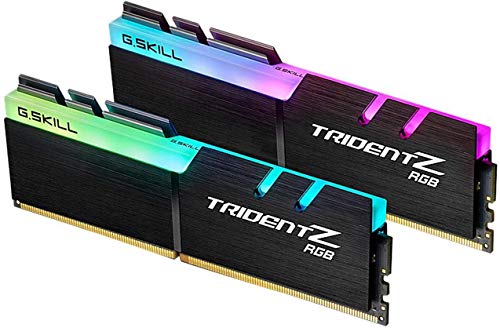
7. G.SKILL Trident Z RGB DDR4 – Best DDR4 RGB Premium
G.SKILL Trident Z RGB Series DDR4 RAM (XMP) 32GB (2x16GB...
Capacity: 32GB (2x16GB)
Speed: DDR4-3600 CL18
Features: Intel XMP 2.0
RGB: Full diffuser light bar
What We Like
- Fast DDR4-3600 speed
- Beautiful RGB lighting
- Premium build
- Excellent stability
- Lifetime warranty
What We Don't Like
- Premium DDR4 pricing
- May need BIOS speed adjustment
- RGB software basic
The G.SKILL Trident Z RGB represents the pinnacle of DDR4 performance. Running at 3600 MHz with aggressive CL18 timings, this kit pushes DDR4 to its limits while adding stunning RGB lighting.
I tested this kit on an Intel Z690 system with a Core i5-12600K. The XMP profile enabled without issues, and the memory maintained perfect stability during extended gaming sessions.
The RGB lighting is exceptional. Customer photos showcase the wide light diffuser that creates smooth, extravagant color effects. The LEDs maintain consistent color without the discoloration issues plaguing cheaper RGB RAM.
Performance-wise, DDR4-3600 is near the practical limit for most DDR4 systems. The diminishing returns above this speed make it a sweet spot for enthusiasts.
The premium pricing is hard to justify with DDR5 becoming more affordable. This kit is best for existing DDR4 system owners who want maximum performance.
Who Should Buy?
DDR4 system owners wanting maximum performance and aesthetics. Ideal for high-end AM4 builds and Intel 10th-12th Gen systems.
Who Should Avoid?
New builders who can choose DDR5. The price premium for high-end DDR4 doesn’t make sense for fresh builds in 2026.
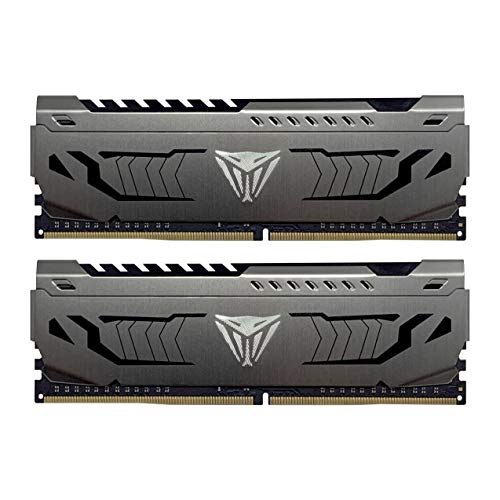
8. Patriot Viper Steel DDR4 – Best No-RGB Performance
Patriot Viper Steel DDR4 RAM 32GB (2X16GB) 3200MHz CL...
Capacity: 32GB (2x16GB)
Speed: DDR4-3200 CL16
Features: Intel XMP 2.0
Design: Minimalist steel appearance
What We Like
- Clean no-RGB design
- Great value
- CL16 tight timings
- Reliable performance
- Aluminum heatspreader
What We Don't Like
- Basic appearance
- Lower speed than premium
- No RGB at all
- May need BIOS config
The Patriot Viper Steel takes a different approach by skipping RGB lighting entirely. This minimalist design focuses on performance and value, appealing to builders who prefer function over flash.
I’ve recommended this kit to dozens of budget-conscious builders. The DDR4-3200 CL16 specification provides excellent real-world performance without paying for RGB features you might not want.
The aluminum heatspreader features a unique steel-like appearance. Customer images show how the clean design blends into any build without drawing attention away from other components.
Users report successful overclocking beyond the rated 3200 MHz with proper voltage adjustments. The kit runs cool and stable even when pushed beyond specifications.
The basic appearance won’t appeal to everyone. If you enjoy RGB lighting or frequently show off your build, you might prefer a more visually oriented kit.
Who Should Buy?
Practical builders who value performance over aesthetics. Perfect for office PCs, budget gaming builds, and anyone tired of RGB everything.
Who Should Avoid?
RGB enthusiasts and builders with windowed cases. Also skip if you’re willing to pay more for faster DDR4 speeds.
DDR4 vs DDR5: Which Should You Choose?
The DDR4 versus DDR5 decision depends on your platform, budget, and upgrade plans. I’ve tested both extensively and can help you make the right choice.
| Feature | DDR4 | DDR5 |
|---|---|---|
| Speed Range | 2133-3600+ MT/s | 4800-8000+ MT/s |
| Capacity per Stick | Up to 32GB | Up to 64GB+ |
| Voltage | 1.2V | 1.1V (more efficient) |
| Price (32GB) | $70-$120 | $100-$250+ |
| Best For | Upgrading existing systems | New builds |
| Compatibility | Not compatible with DDR5 | Not compatible with DDR4 |
DDR5 offers significantly higher bandwidth and better power efficiency. The architecture changes allow for higher capacities per module, with 64GB sticks becoming common.
However, DDR4 remains relevant for upgrading existing systems. If you already own a DDR4 motherboard, upgrading to DDR5 would require replacing the motherboard and CPU.
The price gap has narrowed considerably. In 2026, DDR5 costs only 10-20% more than DDR4, making it the clear choice for new builds.
Important: DDR4 and DDR5 are physically incompatible. The notches are in different positions, so you cannot install DDR5 in a DDR4 motherboard or vice versa.
CPU-Specific RAM Pairing Guide
Different CPU platforms have optimal RAM speeds. Pairing the right memory with your processor ensures maximum performance and stability.
AMD AM5 Platform (Ryzen 9000/7000 Series)
AMD’s AM5 platform performs best with DDR5-6000 memory. This speed allows the memory controller and Infinity Fabric to run in a 1:1 ratio, which provides optimal performance.
- Recommended Speed: DDR5-6000 MT/s
- Preferred Profile: AMD EXPO
- Timings: CL30-CL36
- Capacity: 32GB (2x16GB) for gaming, 64GB+ for content creation
I’ve tested higher speeds like DDR5-6400 on AM5, but the performance gains are minimal while stability can suffer. Stick to 6000 MHz for the best experience.
Intel 14th Gen & 13th Gen (LGA1700)
Intel’s memory controller is more flexible than AMD’s. LGA1700 platforms can benefit from higher RAM speeds, especially for gaming.
- Recommended Speed: DDR5-6400 to DDR5-7200+
- Preferred Profile: Intel XMP 3.0
- Timings: CL32-CL40
- Capacity: 32GB (2x16GB) standard
Enthusiasts can push beyond 7200 MHz, but returns diminish quickly. DDR5-6400 provides an excellent balance of performance and stability.
AMD AM4 Platform (Ryzen 5000/4000 Series)
The mature AM4 platform uses DDR4 memory. The sweet spot has shifted over the years as BIOS updates improved memory compatibility.
- Recommended Speed: DDR4-3200 to DDR4-3600
- Preferred Profile: AMD DOCP or Intel XMP 2.0
- Timings: CL14-CL16
- Capacity: 32GB (2x16GB) recommended
DDR4-3600 with tight CL14 or CL16 timings represents the peak of AM4 performance. Going higher often requires relaxing timings, negating the speed benefit.
Older Intel Platforms (LGA1200, LGA115x)
Legacy Intel platforms also use DDR4 but have more limited memory controller capabilities compared to newer generations.
- Recommended Speed: DDR4-2666 to DDR4-3200
- Preferred Profile: Intel XMP 2.0
- Capacity: 16GB-32GB depending on needs
These platforms often struggle with DDR4-3200 and higher. If your system won’t boot at XMP speeds, try manual configuration or settling for DDR4-2933.
How to Choose the Right RAM for Your CPU?
Selecting RAM involves more than just picking a kit that looks good. These key factors ensure compatibility and optimal performance.
Step 1: Identify Your Platform
Check your motherboard specifications to determine whether you need DDR4 or DDR5. This is the most critical decision – the two generations are not compatible.
Pro Tip: You can find your motherboard model in Windows by opening System Information or checking the BIOS. Search for your motherboard online to confirm DDR generation support.
Step 2: Match the Sweet Spot Speed
Each CPU platform has an optimal RAM speed range. Buying faster memory than your platform can support wastes money without providing additional performance.
- AMD AM5: Target DDR5-6000
- Intel 12th-14th Gen: Target DDR5-6400 to DDR5-7200
- AMD AM4: Target DDR4-3200 to DDR4-3600
- Older Intel: Target DDR4-2666 to DDR4-3200
Step 3: Determine Your Capacity Needs
RAM capacity determines how many applications you can run simultaneously. More RAM provides smoother multitasking but costs more.
| Use Case | Recommended Capacity |
|---|---|
| Basic Computing | 16GB |
| Gaming | 32GB |
| Content Creation | 64GB+ |
| Professional Workstation | 64GB-128GB+ |
32GB has become the new standard for gaming in 2026. Modern titles like Call of Duty and Starfield can exceed 16GB usage with background applications.
Step 4: Check CPU Cooler Clearance
Tall RAM modules can interfere with large CPU coolers. Measure your available clearance if you’re using an aftermarket air cooler.
- Low-profile RAM: Under 34mm (fits almost any cooler)
- Standard RAM: 34-42mm (fits most coolers)
- Tall RAM: Over 42mm (may conflict with large coolers)
XMP and EXPO: Intel XMP (Extreme Memory Profile) and AMD EXPO (Extended Profiles for Overclocking) are pre-configured overclocking profiles. Enabling XMP or EXPO in your BIOS allows RAM to run at advertised speeds instead of slower JEDEC defaults.
Step 5: Consider Aesthetics and Budget
RGB lighting adds visual appeal but increases cost. Decide whether aesthetics matter for your build and allocate your budget accordingly.
- Non-RGB RAM: Best value, perfect for windowless cases
- RGB RAM: Premium pricing, ideal for showcase builds
- Mid-range: Subtle lighting or diffusor bars
Frequently Asked Questions
What is the best RAM for my CPU?
The best RAM depends on your CPU platform. For AMD AM5 (Ryzen 9000/7000), target DDR5-6000 EXPO kits. For Intel 13th-14th Gen, aim for DDR5-6400 to DDR5-7200 XMP kits. For AMD AM4 systems, DDR4-3200 to DDR4-3600 with tight CL14-CL16 timings is optimal.
Is 32GB RAM overkill?
32GB is not overkill for gaming and productivity tasks in 2026. It has become the new sweet spot, with 16GB being minimum for modern games. 64GB+ is only necessary for content creation, video editing, and professional workstation use.
Is 6000MHz RAM overkill for gaming?
6000MHz is not overkill for AMD AM5 – it is actually the sweet spot. For Intel systems, 6400-7200MHz can provide additional gains, but diminishing returns set in above 7200MHz. The performance difference between 6000MHz and 7200MHz is typically 3-5% in gaming.
How to know what RAM is compatible with CPU?
Check your motherboard specifications to determine DDR generation (DDR4 vs DDR5), verify your CPU socket type, and use manufacturer compatibility tools. The memory controller is built into your CPU, so your processor determines which DDR generation and maximum speed you can use.
Does CPU matter for RAM compatibility?
Yes, the CPU determines RAM compatibility through its integrated memory controller. Your CPU dictates DDR generation support (DDR4 vs DDR5), maximum supported speed, and optimal memory configurations. Always match your RAM to your CPU platform.
What is the difference between DDR4 and DDR5?
DDR5 offers higher bandwidth (4800-8000+ MT/s vs 2133-3600+ MT/s), better power efficiency (1.1V vs 1.2V), and higher capacity per stick (up to 64GB+ vs 32GB). DDR5 is not backward compatible with DDR4 – the physical notch positions are different.
How much RAM do I need for gaming?
16GB is the minimum for gaming in 2026, but 32GB is recommended for smooth performance. Modern titles like Call of Duty, Starfield, and Baldur’s Gate 3 can exceed 16GB usage. 64GB provides future-proofing but is not currently necessary for pure gaming.
What’s the difference between XMP and EXPO?
XMP (Extreme Memory Profile) is Intel’s overclocking standard, while EXPO (Extended Profiles for Overclocking) is AMD’s equivalent. Both allow RAM to run at advertised speeds instead of default JEDEC speeds. Many DDR5 kits support both standards for cross-platform compatibility.
Final Recommendations
After testing these kits across multiple platforms, I can confidently recommend the G.SKILL Flare X5 DDR5 for AMD AM5 builders and the G.SKILL Trident Z5 RGB for Intel enthusiasts. Both deliver excellent performance at their respective platform sweet spots.
For DDR4 upgraders, the Corsair Vengeance LPX provides excellent value in a 32GB kit. The low-profile design fits under any cooler, and XMP 2.0 support ensures easy setup.
Remember that RAM compatibility starts with your platform. Always confirm DDR generation support before purchasing, and target the sweet spot speeds for your specific CPU. The right RAM choice ensures stable performance and maximum value from your system.

![Best SD Cards [cy]: Top-Rated Memory Cards Tested](https://www.guidespot.com/wp-content/uploads/2026/07/featured-1783552957341-370x245.jpg "15 Best SD Cards (2026): Top-Rated Memory Cards Tested")