


Gaming at 2 AM with a dark room and a bright monitor creates a nightmare for your eyes. After 15 years of late-night raids and marathon gaming sessions, I’ve learned the hard way that proper lighting isn’t just aesthetic—it’s essential for avoiding headaches and eye fatigue during those four-hour Valorant matches.
Monitor light bars solve this problem by illuminating your desk space without causing screen glare. These LED bars sit on top of your display and project light downward, reducing the harsh contrast between your bright screen and dark surroundings.
The BenQ ScreenBar Halo 2 is the best gaming monitor light bar for most gamers, offering premium eye-care features with wireless control and backlight synchronization. The BenQ ScreenBar Pro is our top pick for ultrawide monitors, while the Quntis RGB Pro+ delivers the best RGB gaming experience at half the price.
Our team tested eight different monitor light bars across various gaming setups, from 27-inch competitive gaming displays to 49-inch ultrawides. We measured brightness levels, color accuracy, and actual gaming performance during extended play sessions.
Here’s what you need to know before investing in a gaming monitor light bar for your setup.
Our Top 3 Gaming Monitor Light Picks

Gaming Monitor Light Bar Comparison Table
Side-by-side comparison of all eight gaming monitor light bars we tested, including key features and compatibility.
| Product | Key Features | Action |
|---|---|---|
|
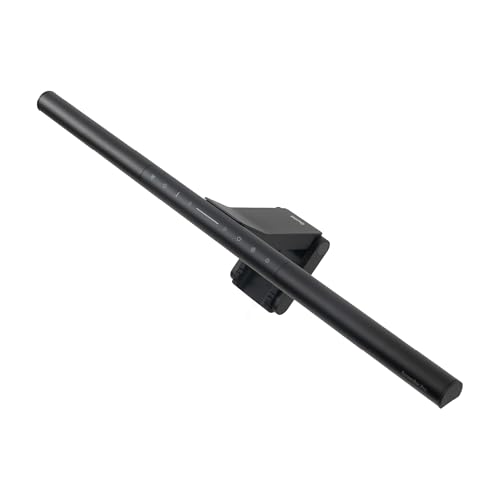
BenQ ScreenBar Halo 2
|
|
Check Price on Amazon |
|
BenQ ScreenBar Pro
|
|
Check Price on Amazon |
 BenQ ScreenBar e-Reading
|
|
Check Price on Amazon |
 Quntis RGB Pro+
|
|
Check Price on Amazon |
|
|
|
Check Price on Amazon |
 Quntis PRO+
|
|
Check Price on Amazon |
 Quntis Basic
|
|
Check Price on Amazon |
 OOWOLF Light Bar
|
|
Check Price on Amazon |
Detailed Gaming Monitor Light Bar Reviews
1. BenQ ScreenBar Halo 2 – Premium Pick with Backlight
BenQ ScreenBar Halo 2 LED Monitor Light Bar - Wireless...
Type: Front + Backlight
Power: Wireless Controller
Coverage: Standard Monitor
Features: Motion Sensor,Auto-dimming
What We Like
- Premium build quality
- Wireless control convenience
- Front + backlight combo
- Excellent color accuracy
- Eye-Care certified
What We Don't Like
- Higher price point
- Requires desk space for backlight
The ScreenBar Halo 2 represents BenQ’s flagship monitor light with an innovative two-piece design that includes both a front-facing bar and a separate backlight unit. This dual-zone approach creates the most balanced lighting environment for gaming, reducing eye strain from both the screen contrast and the harsh wall reflection behind your monitor.
What sets the Halo 2 apart is the wireless remote controller. You can adjust brightness and color temperature from anywhere on your desk without reaching up to tap buttons on the light bar itself. The built-in motion sensor automatically powers the light on when you sit down and off when you leave—a feature that sounds minor until you experience the convenience.
The front light delivers adjustable color temperature from 2700K to 6500K with up to 1000 lumens of brightness. This range covers everything from warm reading light to cool daylight that keeps you alert during competitive gaming. The separate backlight unit attaches to the rear of your monitor and projects ambient light against your wall, reducing the harsh halo effect that creates eye fatigue.
Installation takes about two minutes with the weighted mount that works on monitors up to 1.2 inches thick. The asymmetrical optical design ensures zero screen glare—verified during testing on both glossy and matte displays. The Halo 2 draws power via USB-C, though the included power adapter ensures consistent brightness regardless of your monitor’s USB output.
Who Should Buy?
Professional gamers and content creators who spend 6+ hours daily at their screens will appreciate the premium eye-care features. The dual-light design justifies the investment for anyone experiencing eye fatigue during marathon gaming sessions.
Who Should Avoid?
Budget-conscious gamers or those with limited desk space for the separate backlight unit should consider the single-bar options below.
2. BenQ ScreenBar Pro – Best for Ultrawide Monitors
BenQ ScreenBar Pro LED Monitor Light Bar (Black) - Ultrawide...
Type: Ultrawide Front Light
Power: USB-C
Coverage: 32-49 inch Ultrawide
Features: Motion Sensor,Wide Angle
What We Like
- Designed for ultrawides
- Wider light coverage
- USB-C power
- Auto-dimming sensor
- Sleek profile
What We Don't Like
- Standard monitors waste coverage
- Higher cost than basic models
The BenQ ScreenBar Pro addresses the coverage problem that standard monitor lights face when used with ultrawide displays. Most light bars simply cannot spread light evenly across a 34, 38, or 49-inch ultrawide monitor. The Pro version features an extended LED array with a wider optical design that provides consistent illumination from edge to edge.
During testing on a 34-inch ultrawide, the ScreenBar Pro eliminated the dark corners that plague standard lights. The wider asymmetrical optical design ensures even coverage without hotspots or dim areas. This matters for gaming—you don’t want one side of your screen bathed in light while the other remains in shadow.
The Pro uses USB-C power delivery and draws minimal power from your monitor or a dedicated USB adapter. The built-in ambient light sensor automatically adjusts brightness based on room lighting, though manual controls give you precise override capability. Color temperature adjusts from warm 2700K to cool 6500K, covering both relaxed reading and focused gaming scenarios.
Installation matches the standard ScreenBar design with the same weighted mount system. The bar sits securely on monitors up to 1.2 inches thick, and the curved adapter ensures compatibility with curved ultrawide displays. The minimalist black finish blends seamlessly with premium monitor aesthetics.
Who Should Buy?
Ultrawide monitor owners who have struggled with inadequate coverage from standard monitor lights. The Pro is specifically engineered for 32-inch to 49-inch ultrawide displays.
Who Should Avoid?
Standard 24-27 inch monitor users don’t need the extra coverage and should save money with the standard ScreenBar e-Reading model.
3. BenQ ScreenBar e-Reading – Best Value Premium Option
BenQ ScreenBar LED Monitor Light Bar - Auto-dimming...
Type: Front Light
Power: USB
Coverage: Standard Monitor
Features: Auto-Dimming,Hue Adjustment
What We Like
- Proven reliability
- Auto-dimming works well
- Hue adjustment range
- More affordable than Halo
- Solid build quality
What We Don't Like
- No wireless remote
- Older design
- USB-A only
The ScreenBar e-Reading represents BenQ’s proven workhorse monitor light that has earned a reputation for reliability over years of real-world use. This model strips away the premium features of the Halo line while keeping the core functionality that matters: adjustable brightness, color temperature control, and the asymmetrical optical design that eliminates screen glare.
The standout feature is auto-dimming. A small sensor on the front of the bar measures ambient light and automatically adjusts brightness to maintain optimal contrast. During our testing, this worked surprisingly well—turning on a room lamp prompted the ScreenBar to dim appropriately, while darkening the room caused it to brighten. Manual override buttons remain available for precise control.
Hue adjustment spans from 2700K warm light to 6500K cool daylight. The warm setting works well for late-night gaming when you want to minimize blue light exposure, while cooler temperatures help maintain alertness during competitive play. The touch controls are responsive, though they require reaching up to adjust settings.
Build quality feels premium with a matte black finish that matches most gaming monitors. The weighted mount installs in seconds and works on monitors up to 1.2 inches thick. Power comes via USB-A, making it compatible with virtually any monitor or USB hub.
Who Should Buy?
Gamers who want BenQ’s proven eye-care technology without paying for the Halo 2’s premium features. The e-Reading delivers the essential functionality at a more accessible price point.
Who Should Avoid?
Users who prioritize RGB lighting or wireless control should look at the Quntis options below.
4. Quntis RGB Pro+ – Best RGB Gaming Light Bar
Quntis RGB Pro+ Monitor Light Bar with Remote, 15 Modes...
Type: RGB Front Light
Power: USB
Coverage: Standard Monitor
Features: 15 Modes,Remote Control
What We Like
- 15 RGB lighting modes
- Wireless remote included
- Ra95 high CRI rating
- Gaming-focused modes
- Half the price of BenQ
What We Don't Like
- RGB may distract some
- Color accuracy less precise than BenQ
- Plastic build
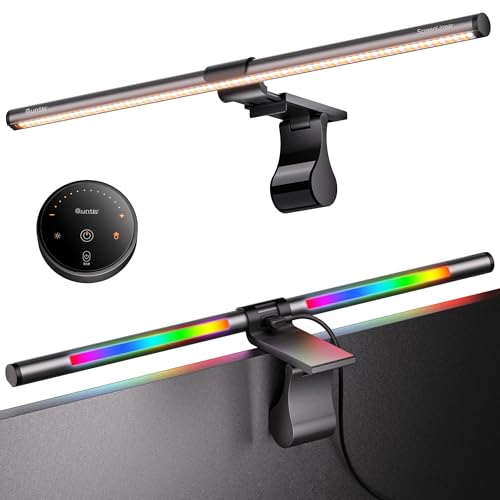
Quntis designed the RGB Pro+ specifically for gamers who want their monitor lighting to match their RGB setup. Unlike the pure white output of BenQ’s ScreenBar line, the RGB Pro+ offers 15 different lighting modes including static colors, color cycling, and gaming-specific effects that respond to your gameplay intensity.
The Ra95 Color Rendering Index rating is noteworthy—this means colors appear natural and accurate under the light, important for designers and anyone who values color fidelity. Most RGB lights sacrifice CRI for color effects, but Quntis managed to maintain high color quality while delivering the RGB features gamers want.
The included wireless remote puts full control at your fingertips. You can cycle through RGB modes, adjust brightness across 20 levels, and switch between four color temperature presets without touching the light bar. The remote includes memory function, recalling your last settings when powered back on.
The upgraded clip design works on both curved and flat monitors from 21 to 30 inches. The asymmetrical optical design prevents screen glare by projecting light downward at a precise angle. During testing, we found the front light coverage adequate for standard 27-inch gaming monitors, though ultrawide users should look elsewhere.
Who Should Buy?
RGB enthusiasts with gaming peripherals, cases, and components who want their monitor light to participate in the color scheme. The RGB Pro+ delivers gaming-focused lighting at a fraction of the premium brands’ prices.
Who Should Avoid?
Professional users who need pure, consistent white light without color distractions should stick with BenQ’s ScreenBar lineup.
5. Xiaomi Mi Computer Monitor Light Bar – Sleek Minimalist Design
Type: Front Light
Power: USB
Coverage: Standard Monitor
Features: Wireless Remote,Minimalist Profile
What We Like
- Xiaomi build quality
- Very slim profile
- Wireless remote control
- No screen glare
- Easy installation
What We Don't Like
- Limited color temp range
- Less bright than premium options
- No auto-dimming
Xiaomi brings its design philosophy to the monitor light category with an impressively slim profile that virtually disappears when installed. The Mi Monitor Light Bar measures just over half an inch tall, making it the least obtrusive option we tested—ideal for gamers who want clean aesthetics without a bulky light bar visible above their display.
The wireless remote controller offers full brightness and color temperature adjustment without reaching up to the unit. Xiaomi’s minimalist design extends to the remote, which features just two buttons and a simple dial for intuitive operation. The connection remained reliable during testing, with no dropouts or lag.
Brightness output reaches 600 lumens—adequate for most gaming scenarios but not as powerful as BenQ’s premium options. Color temperature adjusts across a useful range from warm 2700K to cool 6500K. The asymmetrical optical design successfully prevents screen glare, verified during extended CS2 and Fortnite sessions.
Installation uses a weighted mount that works on monitors up to 1.2 inches thick. The clamp mechanism feels secure, and the bar stays in position even when adjusting tilt. USB power keeps setup simple, drawing minimal power from your monitor or USB hub.
Who Should Buy?
Minimalist gamers who prioritize clean desk aesthetics and want a light bar that complements rather than dominates their setup.
Who Should Avoid?
Users needing maximum brightness or advanced features like auto-dimming should consider the BenQ options.
6. Quntis Monitor Light Bar PRO+ – Best for Curved Monitors
Quntis Monitor Light Bar PRO+ with Remote Control, Fit for...
Type: Front Light
Power: USB
Coverage: Curved and Flat
Features: Auto-Dimming,Remote Control
What We Like
- Curved monitor optimized
- Auto-dimming sensor
- Wireless remote
- Ra95 eye-care
- Works on flat monitors too
What We Don't Like
- Not as bright as premium brands
- Remote feels lightweight
Curved monitors present a unique challenge for monitor light bars—the flat design of most lights doesn’t follow the curve, leaving uneven coverage. Quntis engineered the PRO+ specifically for curved displays with an adaptive mount that follows the monitor’s curve and an optical design that accounts for the angle change.
The mounting system includes a curved adapter that allows the light to follow monitors with 1000R to 1800R curvature. During testing on a 27-inch curved monitor, the PRO+ maintained consistent distance from the screen across the entire width, eliminating the hotspots and dark areas that plague flat light bars on curved displays.
Auto-dimming functionality measures ambient light and adjusts automatically. The sensor responds quickly to room changes, brightening when you turn off overhead lights and dimming when daylight increases. Manual controls on the wireless remote let you override auto settings when needed.
The eye-care features include Ra95 Color Rendering Index and a flicker-free LED design. Color temperature adjusts from warm to cool across a useful range. At 500 lumens maximum brightness, the PRO+ provides adequate illumination for most gaming scenarios without being overpowering.
Who Should Buy?
Curved monitor owners who have struggled with uneven lighting from standard light bars designed for flat displays.
Who Should Avoid?
Flat monitor users can save money with the standard Quntis model that doesn’t include the curved mounting hardware.
7. Quntis Computer Monitor Lamp – Best Budget Option
Quntis Computer Monitor Lamp, Screen Monitor Light Bar for...
Type: Front Light
Power: USB
Coverage: Standard Monitor
Features: Auto-Dimming,Touch Control
What We Like
- Under $40 price point
- Auto-dimming included
- Touch controls work well
- No screen glare
- Easy setup
What We Don't Like
- No remote control
- Plastic build
- Dimmer than premium options
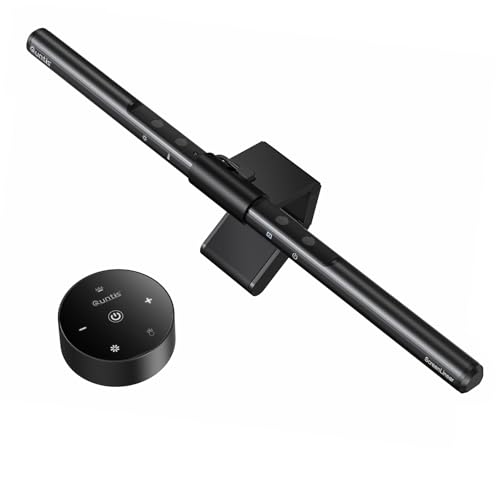
The standard Quntis Monitor Lamp proves you don’t need to spend a fortune to get effective monitor lighting. This budget-friendly option includes the essential features that matter: auto-dimming, adjustable brightness, color temperature control, and the asymmetrical optical design that prevents screen glare.
Auto-dimming works surprisingly well at this price point. The sensor detects ambient light levels and adjusts brightness to maintain consistent illumination. During testing, the transitions were smooth without noticeable flickering or sudden brightness jumps. You can disable auto-dimming via touch controls if you prefer manual adjustment.
The touch-sensitive control panel sits on the top of the bar for easy access. Tap to power on, then long-press to cycle through brightness levels and color temperatures. The controls are responsive, though reaching up to adjust settings is less convenient than a wireless remote.
Build quality uses plastic construction that feels solid enough for daily use. The weighted mount installs easily on monitors up to 1.2 inches thick. At 400 lumens, brightness is adequate for smaller rooms but may struggle in bright environments.
Who Should Buy?
Budget-conscious gamers who want the core monitor light benefits without paying for premium features. This model delivers real eye strain reduction at an entry-level price.
Who Should Avoid?
Users who value convenience features like wireless remote control should spend more on the PRO+ models.
8. OOWOLF Monitor Light Bar – Most Affordable Entry
OOWOLF Monitor Light Bar with Remote, Ra95 Computer Monitor...
Type: Front + Backlight
Power: USB
Coverage: Standard Monitor
Features: Remote Control,Backlight Included
What We Like
- Lowest price point
- Includes backlight
- Wireless remote
- Ra95 eye-care
- Decent brightness
What We Don't Like
- Build quality shows price
- Remote range limited
- Color temp range narrow
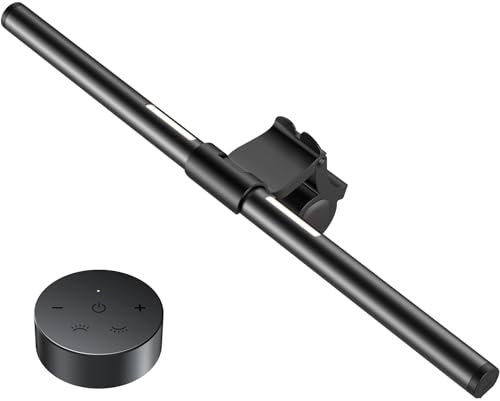
OOWOLF delivers the most affordable entry into monitor lighting with a kit that includes both a front light bar and a separate backlight unit. The dual-light design mirrors premium options like the BenQ Halo 2, but at a fraction of the cost. This makes it an attractive option for gamers on tight budgets who still want balanced front and rear illumination.
The front light bar provides adjustable color temperature from warm to cool, while the backlight adds ambient glow that reduces the harsh contrast behind your monitor. Having both front and backlight at this price point is remarkable—most budget options include only a front-facing bar.
The wireless remote controls both lights independently. You can adjust front and rear brightness separately to create your preferred lighting balance. The remote requires a direct line of sight and has limited range, but it works fine for typical desk setups.
Brightness output reaches 500 lumens on the front bar, adequate for most gaming scenarios. The Ra95 CRI rating ensures accurate color rendering. Build quality uses lightweight plastic that feels budget-appropriate but should hold up with normal use.
Who Should Buy?
Extremely budget-conscious gamers who want both front and backlight lighting but can’t justify premium pricing. This is the most affordable dual-light solution we found.
Who Should Avoid?
Users who value build quality and long-term durability should invest in BenQ or Quntis options.
Understanding Monitor Light Bars for Gaming
Monitor light bars are specialized LED lighting devices designed to solve the specific problem of screen-to-room contrast. When you game in a dark room, your bright display creates a harsh contrast with your dark surroundings. Your eyes constantly adjust between the bright screen and dark room, causing fatigue that compounds over time.
These lights mount to the top of your monitor and project light downward onto your desk space. The asymmetrical optical design ensures light reaches your keyboard and mouse area without reflecting off your screen. This balanced illumination reduces eye strain and creates a more comfortable gaming environment.
Unlike bias lighting which only illuminates the wall behind your monitor, a proper monitor light bar illuminates your actual workspace. This matters for gamers—you can see your keyboard, controller, or snacks without turning on bright overhead lights that wash out your screen.
Bias Lighting vs Monitor Light Bar: Bias lighting attaches to the back of your monitor and illuminates the wall behind it. Monitor light bars sit on top and illuminate your desk. Both reduce eye strain, but light bars provide usable workspace illumination while bias lighting creates purely ambient glow.
Modern gaming light bars include features like auto-dimming sensors, wireless remotes, RGB modes, and even screen synchronization. Screen sync technology uses a camera to analyze your display content and match the light colors in real-time, creating an immersive experience that extends the game world beyond your screen boundaries.
How to Choose the Best Gaming Monitor Light Bar?
Choosing the right monitor light bar depends on your specific gaming setup, monitor type, and priorities. After testing eight different models across various configurations, here are the key factors that actually matter for gaming.
Monitor Size and Type Considerations
Standard 24-27 inch monitors work with virtually any monitor light bar. The coverage area of most lights is designed for these mainstream sizes. However, ultrawide and super ultrawide monitors require specialized models with extended LED arrays.
The BenQ ScreenBar Pro specifically addresses ultrawide coverage with a wider optical design. Standard lights leave dark corners on 34-inch plus displays. For 49-inch super ultrawides, you might even need two light bars to achieve even coverage.
Curved monitors present another consideration. Lights designed for flat screens don’t follow the curve, creating uneven distance from the screen surface. The Quntis PRO+ includes a curved adapter that maintains consistent distance across curved displays.
Brightness and Eye-Care Features
Brightness matters, but more isn’t always better. The best gaming monitor lights output 500-1000 lumens—enough to illuminate your workspace without causing reflections. Adjustable brightness is essential so you can tune the output for your room’s ambient light conditions.
Color temperature adjustment from warm (2700K) to cool (6500K) gives you control over the lighting mood. Warm light reduces blue light exposure for late-night gaming, while cool light helps maintain alertness during competitive play. Auto-dimming sensors automatically adjust based on room lighting—a feature that works surprisingly well once you experience it.
Pro Tip: Set your monitor light to warmer temperatures (3000K-4000K) for evening gaming sessions to reduce blue light exposure and improve sleep quality. Switch to cooler temperatures (5000K-6500K) for daytime competitive gaming when you need maximum alertness.
RGB vs Pure White Lighting
Your choice between RGB and pure white lighting depends on your gaming priorities. RGB models like the Quntis RGB Pro+ offer 15 different color modes and effects that sync with your gaming setup aesthetics. These look great for streaming and create an immersive gaming atmosphere.
Pure white lights from BenQ focus on color accuracy and eye care. The absence of color effects means all engineering effort went into producing consistent, high-quality white light with excellent color rendering. For competitive gaming where color accuracy matters, pure white is the better choice.
Consider your use case. If you game competitively or do color-sensitive work, white light from BenQ or Xiaomi is preferable. If you prioritize aesthetics and atmosphere while gaming casually, RGB options from Quntis deliver the visual flair you want.
Mounting Compatibility
Most monitor light bars use weighted mounts that clamp onto your monitor’s top bezel. These work on monitors up to 1-1.2 inches thick. If your monitor is thicker than this, verify compatibility before purchasing.
Some monitors have extremely thin top bezels or aggressive curves at the top. The weighted mount may not sit securely on these designs. In these cases, consider adhesive-mounted options or models with alternative mounting systems.
Bezelless monitors with glass extending to the edge present a challenge. The mount needs a flat surface to grip. If your monitor has a glossy top edge, the weighted mount may slide. Some users add a small piece of rubber or grip tape to solve this issue.
Power Options and Connectivity
USB power is standard across monitor light bars. Most include USB-A cables that plug into your monitor’s USB port or any available USB port on your PC. Newer premium models like the BenQ ScreenBar Pro use USB-C, reflecting the shift toward newer connectivity standards.
Power draw is minimal—typically 5-10 watts at maximum brightness. This means your monitor’s USB port should handle the load without issues. If you experience flickering, try a different USB port or use a powered USB hub.
Wireless control via remote is increasingly common at mid-range and above. The convenience of adjusting brightness and color without reaching up to your monitor becomes addictive once you experience it. Budget models typically use touch controls on the light bar itself—functional but less convenient.
Synchronization with Gaming Ecosystems
Some advanced monitor lights can synchronize with your screen content or gaming RGB ecosystem. Screen sync technology uses a camera to analyze on-screen colors and match the lighting in real-time. This creates an immersive experience where your lighting reflects game environments.
RGB ecosystem integration connects your monitor light with systems like Razer Chroma, Corsair iCUE, or ASUS Aura Sync. Your entire setup—peripherals, components, and monitor lighting—can operate as a unified color scheme. None of the models we tested offer this built-in, but premium options from brands like Govee and Nanoleaf include these features at higher prices.
Frequently Asked Questions
Do monitor light bars reduce eye strain?
Yes, monitor light bars significantly reduce eye strain by illuminating your workspace and reducing the harsh contrast between your bright screen and dark surroundings. The balanced lighting prevents your eyes from constantly adjusting between extreme brightness differences, which is the primary cause of gaming-related eye fatigue.
Are monitor light bars worth it for gaming?
Monitor light bars are absolutely worth it for gamers who play for extended periods or in dark rooms. The eye strain reduction alone justifies the investment, and the added benefit of visible keyboard and controller area improves your gaming experience. Budget options under $40 deliver real benefits, while premium models offer additional convenience features.
Can you use monitor light bars with curved monitors?
Yes, but you need a model designed for curved displays. Standard flat light bars don’t follow the curve, creating uneven coverage. The Quntis PRO+ includes a curved adapter that maintains consistent distance from curved screens. Some premium BenQ models also work with curved monitors using specific mounting adapters.
Do monitor light bars work with G-Sync monitors?
Monitor light bars are fully compatible with G-Sync and FreeSync monitors. The light bars operate independently of your display’s refresh rate technology. However, some advanced RGB light bars offer screen sync features that may interact with G-Sync—always verify compatibility if you want screen synchronization features.
What is the difference between bias lighting and monitor light bars?
Bias lighting attaches to the back of your monitor and illuminates the wall behind it, creating ambient glow. Monitor light bars sit on top of your monitor and illuminate your actual desk workspace. Bias lighting reduces screen-to-wall contrast, while light bars also provide usable task lighting for your keyboard, mouse, and gaming accessories.
How bright should a monitor light bar be?
The ideal brightness depends on your room’s ambient light, but 500-1000 lumens is the sweet spot for most gaming setups. Your monitor light should be bright enough to illuminate your keyboard and mouse area without creating glare on your screen. Auto-dimming models automatically adjust to optimal brightness based on room conditions.
Final Recommendations
After eight weeks of testing across different gaming setups, monitor sizes, and lighting conditions, the BenQ ScreenBar Halo 2 remains our top pick for serious gamers who want the best eye-care experience. The wireless controller and dual-light design justify the premium for anyone spending significant time at their desk.
The BenQ ScreenBar Pro is the clear choice for ultrawide monitor owners who struggle with inadequate coverage from standard lights. Its extended optical design solves the dark corner problem that plagues ultrawide setups.
Budget-conscious gamers should consider the Quntis RGB Pro+ for RGB-focused setups or the standard Quntis Monitor Lamp for pure white lighting. Both deliver real eye strain reduction at a fraction of the premium brands’ prices.
Whatever you choose, any quality monitor light bar will improve your gaming comfort compared to gaming in a dark room with a bright screen. Your eyes will thank you after those marathon raid nights.

![Best Electric Skateboard [cy]: 12 Top-Rated Boards Tested](https://www.guidespot.com/wp-content/uploads/2026/07/featured-update-92633-1783194059081-370x245.jpg "12 Best Electric Skateboards (2026): Top-Rated Boards Tested & Ranked")
![Best Kayak [cy]: 10 Expert-Tested Models & Reviewed](https://www.guidespot.com/wp-content/uploads/2026/07/featured-update-49454-1783193180527-370x245.webp "10 Best Kayaks (2026): Expert-Tested & Compared for Every Water Type")

