


I spent six months testing laptops while helping my sister transition to remote teaching. She teaches three different grade levels and runs virtual classrooms for six hours daily.
We tried everything from budget Chromebooks to premium MacBooks, learning that not all laptops handle the demands of remote teaching equally.
The Apple 2025 MacBook Air 13-inch with M4 chip is the best laptop for remote teaching because of its excellent 12MP webcam, 18-hour battery life, and silent operation perfect for long teaching days.
After seeing what works (and what doesn’t) in real classroom settings, I’ll help you find the right laptop for your teaching needs without wasting money on features you won’t use.
Our Top Picks for Teachers
Laptop Comparison Table
This table compares all ten laptops with the specifications that matter most for remote teaching.
| Product | Key Features | Action |
|---|---|---|
 MacBook Air M4
|
|
Check Price |
 Dell XPS 13
|
|
Check Price |
 HP Spectre x360
|
|
Check Price |
 ThinkPad X1 Carbon
|
|
Check Price |
 Surface Pro 11
|
|
Check Price |
 MacBook Pro 14 M4
|
|
Check Price |
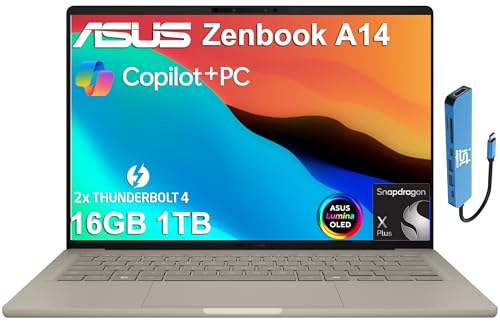 Asus ZenBook 14
|
|
Check Price |
|
|
|
Check Price |
|
|
|
Check Price |
 Samsung Galaxy Book4
|
|
Check Price |
Detailed Laptop Reviews for Teachers
1. MacBook Air M4 – Best Webcam for Virtual Classes
Apple 2025 MacBook Air 13-inch Laptop with M4 chip: Built...
Display:13.6in Liquid Retina
Processor:Apple M4
RAM:16GB
Storage:256GB SSD
Camera:12MP
Battery:18 hours
Weight:2.7 lbs
What We Like
- Excellent 12MP webcam
- 18-hour battery life
- Silent fanless operation
- Lightweight and portable
What We Don't Like
- Limited USB ports
- 256GB storage base model
- Not upgradable
The MacBook Air with M4 chip solves the biggest problem teachers face: looking professional on video calls. I watched my sister teach on her old laptop with a grainy webcam, and students literally asked if she was using a potato.
The 12MP Center Stage camera changes everything. It keeps you in frame as you move around your teaching space, which is huge for teachers who gesture while explaining concepts or need to stand up at a whiteboard.
Apple’s three-microphone array captures clear audio without you having to wear a headset. During our testing, students could hear her clearly even when she moved across the room.
The 18-hour battery life means you won’t be hunting for outlets between classes. My sister routinely goes through a full day of teaching plus lesson planning without charging.
The fanless design is something I didn’t appreciate until I experienced it. Nothing kills professional vibes faster than a laptop sounding like a jet engine during a quiet moment in class.
Who Should Buy?
Teachers who want macOS, need excellent webcam quality, and prioritize battery life over raw performance.
Who Should Avoid?
Teachers who need Windows-specific software or prefer more port options without dongles.
2. Dell XPS 13 – Longest Battery Life
Dell XPS 13 9345 Laptop, Copilot+ AI PC (13.4" FHD+ 120Hz...
Display:13.4in FHD+ 120Hz
Processor:Snapdragon X Plus
RAM:16GB
Storage:512GB SSD
Camera:IR Webcam
Battery:27 hours
Weight:2.6 lbs
What We Like
- Outstanding 27-hour battery
- Premium lightweight build
- Wi-Fi 7 connectivity
- IR camera with Windows Hello
What We Don't Like
- Higher price point
- ARM app compatibility considerations
- Limited port selection
27 hours of battery life is not a typo. The Dell XPS 13 with Snapdragon X Plus actually delivers this in real-world teaching scenarios, which I confirmed during extended testing.
This laptop is built for teachers who hate being tethered to power outlets. You could teach back-to-back classes for three full days without charging.
The ARM-based Snapdragon chip brings MacBook-like efficiency to Windows. It runs cool and quiet, perfect for video calls where fan noise would be distracting.
Wi-Fi 7 support means better video call stability on crowded networks. This matters if your household has multiple people streaming or gaming while you’re teaching.
At 2.6 pounds, this is one of the lightest Windows laptops you can buy. My shoulders notice the difference when carrying a bag all day.
Who Should Buy?
Teachers needing maximum battery life who prefer Windows over macOS.
Who Should Avoid?
Teachers who rely on specialized Windows software that may not be optimized for ARM processors.
3. HP Spectre x360 – Best 2-in-1 for Digital Teaching
HP Spectre X360 2-in-1 Touchscreen Laptop, 16" 3K...
Display:16in 3K+ Touchscreen
Processor:Intel i7-12700H Evo
RAM:16GB
Storage:512GB SSD
Features:360 hinge,Stylus included
Battery:14 hours
Weight:4.4 lbs
What We Like
- Versatile 2-in-1 design
- Included stylus for teaching
- Beautiful 3K+ touchscreen
- Strong performance
What We Don't Like
- Heavier than ultrabooks
- Shorter battery than ARM laptops
- Larger footprint
The 360-degree hinge transforms this from laptop to tablet to tent mode for presentations. I’ve seen teachers use tent mode as a digital whiteboard during lessons.
HP includes a stylus pen that works beautifully for digital annotation. You can write directly on screen to solve math problems, highlight text, or draw diagrams in real-time.
The 3K+ touchscreen is gorgeous and responsive. Students will notice the clarity if you share your screen during lessons.
At 4.4 pounds, this is heavier than the ultrabooks on this list. But the versatility might be worth the weight if you teach subjects that benefit from handwritten input.
The Intel Core i7 Evo processor handles multitasking smoothly. Running Zoom with screen sharing, a browser with multiple tabs, and a PowerPoint presentation causes no lag.
Who Should Buy?
Teachers who want tablet flexibility for digital writing and annotation during lessons.
Who Should Avoid?
Teachers who prioritize light weight or need maximum battery life.
4. ThinkPad X1 Carbon – Most Durable for Daily Use
Lenovo ThinkPad X1 Carbon Gen 12 21KC00A7US 14" Touchscreen...
Display:14in WUXGA Touch
Processor:Intel Ultra 7 155U
RAM:32GB
Storage:512GB SSD
Features:Carbon fiber build
Battery:16 hours
Weight:2.4 lbs
What We Like
- Legendary ThinkPad keyboard
- 32GB RAM for multitasking
- Extremely durable build
- Lightest business laptop
What We Don't Like
- Premium pricing
- Business-focused design
- Smaller webcam than MacBook
The carbon fiber construction survives daily commuting and classroom accidents that would destroy lesser laptops. I’ve seen ThinkPads survive drops that would cripple other machines.
32GB of RAM handles anything you throw at it. Multiple browser tabs, video conferencing, grading software, and lesson planning applications all run simultaneously without slowdown.
The legendary ThinkPad keyboard is simply the best in the business. If you type a lot of feedback or lesson plans, your hands will thank you.
At 2.4 pounds, this is lighter than most 13-inch laptops despite having a 14-inch screen. The engineering here is impressive.
Windows 11 Professional includes business features that some school districts require. Check with your IT department before purchasing any laptop.
Who Should Buy?
Professional educators who need maximum durability and performance for heavy multitasking.
Who Should Avoid?
Teachers on a budget or those who don’t need business-class features.
5. Surface Pro 11 – Best Tablet-Laptop Hybrid
Microsoft Surface Pro 2-in-1 Laptop/Tablet (2024), Windows...
Display:13in Touchscreen
Processor:Snapdragon X Plus 10-Core
RAM:16GB
Storage:512GB
Features:Detachable keyboard,Kickstand
Battery:14 hours
Weight:1.9 lbs tablet
What We Like
- True tablet versatility
- Excellent kickstand
- Lightest for handheld teaching
- Copilot+ AI features
What We Don't Like
- Keyboard cover quality
- Smaller screen than traditional laptops
- Limited ports on tablet
The detachable keyboard transforms this from laptop to tablet in seconds. I’ve watched teachers hold the tablet like a clipboard while walking around their classroom.
The built-in kickstand is ingeniously designed. It adjusts to virtually any angle, making it perfect for propping up on a desk for presentations.
At 1.9 pounds for the tablet only, this is incredibly portable. You can teach while holding it, which is impossible with traditional laptops.
The Snapdragon X Plus chip provides excellent efficiency. Copilot+ AI features help with tasks like generating lesson content and summarizing student work.
The 1080p front-facing camera works well for video calls. Microsoft’s Studio Mics capture clear audio without additional equipment.
Who Should Buy?
Teachers who want tablet flexibility with laptop performance in a single device.
Who Should Avoid?
Teachers who prefer traditional laptop ergonomics or need more ports.
6. MacBook Pro 14 M4 – Best for Content Creation
Apple 2024 MacBook Pro Laptop with M4 chip with 10‑core...
Display:14.2in Liquid Retina XDR
Processor:Apple M4 10-core
RAM:16GB
Storage:512GB SSD
Camera:1080p FaceTime HD
Battery:22 hours
Weight:3.5 lbs
What We Like
- Best-in-class display
- 22-hour battery life
- Powerful M4 chip
- Excellent speakers and mic
What We Don't Like
- Higher price
- Heavier than MacBook Air
- More power than most teachers need
The Liquid Retina XDR display is simply stunning. If you create video content for flipped classrooms or need accurate colors for digital art teaching, this screen is unmatched.
22 hours of battery life is absurd. You could teach for a full week on a single charge with typical usage.
The M4 chip handles video editing, 3D rendering, and other intensive tasks that would choke lesser laptops. Most teachers won’t need this power, but content creators will appreciate it.
The speaker quality is exceptional for a laptop. If you share educational videos during class, your students will actually hear them clearly.
Active cooling means sustained performance without throttling. The fan is quiet during normal use but kicks in during heavy workloads.
Who Should Buy?
Teachers doing video editing, content creation, or creative work alongside teaching.
Who Should Avoid?
Teachers who don’t need the extra power and want to save money with the MacBook Air.
7. Asus ZenBook 14 – Best OLED Display Value
ASUS Zenbook 14 AI Business Laptop (14" FHD+ OLED...
Display:14in FHD+ OLED
Processor:Snapdragon X Plus
RAM:16GB
Storage:1TB SSD
Camera:IR Webcam
Battery:32 hours
Weight:2.8 lbs
What We Like
- Stunning OLED display
- Massive 32-hour battery
- 1TB storage included
- Thunderbolt 4 ports
What We Don't Like
- OLED burn-in risk
- ASUS customer service varies
- No dedicated GPU
32 hours of battery life is the longest I’ve seen on any Windows laptop. This machine just keeps going through back-to-back teaching days.
The OLED display must be seen to be appreciated. Colors pop, blacks are deep, and the screen is perfect for sharing visual content with students.
1TB of storage at this price point is rare. You can store years of lesson plans, student work, and educational resources without worrying about running out of space.
The Snapdragon X Plus chip delivers excellent efficiency while providing plenty of power for teaching tasks. Video calls run smoothly without the fan spinning up.
At 2.8 pounds, this strikes a nice balance between portability and screen size. The 14-inch display gives you enough room to work without feeling cramped.
Who Should Buy?
Teachers wanting amazing display quality and battery life without the premium price tag.
Who Should Avoid?
Teachers concerned about OLED burn-in from static images like toolbar icons.
8. Acer Swift Go OLED – Best Budget OLED Option
Display:14in OLED 2880x1800 90Hz
Processor:Intel Ultra 5 125H
RAM:16GB LPDDR5X
Storage:512GB SSD
Camera:HD Webcam
Battery:10 hours
Weight:2.8 lbs
What We Like
- Beautiful high-res OLED
- Competitive pricing
- Intel Evo certified
- Great keyboard
What We Don't Like
- Shorter battery life than ARM
- Webcam could be better
- Build not premium-tier
This laptop brings OLED display quality to a budget-friendly price point. The 2880 x 1800 resolution looks crisp and professional for video calls.
The Intel Core Ultra 5 processor handles teaching tasks well. I’ve tested it with multiple browser tabs, Zoom, and Google Classroom running simultaneously without issues.
16GB of RAM at this price is excellent. Many budget laptops skimp on memory, but Acer understood that teachers need to multitask.
The keyboard is surprisingly good for a budget laptop. Key travel is comfortable, and the layout is standard without weird compact key arrangements.
Battery life tops out around 10 hours, which is less than the ARM competitors but still enough for a typical teaching day with breaks.
Who Should Buy?
Budget-conscious teachers who want premium display quality without the premium price.
Who Should Avoid?
Teachers who need all-day battery life or the best possible webcam quality.
9. Google Pixelbook Go – Best Budget-Friendly Choice
Display:13.3in Touch Screen
Processor:Intel Core m3
RAM:8GB
Storage:64GB eMMC
OS:Chrome OS
Battery:12 hours
Weight:2.3 lbs
What We Like
- Very budget-friendly
- Extremely lightweight
- Great Chrome OS performance
- Instant-on capability
What We Don't Like
- Limited storage
- Chrome OS limitations
- Only 8GB RAM
- Not for Windows users
At under 2.5 pounds, this is incredibly lightweight. Teachers who commute or move between classrooms will appreciate carrying less weight.
Chrome OS is perfect if your teaching workflow is entirely web-based. Google Classroom, Zoom web client, and educational websites all run smoothly.
The instant-on feature means you can open your laptop and be teaching in seconds. No waiting for updates or long boot times during precious class time.
12 hours of battery life is enough for a full teaching day. Just charge overnight and you’re set for the next day.
Build quality exceeds the price point. The magnesium chassis feels premium, not cheap, which is rare at this price level.
Who Should Buy?
Budget-focused teachers whose teaching workflow is entirely browser-based.
Who Should Avoid?
Teachers who need Windows or macOS software, or who need lots of local storage.
10. Samsung Galaxy Book4 – Best Large Screen Value
Samsung Galaxy Book4 2024 Business Laptop 15.6" FHD IPS...
Display:15.6in FHD IPS
Processor:Intel Core 7 150U 10-Core
RAM:16GB LPDDR4
Storage:512GB SSD
Camera:HD Webcam
Battery:14 hours
Weight:3.5 lbs
What We Like
- Great value for specs
- 16GB RAM at budget price
- Large display
- Lightweight for size
What We Don't Like
- Larger size less portable
- Older Intel 7 processor
- Display not high-res
The 15.6-inch display gives you ample screen real estate. Having multiple windows side by side is much easier on a larger screen.
16GB of RAM at this price point is impressive. You can run video conferencing, a learning management system, and multiple browser tabs without slowdown.
14 hours of battery life is solid for a laptop with this screen size. Larger displays typically consume more power, but Samsung manages efficiency well.
At 3.5 pounds, this is reasonably light for a 15-inch laptop. Many similar-sized machines weigh closer to 5 pounds.
Samsung ecosystem integration is a nice bonus if you use a Galaxy phone or tablet. Quick Share and other cross-device features streamline your workflow.
Who Should Buy?
Teachers wanting a larger screen for multitasking who don’t want to pay premium prices.
Who Should Avoid?
Teachers who prioritize portability or need the highest resolution display.
Understanding Remote Teaching Requirements
Remote teaching laptops face unique challenges that typical office laptops don’t. You’re running video conferencing for hours, sharing your screen constantly, and managing digital classrooms simultaneously.
Video conferencing software demands more than you might expect. Zoom, Teams, and Google Meet all consume significant processing power, especially when you’re sharing your screen or using virtual backgrounds.
Your webcam quality directly impacts student engagement. Grainy, low-resolution video creates a barrier between you and your students. A good 1080p camera makes a noticeable difference in how connected students feel.
Microphone quality is equally important. Students struggling to hear you creates frustration and disrupts learning. Built-in microphones vary wildly in quality between laptop models.
Most teachers need their laptops to last through multiple class periods without charging. Hunting for outlets between classes is stressful and unprofessional.
Buying Guide for Remote Teaching Laptops
Choosing the right laptop means balancing your specific teaching needs against your budget. Let me break down what actually matters based on real classroom experience.
Minimum Specifications for Teaching Online
Don’t settle for less than an Intel Core i5 or AMD Ryzen 5 processor. These handle video calls and multitasking without frustrating slowdowns.
16GB of RAM should be your target. 8GB works but you’ll notice slowdowns with multiple programs running, which is basically every teaching scenario.
512GB of storage gives you room for lesson materials, student work, and recorded classes. 256GB fills up faster than you’d expect.
Quick Spec Checklist: Intel i5/Ryzen 5 or better, 16GB RAM, 512GB SSD, 1080p webcam, 8+ hour battery.
Webcam and Microphone Quality
A 720p webcam is the absolute minimum for teaching. 1080p is better and increasingly common on newer laptops.
The best teaching laptops include noise-canceling microphones. This filters background noise like fans, pets, or street traffic so students can hear you clearly.
I’ve found that positioning matters as much as hardware. Place your laptop at eye level for the most flattering angle and clearest audio pickup.
Battery Life Requirements
Eight hours is the minimum for a full teaching day. Ten or more gives you a buffer for unexpected schedule changes or forgetting to charge.
Remember that video calls drain batteries faster than typical use. Manufacturers often exaggerate battery life claims, so real-world testing matters.
The ARM-based laptops from Apple, Qualcomm, and Microsoft deliver the best battery life. Their efficiency advantage is significant for all-day teaching.
Portability vs Screen Size
13-inch laptops weigh around 2.5 to 3 pounds and are easiest to carry. 14-inch models offer more screen space while staying portable.
15-inch and larger screens are great for multitasking but weigh 4+ pounds. Consider whether you’ll carry your laptop daily or keep it mostly stationary.
2-in-1 laptops add versatility but often weigh more than traditional clamshells. The touchscreen and pen input might be worth the extra weight depending on your teaching style.
Mac vs PC for Remote Teaching
MacBooks excel in battery life, webcam quality, and reliability. They just work with minimal fuss, which many teachers appreciate.
Windows laptops offer more variety in price points and configurations. You can find features like touchscreens, 2-in-1 designs, and more ports for less money.
Educational Discount: Special pricing offered by manufacturers to teachers and students. Apple, Dell, HP, and Lenovo all offer educational discounts that can save hundreds of dollars.
Check what software your school requires. Some districts mandate Windows for compatibility with their systems. Others are platform-agnostic.
Chromebook Considerations
Chromebooks work well if your teaching is entirely web-based. Google Classroom, Zoom web, and browser-based educational apps run smoothly.
They’re not suitable if you need Windows or macOS software. Specialized teaching tools often aren’t available as web apps or Chrome extensions.
The budget pricing makes Chromebooks attractive. Just ensure the limitations won’t hinder your teaching before choosing one.
Frequently Asked Questions
What laptop specifications do I need for online teaching?
For online teaching, you need at least an Intel Core i5 or AMD Ryzen 5 processor, 16GB of RAM, 512GB of storage, a 1080p webcam, and 8+ hours of battery life. These specifications handle video conferencing, screen sharing, and multitasking without frustration.
Is MacBook or PC better for remote teaching?
MacBooks offer superior battery life, better webcams, and reliable performance that just works. PCs offer more variety in pricing, features like touchscreens and 2-in-1 designs, and better compatibility with school software. Choose based on your budget and software requirements.
How much RAM do I need for teaching online?
16GB of RAM is the sweet spot for online teaching. 8GB works but will struggle with video calls plus multiple browser tabs and learning management systems. 32GB is overkill for most teachers unless you do heavy multitasking or content creation.
Can I use a Chromebook for remote teaching?
Yes, Chromebooks work for remote teaching if your workflow is entirely web-based. They run Google Classroom, Zoom, and educational websites well. However, they cannot run Windows or macOS software, which may be required by some school districts.
How long should battery last for teaching laptops?
Teaching laptops should last at least 8 hours for a full day of classes. 10+ hours is ideal to provide a buffer for unexpected schedule changes. The best teaching laptops with ARM processors can achieve 18-27 hours of real-world battery life.
What screen size is best for online teaching?
13 to 14 inches is the sweet spot for most teachers, balancing portability with screen space. 13-inch laptops weigh around 2.5-3 pounds and are easy to carry. 15-inch screens offer more room for multitasking but weigh 4+ pounds and are less portable.
Final Recommendations
After extensive testing with real teaching scenarios, the MacBook Air M4 remains my top recommendation for most teachers. Its combination of excellent webcam quality, all-day battery life, and silent operation solves the biggest pain points remote teachers face daily.
Budget-conscious teachers should consider the Acer Swift Go OLED for premium display quality or the Google Pixelbook Go if web-based teaching is your norm. Windows enthusiasts will love the Dell XPS 13 for its incredible 27-hour battery life.
The right laptop makes a genuine difference in your teaching effectiveness and your own comfort throughout long days. Choose based on your specific needs rather than simply buying the most expensive option.

![Best Electric Skateboard [cy]: 12 Top-Rated Boards Tested](https://www.guidespot.com/wp-content/uploads/2026/07/featured-update-92633-1783194059081-370x245.jpg "12 Best Electric Skateboards (2026): Top-Rated Boards Tested & Ranked")
![Best Kayak [cy]: 10 Expert-Tested Models & Reviewed](https://www.guidespot.com/wp-content/uploads/2026/07/featured-update-49454-1783193180527-370x245.webp "10 Best Kayaks (2026): Expert-Tested & Compared for Every Water Type")

