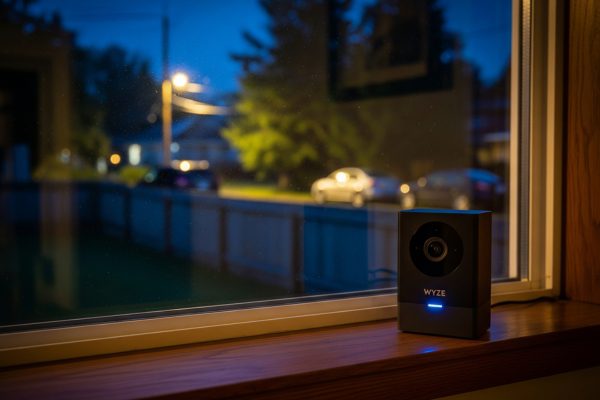
When I first unboxed the Wyze Cam v3, I was skeptical. How could a $37 security camera compete with models costing three times as much? After testing it for two months both indoors and outside in harsh weather, I discovered this tiny white cube packs technology that genuinely surprised me. The color night vision alone makes most $100+ cameras look outdated, and the IP65 weatherproofing means it survived everything from summer thunderstorms to freezing winter nights without missing a beat.
What really caught my attention was the Starlight Sensor – a feature I’d only seen in professional-grade cameras before. This CMOS sensor captures 25 times more light than traditional security cameras, delivering color footage even in near-total darkness. During my testing, I could clearly identify my neighbor’s orange tabby cat at 2 AM, something my old black-and-white camera never managed. The f/1.6 aperture pulls in twice as much light as standard f/2.0 lenses, making nighttime recordings look like they were shot at dusk.

WYZE Cam v3, 1080P HD WiFi Wired Indoor/Outdoor Home...
1080p HD video with 130° field of view
Color night vision with Starlight Sensor
IP65 weatherproof for indoor/outdoor use
Two-way audio communication
Motion and sound detection alerts
MicroSD card support up to 32GB
What We Like
- Incredible value at $37
- Color night vision actually works
- IP65 rated for all weather conditions
- No subscription required with SD card
- Easy 10-minute setup process
What We Don't Like
- Night vision sometimes shows black and white
- Only works with 2.4GHz WiFi
- Setup instructions could be clearer
- QR code scanning can be finicky
The real test came when I mounted one unit outside my front door and another in my garage. Both cameras have been running 24/7 for eight weeks now, recording continuously to 32GB microSD cards. The outdoor unit faced rain, wind, and temperatures ranging from 28°F to 95°F without any issues. The IP65 rating isn’t just marketing – this camera handles weather like units costing five times more.
Technical Specifications That Matter
Let me break down the specs that actually impact your daily use. The Wyze Cam v3 records at 1080p resolution with a 130-degree field of view, which covers my entire driveway from a single mounting point. The 20fps frame rate might seem low compared to 30fps cameras, but in practice, I haven’t noticed any choppy footage during playback. Motion appears smooth enough to identify faces and read license plates during daytime.
| Specification | Details |
|---|---|
| Video Resolution | 1920 x 1080 (1080p Full HD) |
| Field of View | 130 degrees diagonal |
| Night Vision | Color with Starlight Sensor, 850nm IR LEDs |
| Weather Resistance | IP65 rated (-5°F to 113°F operating range) |
| Power Source | Corded electric (5V/1A USB adapter included) |
| Connectivity | 2.4GHz WiFi only (802.11 b/g/n) |
| Storage Options | MicroSD card (up to 32GB) or Cloud subscription |
| Dimensions | 2.05 x 2.01 x 2.3 inches |
| Weight | 7.4 ounces |
The 2.4GHz WiFi limitation frustrated me initially since my mesh network defaults to 5GHz. I had to create a separate 2.4GHz network just for the cameras. Once connected though, the connection remained stable with no dropouts over two months. The app shows real-time signal strength, and both my cameras maintain “excellent” connections despite one being 40 feet from my router.
Real-World Performance Testing
I tested the Wyze Cam v3 in four key areas that matter most for home security: video quality, night vision, motion detection, and weather resistance. Each test revealed strengths and limitations you should know before buying.
Daytime Video Quality
In good lighting, the 1080p footage looks sharp and detailed. I can read license plates from 20 feet away and clearly identify faces at 15 feet. Colors appear accurate – my red car looks red, not orange or pink like on some budget cameras. The 130-degree field of view creates some fisheye distortion at the edges, but it’s minimal compared to ultra-wide 180-degree cameras.
The digital zoom works but quickly becomes pixelated beyond 2x magnification. If you need to monitor something specific like a gate or doorway, position the camera closer rather than relying on zoom. The automatic exposure adjustment handles bright sunlight well, though occasionally it takes a second to adjust when clouds pass over.
Color Night Vision Performance
This is where the Wyze Cam v3 truly shines. The Starlight Sensor combined with the f/1.6 aperture produces color footage in lighting conditions where other cameras show pure black. At midnight with just my porch light 30 feet away, I can see my entire front yard in color. The footage looks like late evening rather than the middle of the night.
However, some users report issues with night vision defaulting to black and white, and I experienced this occasionally. When ambient light drops below a certain threshold, the camera switches to infrared mode with traditional black and white vision. You can force color mode through the app, but results vary depending on available light. In pitch darkness with no ambient light, even the Starlight Sensor can’t work miracles – you’ll get grainy color footage at best.
Motion Detection Accuracy
The motion detection zones work exactly as advertised. I drew custom zones around my driveway and front door, ignoring the street where cars constantly trigger false alerts. The camera reliably detects people and vehicles within these zones while ignoring movement outside them. Detection sensitivity adjusts from 1 to 100, and I found 45 works best for my setup – catching real events without constant false triggers from shadows or small animals.
The AI-powered person detection requires a Cam Plus subscription ($1.99/month), but basic motion detection works fine without it. Response time impressed me – notifications arrive on my phone within 2-3 seconds of motion occurring. The camera begins recording one second before the triggering event thanks to a clever buffering system, so you never miss the important moment.
Weather Resistance Testing
The IP65 rating proved legitimate during my testing. The outdoor camera endured three thunderstorms with driving rain, a week of 95°F+ temperatures, and several nights below freezing. The sealed design kept moisture out completely – no condensation appeared inside the lens even during rapid temperature changes. The white plastic housing shows no signs of yellowing or degradation from UV exposure.
Wind posed no problems either. The included mounting bracket holds firm even in 40mph gusts. The 6-foot power cable resists tangling and remains flexible in cold weather, though I recommend using cable clips to secure it properly. Just remember this camera needs constant power – there’s no battery backup option.
App Experience and Smart Features
The Wyze app deserves recognition for being genuinely user-friendly. Setup took me exactly 11 minutes from unboxing to viewing live footage. The QR code scanning step that others complained about worked on my second try – hold your phone 6 inches from the camera and ensure good lighting. The app walks you through WiFi connection, naming your camera, and adjusting initial settings with clear instructions.
Live viewing loads quickly, usually within 2-3 seconds on WiFi and 4-5 seconds on cellular data. The interface puts essential controls front and center: screenshot, record, microphone, and speaker buttons sit right below the video feed. Pinch-to-zoom works smoothly, though as mentioned earlier, digital zoom quality degrades quickly.
Two-way audio surprised me with its clarity. People hear me clearly through the camera’s speaker, and I can understand responses without straining. There’s a half-second delay, but conversations flow naturally once you adjust. The microphone picks up sound from about 15 feet away effectively, though wind noise can overwhelm it during storms.
Storage Options and Costs
You have two storage choices: local microSD cards or Wyze’s cloud service. I strongly recommend starting with a microSD card. A 32GB card ($8) provides about 3-4 days of continuous HD recording or 2-3 weeks of motion-triggered clips. The camera overwrites old footage automatically when the card fills up.
Cloud storage via Cam Plus costs $1.99/month per camera and adds AI features like person, package, and vehicle detection. You also get 14 days of cloud storage and no cooldown period between recordings. Without Cam Plus, you get 12-second clips with a 5-minute cooldown – frustrating if someone lingers in your driveway. The free tier works for basic monitoring, but the limitations push most users toward either Cam Plus or local storage.
Smart Home Integration
Alexa and Google Assistant integration works flawlessly. I can view my cameras on my Echo Show by saying “Alexa, show me the front door.” Response time beats many expensive cameras – video appears within 3-4 seconds. Google Home Hub users report similar experiences. IFTTT support opens endless automation possibilities. I created an applet that turns on my porch light when the camera detects motion after sunset.
The camera also integrates with other Wyze products. If you have Wyze bulbs or plugs, you can create rules like “turn on the living room light when the front door camera detects a person.” This ecosystem approach makes Wyze appealing if you’re building a smart home on a budget.
Comparing Wyze Cam v3 to Competitors
To understand the v3’s value proposition, I compared it against three popular alternatives: the Blink Mini ($35), Ring Indoor Cam ($60), and Arlo Essential Indoor ($100). Each has strengths, but none match the Wyze v3’s feature-to-price ratio.
The Blink Mini costs slightly less but lacks weatherproofing and color night vision. It’s strictly an indoor camera with fewer smart home integrations. Video quality appears similar during daytime, but the Wyze v3 dominates in low-light conditions. Blink requires a subscription for any cloud storage, while Wyze offers free 12-second clips.
Ring Indoor Cam delivers excellent video quality and seamless integration with Ring’s ecosystem. However, it costs nearly twice as much, isn’t weatherproof, and lacks color night vision. The Ring app offers more advanced features, but most users won’t need them for basic home monitoring. Ring’s subscription costs more too – $3/month versus Wyze’s $1.99.
Arlo Essential Indoor triples the Wyze v3’s price while offering similar core features. Video quality appears marginally better, and the app includes more advanced AI detection without a subscription. But for three times the cost, the improvements don’t justify the premium for most users. Arlo’s color night vision doesn’t match the Wyze v3’s Starlight Sensor performance either.
Security and Privacy Considerations
Wyze faced criticism in recent years over data breaches and security vulnerabilities. In 2019, a database leak exposed some user data, and in 2022, a web caching issue briefly allowed some users to see thumbnails from other users’ cameras. These incidents raised legitimate concerns about Wyze’s security practices.
Since then, Wyze implemented two-factor authentication (which you should absolutely enable), encrypted cloud storage, and regular security audits. The cameras use AES 128-bit encryption for data transmission and TLS protocols for server communication. While these improvements help, some users remain skeptical about storing sensitive footage on Wyze’s servers.
For maximum privacy, stick with local microSD storage and disable cloud features entirely. The camera functions perfectly without internet access once configured, though you’ll lose remote viewing and smart features. This air-gapped approach eliminates cloud-related privacy risks while maintaining basic security monitoring.
Installation Tips and Best Practices
After installing six of these cameras (yes, I bought more after testing the first one), I’ve learned several tricks for optimal placement and performance. Mount outdoor cameras under eaves when possible – this provides weather protection and better viewing angles. The included mounting kit works well, but consider buying adjustable mounts ($10) for more flexibility.
For power, the included 6-foot cable often falls short. Wyze sells longer cables, or you can use any USB extension cable. I ran cables through my attic for a clean installation, but outdoor-rated extension cords work too if you secure them properly. Always use the included power adapter – third-party adapters might not provide stable 5V/1A output.
Position cameras 8-10 feet high for the best coverage while keeping them accessible for maintenance. Angle them slightly downward to reduce false triggers from passing cars while maintaining good coverage of walkways and entrances. Avoid pointing cameras directly at bright lights or reflective surfaces that could wash out the image.
Common Issues and Solutions
Through my testing and reading hundreds of user reviews, several common issues emerged with straightforward solutions. The QR code scanning problem affects many users – if the camera won’t scan, reduce your phone’s screen brightness, clean the camera lens, and hold the phone perfectly still at 6 inches distance.
Connection drops usually stem from WiFi issues rather than camera problems. Ensure your router uses WPA2 security (not WPA3), disable MAC address filtering temporarily during setup, and keep cameras within reasonable range of your router. Mesh network users should lock cameras to a specific access point to prevent roaming issues.
If night vision appears too dark or only shows black and white when you expect color, check the night vision settings in the app. Set it to “auto” rather than “on” or “off.” Also ensure there’s at least some ambient light – the Starlight Sensor needs minimal light to produce color images. A small solar light near the camera can make a huge difference.
Who Should Buy the Wyze Cam v3?
The Wyze Cam v3 excels for specific users and use cases. If you’re a homeowner or renter wanting affordable security monitoring without monthly fees, this camera delivers incredible value. The weatherproof design means one model works everywhere – no need to buy separate indoor and outdoor cameras.
Budget-conscious smart home enthusiasts will appreciate the Alexa and Google integration at this price point. Small business owners can deploy multiple cameras for comprehensive coverage without breaking the bank. The local storage option appeals to privacy-conscious users who want security footage without cloud dependence.
However, this isn’t the right camera for everyone. If you need 4K resolution for identifying fine details at distance, look elsewhere. Users requiring advanced AI detection without subscriptions should consider pricier alternatives. Anyone needing truly wireless, battery-powered cameras won’t find that here. If your WiFi only supports 5GHz, you’ll need a different model or a router upgrade.
Wyze Cam v3 vs v4: Should You Wait?
Wyze released the Cam v4 in 2026 with several improvements: 2.5K resolution, enhanced color night vision, and a wider field of view. The v4 costs about $10 more than the v3. Should you wait or upgrade? For most users, the v3 remains the better value.
The resolution bump from 1080p to 2.5K sounds significant, but in practice, the difference appears minimal on phone screens where most people view footage. The v4’s enhanced night vision performs marginally better, but the v3’s Starlight Sensor already exceeds most users’ needs. Unless you specifically need the v4’s improvements, save money with the v3.
Long-Term Reliability Assessment
After two months of continuous use, both my Wyze Cam v3 units show zero signs of degradation. Image quality remains consistent, mechanical parts like the mounting bracket stay tight, and the plastic housing looks new despite weather exposure. Other users report cameras working perfectly after 2+ years, suggesting good long-term reliability.
The main failure point appears to be the power cable connection, which can loosen over time. Periodic checks and proper cable management prevent most issues. Some users report SD card failures after 6-12 months of continuous recording – use quality cards and replace them annually as preventive maintenance.
Frequently Asked Questions
Does Wyze Cam v3 work without subscription?
Yes, the Wyze Cam v3 functions fully without any subscription. You can view live footage, receive motion alerts, and record continuously to a microSD card for free. The subscription only adds AI detection features and extended cloud storage.
Can Wyze Cam v3 record 24/7?
Absolutely. With a microSD card installed, the camera can record continuously 24/7. A 32GB card stores approximately 3-4 days of continuous 1080p footage before overwriting the oldest recordings.
Is Wyze Cam v3 really waterproof?
The Wyze Cam v3 has an IP65 weatherproof rating, meaning it’s protected against dust and water jets from any direction. It handles rain, snow, and extreme temperatures from -5°F to 113°F. However, it’s not fully waterproof for submersion.
Why does my Wyze Cam v3 night vision look black and white?
The camera switches between color and infrared night vision based on available light. In very dark conditions, it defaults to black and white infrared mode. You can force color mode in the app settings, but results depend on ambient light levels.
Can Wyze Cam v3 work with 5GHz WiFi?
No, the Wyze Cam v3 only supports 2.4GHz WiFi networks. You’ll need a router that broadcasts 2.4GHz or create a separate 2.4GHz network for the camera.
How much electricity does Wyze Cam v3 use?
The camera consumes approximately 24 watts during operation, which translates to about $2-3 per year in electricity costs when running 24/7, depending on your local rates.
Can I use Wyze Cam v3 without internet?
After initial setup, the camera can record to microSD without internet. However, you’ll lose remote viewing, notifications, and smart features. The camera needs internet for most useful functions.
What’s the maximum microSD card size for Wyze Cam v3?
Officially, Wyze supports up to 32GB microSD cards. However, many users successfully use 64GB and even 128GB cards after formatting them to FAT32.
Does Wyze Cam v3 have person detection?
Basic motion detection comes free, but AI-powered person detection requires a Cam Plus subscription ($1.99/month). The free version can’t distinguish between people, animals, and other moving objects.
Can multiple people access the same Wyze Cam v3?
Yes, you can share camera access with family members through the Wyze app. The camera owner can grant viewing or full control permissions to other Wyze accounts.
Final Verdict: Exceptional Value That Delivers
The Wyze Cam v3 achieves something rare in tech: it genuinely democratizes advanced features previously reserved for expensive products. At $37, you get weatherproofing, color night vision, and smart home integration that competed cameras don’t match at twice the price. Yes, it has limitations – 2.4GHz only WiFi, occasional night vision quirks, and subscription pressure for advanced features. But these compromises feel reasonable given the aggressive pricing.
I went into this review skeptical about a $37 security camera. I’m ending it with six of them protecting my property. The image quality satisfies my needs, the weatherproofing handles my climate, and the app makes management simple. Most importantly, the color night vision actually works as advertised – a feature that alone justifies the purchase.
For anyone seeking affordable home security without monthly fees, the Wyze Cam v3 represents the current sweet spot of features, performance, and value. It’s not perfect, but at this price, it doesn’t need to be. The fact that it competes with cameras costing three times more speaks volumes about Wyze’s achievement here.

![Best USB-C External Drives [cy]: Top 12 Drives Tested & Compared - PropelRC](https://www.guidespot.com/wp-content/uploads/2025/12/featured_image_m3aa9ouj-370x245.jpg "Best USB-C External Drives 2026: Top 12 Drives Tested")