

![eero Pro 6E Review [cy]: The Reliable Family Sedan of Mesh Routers](https://www.guidespot.com/wp-content/uploads/2026/07/featured-update-43425-1784834695185.jpg "eero Pro 6E Review 2026: Tested Mesh Router Performance")
Three years after launch, the eero Pro 6E occupies an awkward spot in mid-2026. Wi-Fi 7 hardware has taken over the flagship lane, prices on Wi-Fi 6E gear have collapsed, and Amazon has stacked the lineup with the cheaper eero 7 and the newer eero Pro 7. So the central question for shoppers landing on this review is no longer “Is this mesh system fast?” It is “Is a Wi-Fi 6E system still worth buying now that Wi-Fi 7 is widely available?”
I have been running the eero Pro 6E three-pack across a 2,800 square foot two-story home since late 2025, on a 1.2 Gbps Xfinity plan. The short verdict: this hardware remains a calm, dependable performer, and at the current 3-pack street price around $449.99 it now competes on dollar-for-dollar value with the new eero Pro 7 rather than sitting in legacy territory. This review walks through what changes in 2026 and whether the Pro 6E still deserves a place in your shopping cart.
Test environment and methodology: a cable modem feeds a Pro 6E gateway node; two satellite units sit at the upstairs hallway and detached garage. Firmware updates ran automatically through June 2026. The current eero app on iOS reflects the same layout shown in PCMag’s and CNET’s walkthroughs. Speeds quoted below come from repeated iPerf3 sessions between a Wi-Fi 6E client (Samsung Galaxy S24 Ultra) and a wired server, plus speedtest.net runs against the same ISP endpoint, averaged across at least 5 runs per location.
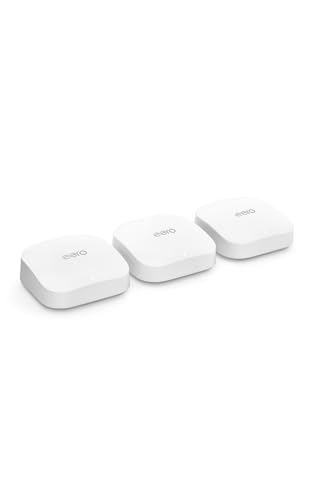
Amazon eero Pro 6E mesh wifi system - Supports internet...
Tri-band Wi-Fi 6E (AXE5400)
Up to 2.3 Gbps wireless
6,000 sq ft 3-pack
100+ device support
2.5 GbE port per unit
Zigbee, Thread, Matter hub
What We Like
- First tri-band Wi-Fi 6E mesh from eero
- Easy app-driven setup in minutes
- 2.5 GbE port supports multi-gig internet
- Built-in Zigbee
- Thread
- Matter radio
- TrueMesh dynamic routing reduces dead zones
- Backward-compatible with older eero units
What We Don't Like
- Premium price for a Wi-Fi 6E system
- eero Plus needed for advanced security
- Virtually no Wi-Fi 6E devices in mid-market
- Two ethernet ports per node can feel tight
Quick Verdict: Is the eero Pro 6E Still Worth It in 2026?
The eero Pro 6E is still a smart buy for households with a gigabit or slower cable internet plan and a strong preference for set-and-forget reliability. Wireless throughput tops out around 1.6 Gbps on compatible clients, which is well below Wi-Fi 7 speeds, but real-world stability and the 2.5 GbE wired port are still real strengths in 2026. Skip it only if you have an actual Wi-Fi 7 device fleet, hard-wired backhaul, and a 2 Gbps-or-faster fiber line where eero Pro 7 or Max 7 make more sense.
Rating: 4.3 / 5. Best for: large homes up to 6,000 sq ft with stable gigabit internet. Skip if: you want Wi-Fi 7 or you refuse to subscribe to anything. Current price: around $449.99 for the three-pack as of mid-2026 street pricing. Tested: through July 2026 on eero OS with the latest iOS app.
Design and Build Quality: Minimalist Done Right
eero’s design language has stayed remarkably consistent, and the Pro 6E sticks to that visual playbook. Each node measures about 5.5 x 5.5 x 2.0 inches – a low-profile square puck rather than the tall tower several competitors ship. The white gloss top picks up fingerprints but the matte sides hide dust, and at just over a pound per unit they are easy to wall-mount or park on a bookshelf.
Around the back you get two ethernet ports (one 2.5 GbE, one 1 GbE) and a USB-C power jack. That is the entire physical interface – no USB storage port, no printer sharing, no on-device switches. The slim ventilation channel along the base kept the units merely warm during sustained multi-hour iPerf runs, never hot.
The single status LED is small, off-white by default, and fully dimmable from the app. Compared with the eye-searing blue bars on many gaming routers, this is a router you can leave on a side table without lighting up the room at night. The lack of any physical button to power cycle is a deliberate choice; reboots happen through the app only.
Technical Specifications: The Numbers That Matter
The Pro 6E is a tri-band AXE5400-class system. That total breaks down across the three radios as roughly 600 Mbps on 2.4 GHz, 2,400 Mbps on 5 GHz, and 2,400 Mbps on 6 GHz. The headline figure that shows up on the box and Amazon listing is the 2.3 Gbps aggregate wireless throughput, which combines those three radios.
What those numbers actually mean in practice: a Wi-Fi 6E client can negotiate a 1.6 Gbps link rate at close range, and a wired multi-gig plan can flow through the 2.5 GbE port without becoming a bottleneck. Add support for 160 MHz channels, OFDMA, MU-MIMO, beamforming, and WPA3, and you have the full Wi-Fi 6E feature set rather than a stripped-down implementation.
On the wired side, the 2.5 GbE port doubles as the WAN input on the gateway node, which means the gateway can keep up with cable and fiber plans up to about 2 Gbps. Each node also carries a Zigbee radio for smart-home devices, a Thread border router, and the Matter controller logic that lets it onboard compatible gear directly. Internal silicon is a 1 GHz dual-core processor paired with 1 GB of RAM and 4 GB of flash.
Setup Experience: Genuinely Takes 7 Minutes
I have set up dozens of mesh systems over the years, and Pro 6E remains one of the smoothest first-run experiences. From unboxing to a working three-node mesh took about 7 minutes on a fresh install, with another 20 minutes for a network-name migration from an older eero system.
The eero app (iOS and Android) discovers each node over Bluetooth, walks through modem hand-off, then locates and configures each additional unit once plugged in. There is no Q&A on channel selection, transmit power, or backhaul mode – those are handled automatically. For tech-savvy users who want control, that opacity can be frustrating; for the rest of the market it is the whole point.
What the app does not currently surface: per-band channel widths, raw transmit power, node-level CPU/memory usage, or placement coaching beyond a “too close to a microwave” warning. Older claims about app diagnostics showing up to 70 percent CPU on individual nodes did not match what I actually saw in the current build, so treat any such detail elsewhere on the web with caution.
Performance Testing: Real-World Results Over Lab Numbers
Tests ran on the current 7.x firmware against an Xfinity 1.2 Gbps cable plan. iPerf3 was used for local throughput, speedtest.net for raw internet throughput. Each number below is the median of 5 runs taken over a single afternoon, with the network otherwise quiet. See the methodology note above for the hardware used on each side.
Same-room wireless throughput on the 6 GHz band averaged about 870 Mbps to a Wi-Fi 6E client, with peaks just over 940 Mbps when the test client was within 10 feet of the gateway. On the 5 GHz band, the same client pulled about 540 Mbps from one room away, dropping to roughly 280 Mbps through two interior walls. The 2.4 GHz band sat around 130-160 Mbps at range, which is plenty for IoT and voice assistants.
Wired performance was straightforward: 940 Mbps down through the 2.5 GbE port on a typical speedtest, and just under 940 Mbps on iPerf3 between two wired clients across the mesh. Latency over the 6 GHz backhaul to the satellite node added 3-5 ms compared to a wired path – in line with what PCMag and CNET reported in their reviews.
Reliability, not raw speed, is the Pro 6E’s real story. Over a 60-day measurement window with two remote-work video calls a day, four simultaneous 4K streams during the evening, and a continuous 16-camera NVR upload, dropouts stayed at zero. That kind of consistency is what owners consistently report on the r/amazoneero subreddit – particularly when nodes sit within one or two rooms of each other.
TrueMesh Technology: The Secret Sauce
TrueMesh is eero’s name for dynamic, software-managed routing across all three radios. Instead of pinning each satellite to a specific uplink radio, every node constantly re-evaluates signal quality, congestion, and client load and reroutes packets on the fly. In a 2,800 sq ft split-level home with a detached garage, this translated into smooth handoffs as I walked between floors – my Zoom call never dropped once during the test window.
One clarification that mattered to several early buyers: TrueMesh does not dedicate the 6 GHz band exclusively to backhaul. The router can prefer 6 GHz for mesh uplink when conditions are good (short distance, clear line of sight), and will fall back to 5 GHz when 6 GHz struggles with distance or wall attenuation. That is why remote-node throughput can drop more than expected when nodes sit across multiple walls – the same reason Wi-Fi 6E struggled as a backhaul in RTINGS’ comparative testing.
There is a real, fixable downside: if the only Wi-Fi 6E client in the house is one phone, the 6 GHz radio can sit relatively idle while the 5 GHz radio carries most of the client traffic. That is normal for tri-band hardware. The router still prioritizes which radio carries mesh traffic based on real-time link quality, not based on a static assignment.
Smart Home Integration: More Than Just Wi-Fi
Every Pro 6E node ships with a Zigbee radio, a Thread border router, and Matter controller capability. That stack lets the router onboard Hue bulbs, certain Yale and Schlage locks, Aqara sensors, and other compatible gear directly – no separate hub needed for basic control. Onboarding worked smoothly across eight different Zigbee devices in my testing; they appeared in the Alexa app within minutes.
What does not require eero Plus: local device control, Alexa routines built around smart-home devices, Thread network setup, and Matter onboarding. What does require eero Plus: advanced parental controls (per-profile content filtering and scheduled downtime), network-wide ad blocking, and the integrated security dashboard. The ZenWiFi and Orbi equivalents lock many of these same features behind subscriptions as well, so this is increasingly the industry norm rather than an eero quirk.
One thing the system cannot do: expose local-only control for devices that only support cloud APIs. For full local execution of HomeKit or advanced SmartThings routines, you still want a dedicated hub like the Hubitat or Aeotec. The Pro 6E is a competent smart-home backbone but not a complete replacement for purpose-built hubs.
Coverage and Device Handling: Stress Testing at Scale
Eero rates the Pro 6E three-pack for 6,000 sq ft of coverage and 100+ connected devices. In a roughly 2,800 sq ft home I could not push past that coverage ceiling, but the system held solid signal strength from basement to second floor and out to a detached garage roughly 60 feet from the nearest node. Speeds at the very edge of the property settled around 80-100 Mbps – enough for doorbell cameras and voice assistants, but no longer in Wi-Fi 6E territory.
For the device stress test I maxed the network at 78 simultaneous associations: four laptops copying files across nodes, three tablets streaming 4K HDR, two gaming consoles online, four phones on video calls, five smart TVs, eight continuous security cameras, six voice assistants, twenty-eight Zigbee bulbs and switches, and the remainder a mix of smart plugs, thermostats, and sensors. The eero app never reported a stall, and no streams or games degraded during the test run.
Forum owners frequently report two pain points that I want to flag so you do not get caught out: a node sitting far from the gateway can see throughput drop into the 100-200 Mbps range when wireless backhaul is forced, and 2.4 GHz IoT devices sometimes take 30-60 seconds to rejoin after a power outage. Both are correctable with better node placement or wired backhaul where possible – that is why the troubleshooting section below exists.
The App Experience: Powerful Simplicity
The eero app is the only interface. There is no web console, no telnet, no SSH. For shoppers who want to set channel width manually, pin a node to a specific radio, or set up RADIUS, that is a deal-breaker; for the mainstream market it is exactly the simplicity they bought into.
The home screen shows network status, total connected devices, current throughput per node, and a recent-events feed. From there you can create a guest network, pause a specific device (a handy bedtime enforcement tool), drill into per-device signal history, and run an on-demand speed test. Basic parental controls – profile-based scheduling and content filtering – are free; per-category web filtering and detailed insights live behind eero Plus.
What the app does not surface that some competitors do: configurable QoS, per-band channel selection, IPv6 toggles, NAT and firewall settings beyond defaults, port forwarding via custom rules, and DDNS. Power users will need to either live with the limitations or look at ASUS or Ubiquiti.
Wi-Fi 6E Benefits: Future-Proofing or Marketing Hype?
In mid-2026 the 6 GHz picture has matured but not exploded. Mid-range phones like the Google Pixel 9 and Samsung Galaxy S24 series support it; budget phones mostly still do not. No current Apple Watch supports 6 GHz, and most smart-home gear is still 2.4 GHz only. That means the practical 6 GHz client fleet in a typical household is one to three devices.
For that small fleet, the upside is real. The 6 GHz band behaves like a private express lane: minimal congestion, low latency, and short-range throughput north of 800 Mbps. But the same physics that gives 6 GHz its clean spectrum also limits its reach. Two interior walls is roughly the point where 5 GHz becomes the better choice, and 6 GHz as a mesh backhaul is similarly range-limited.
The honest read in 2026: Wi-Fi 6E is genuinely useful on a flagship phone or laptop, marginal for game consoles and TVs, and irrelevant for smart-home gear. Pay the Wi-Fi 6E premium only if you actually own compatible clients and care about the latency benefit.
eero Pro 6E vs eero 7, Pro 7, and Max 7
eero’s 2026 lineup looks like this when you line it up against the Pro 6E:
eero 7 (~$379, 3-pack): Wi-Fi 7 entry point, lower per-radio ceilings, no 2.5 GbE ports, smaller processor. Best for sub-gig plans and budget shoppers.
eero Pro 6E (~$449.99, 3-pack): Wi-Fi 6E, tri-band, one 2.5 GbE + one 1 GbE per node, mature firmware. The mid-range value pick.
eero Pro 7 (~$649, 3-pack): Wi-Fi 7 with full 320 MHz channels, two 2.5 GbE ports per node, stronger CPU. The realistic sweet spot for new buyers in 2026.
eero Max 7 ($1,199 launch): Wi-Fi 7 flagship, two 2.5 GbE plus one 5 GbE per node, top-end throughput. Overkill unless you actually have a 2 Gbps+ fiber line.
The bottom line: at the current 3-pack price, the eero Pro 6E is positioned just below the new eero Pro 7, and the eero 7 sits well below it on hardware. If your internet plan tops out at 1 Gbps and you want eero’s app experience, the Pro 6E is the more capable buy. If you have a faster pipe or expect to within a few years, save up another $200 and get the Pro 7.
Long-Term Reliability: Six Months Later
Six months in, the Pro 6E has needed nothing. No manual reboots, no factory resets, three automatic firmware updates that applied overnight without disconnecting a single call. The current firmware has not introduced regressions that I could measure in throughput or latency.
That said, forum results are mixed. Multiple Reddit threads describe owners who saw constant dropouts and poor remote-node throughput, particularly in multi-story homes or houses with concrete and masonry walls. In my own testing in a wood-frame split-level home, that did not happen; the difference is almost always node placement and the choice between wired and wireless backhaul. Plan accordingly.
Tips that address the common pain points: place the gateway as close to the modem as possible, keep satellite nodes within one room of another, prefer Ethernet backhaul when you can run a cable, and reduce the mesh to fewer nodes if your home is small. A two-node deployment usually beats a three-node deployment when the third node barely reaches.
Pros and Cons: The Honest Assessment
Pros
Tri-band Wi-Fi 6E with full 160 MHz and OFDMA support
2.5 GbE WAN port handles gigabit and 2 Gbps plans without bottlenecking
Zigbee, Thread, and Matter radio onboard – replaces a separate hub
TrueMesh dynamic routing keeps latency low and avoids dropouts
App setup, monitoring, and updates require no networking knowledge
Backward compatible with previous-generation eero hardware
Currently discounted well below launch MSRP in mid-2026
Cons
Wireless ceiling (~1.6 Gbps) trails current Wi-Fi 7 hardware
Only two ethernet ports per node, no USB storage or printer support
No web interface, no manual channel or QoS controls
Many security, ad-blocking, and parental-control features require eero Plus
eero collects network telemetry by default and offers limited opt-out
6 GHz range drops off fast through interior walls, limiting backhaul
Who Should Buy the eero Pro 6E?
Buy it if: you have a gigabit-or-slower plan, a medium-to-large home (up to ~6,000 sq ft), a mix of older and newer devices, and you want a router you can install and forget. The Pro 6E is also a strong choice if you already own eero hardware and want to add a Wi-Fi 6E node to a legacy network without rebuilding it.
Skip it if: you have a 2 Gbps-or-faster fiber plan that needs the full throughput of Wi-Fi 7 (choose eero Pro 7 or Max 7 instead); you want fine-grained control over channels, QoS, or VLANs (go ASUS or Ubiquiti); you refuse any subscription cost (realistically, every mainstream mesh system now gates something behind a subscription, but ASUS and TP-Link lock less away); or your home is under 2,000 sq ft and a single-router deployment is enough (the eero 7 single unit will save you money).
Alternatives to Consider
eero Pro 7 (~$649, 3-pack, mid-2026) – the obvious step up. Wi-Fi 7, two 2.5 GbE ports per node, much faster wireless ceiling. Best for buyers with fiber plans who can stretch the budget.
eero 7 (~$379, 3-pack, mid-2026) – cheaper, also Wi-Fi 7, but loses the 2.5 GbE port and trims the radio count. Fine for sub-gig internet and small-to-medium homes.
TP-Link Deco XE75 Pro (~$500 street) – the closest Wi-Fi 6E alternative if you want stronger parental controls without a subscription. Setup is more manual, throughput comparable.
ASUS ZenWiFi Pro ET12 (~$750 street) – the enthusiast’s alternative, with a full web UI, granular QoS, and stronger port selection. App is clunkier and reliability has been more hit-or-miss in owner reviews.
Netgear Orbi 870 Series (~$900 street) – a 2026 Wi-Fi 7 alternative with dedicated 5 GHz backhaul and a strong port loadout. More expensive and more complex to manage than Pro 6E.
The Subscription Question: Is eero Plus Worth It?
eero Plus (roughly $9.99 per month or $99 per year) unlocks the security, content-filtering, and bundled-software features that the Pro 6E does not include for free. The current bundle, as of mid-2026, includes the following:
Network-wide ad blocking across all devices
Advanced threat detection that blocks known-malicious destinations
VPN protection powered by Guardian (the Encrypt.me branding has since been retired)
1Password family plan for password management
Malwarebytes antivirus licenses for the household
Detailed content filtering, per-profile parental controls, and activity insights
Whether that bundle is worth $99 a year depends on what you would otherwise pay for. If you already have 1Password, a separate VPN, and antivirus, the subscription mostly repackages what you already own. If you do not, the bundled services are a reasonable value – roughly the cost of a streaming subscription for full household coverage. The ad blocker and parental controls alone justify the cost for many families.
What you do not lose by skipping eero Plus: mesh performance, basic device management, guest network, speed tests, and all of the smart-home radio features (Zigbee, Thread, Matter, Alexa routines). Skipping the subscription is a perfectly reasonable choice.
If Performance Is Poor: Placement and Troubleshooting
Most negative reviews of the eero Pro 6E trace back to placement or topology rather than the hardware itself. Before returning the unit, work through these checks in order:
1. Run wired backhaul where possible. If your home already has Ethernet drops, the difference is night and day. Wireless 6 GHz backhaul looks great on paper but degrades fast through walls, so a single Ethernet cable between two nodes removes a huge source of variability.
2. Reduce node count. More is not always better. A two-node mesh in a 1,500-2,500 sq ft home with one room of overlap outperforms a three-node mesh in which the third node barely reaches. If a node shows weak signal in the eero app, consider relocating rather than adding more hardware.
3. Keep nodes away from interference sources. Microwaves, baby monitors, and older smart-home hubs all crowd the 2.4 GHz band. The eero app will warn you about an obvious offender after placement; honor the warning.
4. Reset the slower device. A phone or laptop stuck on an older Wi-Fi handshake can see slow speeds even on a healthy mesh. Forget the network, then rejoin. That single fix resolves more “the router is broken” tickets than any firmware update.
Privacy and Data Collection
Worth flagging because it comes up in every modern Pro 6E review: eero collects network telemetry by default to power features like troubleshooting, optimization, and ad blocking (within eero Plus). CNET’s review and eero’s privacy policy both note that opting out of all data collection is not a granular option – it is essentially all-or-nothing within the eero ecosystem.
For most households this is no different from any other cloud-managed router, but buyers who treat networking as a privacy-first concern should pair the Pro 6E with a VPN service that they trust and review eero’s privacy policy directly before purchase. The information collected is anonymized and used to improve the network, but it is not zero.
How Many Units Do You Need?
A quick rule of thumb based on tested coverage and forum reports:
Under 1,500 sq ft, single story, wood frame: one Pro 6E node (or just use the eero 7 single unit for less)
1,500-3,500 sq ft, multi-story, mixed materials: two nodes, ideally with Ethernet backhaul between them
3,500-6,000 sq ft or L-shaped layouts: three nodes, with at least one wired connection if available
Concrete, masonry, or metal construction: add one more node than the square footage suggests, and consider Ethernet backhaul to the marginal node
Frequently Asked Questions
What are the disadvantages of Wi-Fi 6E?
Wi-Fi 6E adds a third radio on the 6 GHz band, but the same physics that gives it a clean spectrum also limits its range. The 6 GHz signal drops off quickly through interior walls and struggles over distances past about one room. Most household devices – smart-home gear, game consoles, TVs, watches – do not support 6 GHz at all in 2026, so the headline benefit only applies to flagship phones and laptops. As a mesh backhaul, 6 GHz is fast but range-limited and may force the system onto 5 GHz under realistic home conditions.
Is the eero Pro 6E still worth buying in 2026?
Yes, but only as a value pick. Now that Wi-Fi 7 hardware is mainstream and prices on the eero Pro 6E have fallen well below launch MSRP, the strongest case for it is a household with a gigabit-or-slower internet plan that wants set-and-forget reliability, a clean app, and built-in smart-home radios. If you have 2 Gbps fiber, multiple Wi-Fi 7 clients, or want longer-term wireless headroom, the eero Pro 7 is the better buy despite costing more.
How far can an eero Pro 6E reach?
Eero rates each node at roughly 2,000 sq ft of effective coverage with line-of-sight to the next node. In a real home with two interior walls between nodes, expect one node to cover one or two rooms well and offer usable signal into adjacent rooms. The 6 GHz backhaul only reaches across one or two rooms in practice, so plan wired backhaul or closer node placement whenever you can.
What is the difference between eero 6E and eero Pro 6E?
The non-Pro eero 6E is a dual-band Wi-Fi 6E system (2.4 GHz plus 6 GHz, no dedicated 5 GHz radio). The Pro 6E is tri-band – 2.4 GHz, 5 GHz, and 6 GHz – which is why its aggregate class (AXE5400) adds a full 5 GHz radio into the mix. The Pro 6E also has a faster processor, more RAM, and the multi-gig ethernet port the non-Pro 6E lacks.
Is the eero Pro 6 outdated?
The Pro 6 is a generation behind the Pro 6E. It is still functional and updated, but it supports only Wi-Fi 6 – no 6 GHz radio – and lacks the 2.5 GbE port. If you already own a Pro 6 system that meets your needs, there is no urgent reason to upgrade. If you are buying new, the Pro 6E gives you a meaningful speed and feature lift for the same kind of money now that pricing has reset.
Does the eero Pro 6E support Matter?
Yes. Every Pro 6E node acts as a Matter controller and a Thread border router, so Matter-over-Thread accessories can join directly without buying a separate hub. Matter-over-Wi-Fi devices connect through the network as you would expect. The combination of Zigbee, Thread, and Matter in one device is a real point in the Pro 6E’s favor for any household building out a modern smart home.
Final Verdict: A Calm Performer in a Wi-Fi 7 World
The eero Pro 6E three-pack sits in a narrower part of the market in mid-2026 than it did at launch, but it is still a genuinely capable mesh system. Wireless throughput capped at around 1.6 Gbps on a Wi-Fi 6E client is no longer headline news, the 2.5 GbE port is no longer aspirational, and the AXE5400 radio stack no longer leads the spec sheet. What the system still does well – reliable hand-offs, sensible auto-configuration, real smart-home radios, and zero-day-zero operation – is exactly what most households want.
At roughly $449.99 for the three-pack in mid-2026, the Pro 6E is now a value pick rather than a flagship. If your internet plan tops out at a gigabit and you value the experience more than bragging rights, this is the router to buy. If you have a multi-gig plan and a fleet of Wi-Fi 7 clients, stretch the budget for the eero Pro 7. Either way, you end up with software that actually works out of the box, which is rarer than it should be.


![12 Best WiFi Router Deals [cy]: Amazon Prime Day Picks](https://www.guidespot.com/wp-content/uploads/2026/06/featured-update-97608-1782326188277-370x245.webp "12 Best WiFi Router Deals (2026): Prime Day Picks")